
Known Participant
August 21, 2022
Question

Illustrator guarda muy lento

  • August 21, 2022
  • 2 replies
  • 1390 views

Buenas tardes.

Tengo una seria duda con respecto al redimiento de Illustrator y eventualmente de mi equipo a la hora de guardar archivos grandes. Es un proceso muy lento.

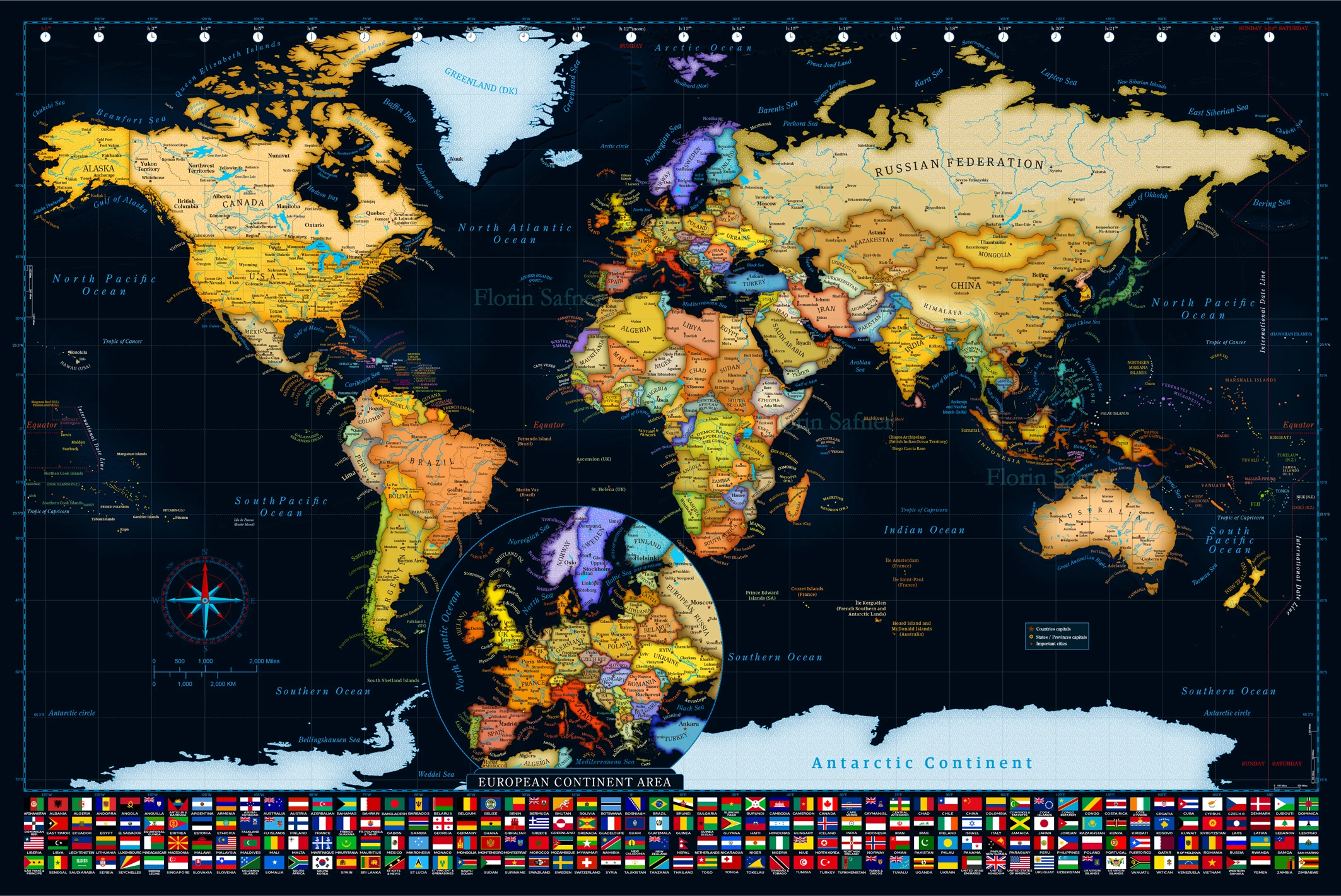
La ultima experiencia la tuve con un mapa del mundo, tamaño 36 x 24 pulgadas, con un gran contenido de objetos (unos 200 paises, islas, rios, algunas texturas etc), efectos en el agua de los oceanos y en los bordes de los paises con diferentes colores. Todo el tamaño es de aproximadamente 90.4 Mb.

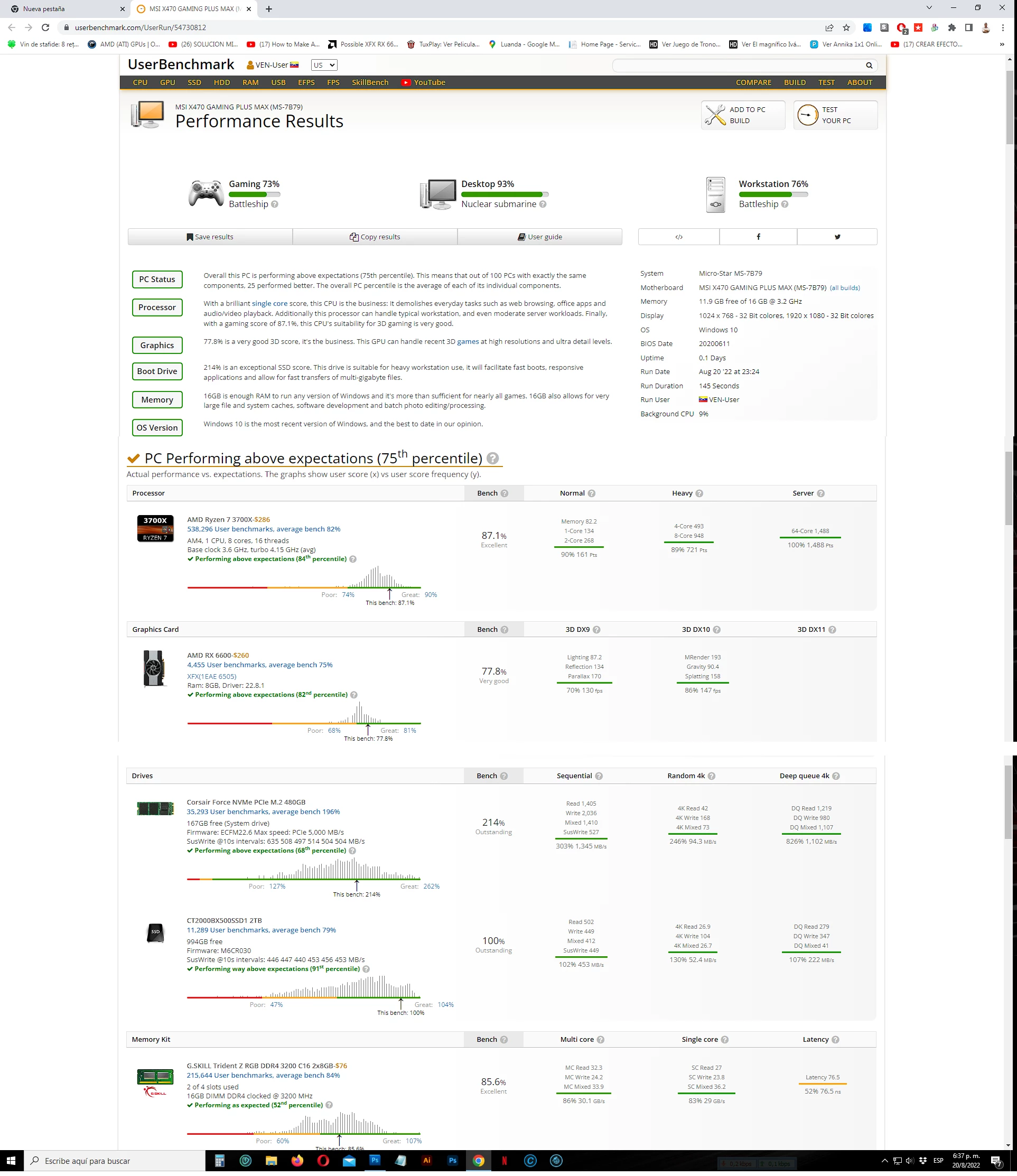
Ahora  Gb estaba esperando un rendimiento nejor bien, despues de renovar todo el sistema y recientemente remplazar la t grafica con una Radon RX 6600 / 8 Gb pero la lentitud de Illustrator para guardar el archivo es muy obvia. Varia ente 1 minuto - 1 minuto 10 segundos.

Como se puede ver en la imagen adjunta la brueba Benchmark arroja numeros muy positivos en cuanto al rendimiento. El PCU tiene auto overclock y va desde 3600 hasta 4400 Mhz, el dico C es un WD M2 NMVe de 500Gb, los 16 Gb de memoria RAM son G Skill y trabajan sin falla y de ultimo la tg XFX tiene un promedio alto, cerca del maximo. Aun asi, todo va lento a la ora de hacer Save / Guardar. La carpeta del trabajo esta en el mismo dsco C porque es mas rapida, un M2, y los otros trabajos nas livianos se guardan en el disco D que es un SSD de Crucial, muy bueno pero mas lento que el M2. He probado copiando el archivo en el mismo disco C de una carpeta a otra, copiar/pegar. No toma ni un segundo! Pero si le hago un pequeño ajust (al archivo) y le doy Save/Guardar el proceso dura 60-70 segundos.

Alguien me podria explicar el asunto? Es normal tal lentitud en un PC bien equipado?

Gracias y saludos.
This topic has been closed for replies.

2 replies

Anubhav M
Community Manager
Community Manager
August 22, 2022

Hello Florin-S,


Sorry to hear about this experience. I would request you try resetting Illustrator's preferences by following the steps shared in this article (https://helpx.adobe.com/illustrator/kb/troubleshoot-preference-issues.html) and sharing your observations.
Disclaimer: Please note that resetting preferences will remove all custom settings, and Illustrator will launch with the defaults. You may take a backup of these settings from the location mentioned in the article. 

Looking forward to hearing from you.


Thanks,
Anubhav

Florin-SAuthor
Known Participant
August 22, 2022

Hi Monika, hi Anubhav.

I was taking a real time survey of the saving slowness process.

See the attachment. I applied a small change on the big map file and did "Save". I have taken the Task Admin Performance screenshot in the peak of the saving process (when Illustrator is showing the saving process %), it was in the 50% saving, in the middle. Till the saving ended it never used more than 5 Gb of RAM. Why? That's why I doubt that is not a "few" RAM capacity (16 Gb) but a very linited use of thr RAM. And this could be an answer for the slowness. Is maybe the same Illustrator limited or is it limiting the whole RAM capacity?

Best,

Florin

Anubhav M
Community Manager
Community Manager
August 25, 2022

Hello @Florin-S,


Thanks for getting back. I would request you try turning off PDF compatibility and unchecking Use Compression while saving and check if it helps.


Also, kindly confirm if you can replicate this behavior with other files as well.


Looking forward to your response.


Regards.

Monika Gause
Community Expert
Community Expert
August 21, 2022

Copying an existing file is a different process than saving a file.

16 GB is not a lot of RAM for Illustrator.


When saving an AI, Illustrator actually saves 2 files into one, one of them being a PDF, which means that effects need to be expanded at the time of saving.

Florin-SAuthor
Known Participant
August 21, 2022

Hi Monika.

16 GB is not a lot of RAM for Illustrator??

What's the average RAM in the most of the designers PC? Above 16 Gb DDR4 / 3200 Mz??  Sounds strange.

I understand your explanation about a paralel PDF profile saving but I cannot believe that a PC with such resources needs 60-70 seconds to save a 90 Mb file. I was always clear that's a different process than copy/paste a 90 Mb file (this was taking half second, it's instant) because each one of Illustrator's file obects, dozens or hundreds of them, have their own attributes, effects make the file havy also but it's slow. Too slow.

Any chance to exclude the PDF paralel profile? 

Thank you

Florin