
Participant
June 21, 2017
Question

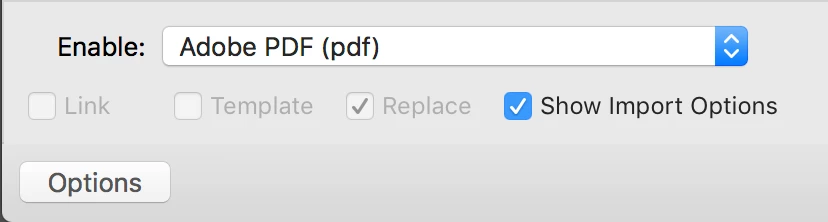
Illustrator import options "link" is grayed out

  • June 21, 2017
  • 2 replies
  • 3121 views

I'm trying to place a pdf into an Illustrator document. It keeps automatically embedding the file instead of placing it as a link. When I click on options, "Link" is grayed . out and unavailable. I've only recently had this problem. I updated my Illustrator, hoping it would resolve the problem but it hasn't. Any advice will be appreciated.
This topic has been closed for replies.

2 replies

Mike_Gondek10189183
Community Expert
Community Expert
June 21, 2017

What happens if you drag and drop a .pdf onto you canvas to import?

semiboldAuthor
Participant
June 21, 2017

that works if i'm importing a 1-page pdf, but when I need to import from a multi-page pdf I need to place the file using import options, unless there's another way of doing that.

semiboldAuthor
Participant
June 21, 2017

What if you change to all readable documents. I also do not get an options button on mac OS 10.10.5 with CC 2015 or CC 2017.


I re-started the computer. That didn't make a difference.

Also, a screen shot showing "All Readable Documents." Still no change.

Srishti Bali
Legend
June 21, 2017

Hi semibold,

Could you please confirm if it is happening with other PDFs as well?

If yes, please reset Illustrator preferences to defaults , for details click here How to set preferences in Illustrator 

Regards

Srishti

semiboldAuthor
Participant
June 21, 2017

It was happening with any pdf I tried to import.

I reset my preferences, and the "link" option is still gray, but now when I import a pdf it will show up as a link in the links palette instead of embedded art. So at least that part of the problem is solved! thank you!