- Home
- Illustrator
- Discussions
- Re: Illustrator is changing my color values
- Re: Illustrator is changing my color values

Copy link to clipboard
Copied
I am having a very strange experience in creating artwork in Adobe Illustrator. I have some older files, specifically for one client, and noticed the colors were duller than when created. I wrote it off as me creating the files incorrectly many years ago. However, I recently updated to Creative Cloud and designed a new project from scratch for a new client with new colors. When I went back to that file today to expand on the project I noticed the colors were duller than previously. I compared some of the color values to the original artwork and noticed that they had been changed slightly (ie: RGB 67 > 67, 187 > 168, 219 > 200; 241>222, 172>153, 27>27; etc).
The files are, and always have been, RGB. It would appear as if my colors are being changed from the time I save and close, to the time I re-open. Any ideas?


 1 Correct answer

Hello guys, try this:
edit-> assign profile -> working RGB (for me default was "profile:display (...)" and that was causing the problem).


Explore related tutorials & articles
 26
Replies
26
26
Replies
26


Copy link to clipboard
Copied
How's your color management set up?
How's your soft proof set up and have your perhaps turned it on?
Does the document color profile match the working profile?
WHich app does your client use to view it?
Is that app color management enabled and is it set up correctly?

Copy link to clipboard
Copied
You need to make Color Management settings. The link that I share will help you with this.
Creative Suite * Keeping colors consistent
Copy link to clipboard
Copied
Thank you for the article. I read through it and checked to make sure my color profiles were synchronized, which they are. Unfortunately, I think this still remains a mystery.
Copy link to clipboard
Copied
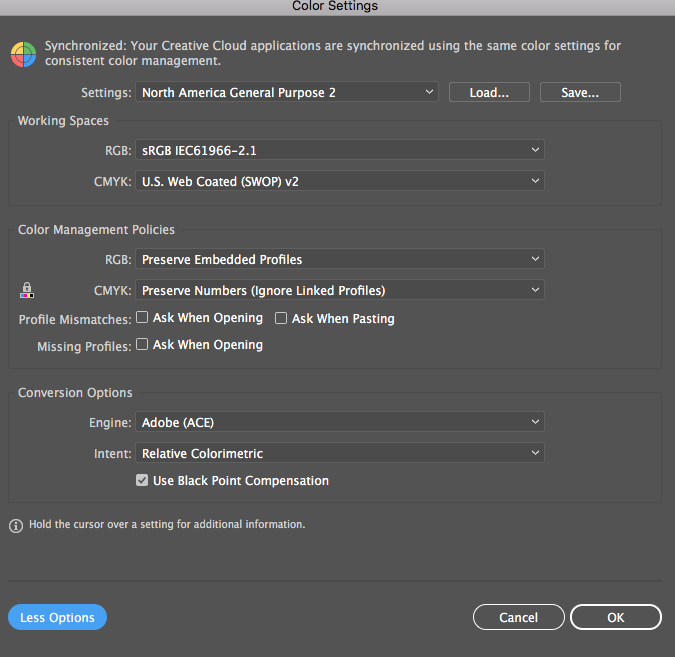
- I am using 'North America General Purpose 2' for my color settings across all creative suite programs.
- I don't know what soft proof is, but I don't believe I've turned it on. How would I check?
- The document color mode is RGB. I attached a screenshot of the color settings.
- I sent the client a low-res PDF for proofing. This is a web project, so is it possible that it's converting the colors when I save a PDF rather than exporting it as a jpg?
- I'm nto sure how my client views the document, but it seems irrelevant. The colors are changing in my Illustrator file, which is only accessed by me.
Copy link to clipboard
Copied
danah27870700 schrieb
- I sent the client a low-res PDF for proofing. This is a web project, so is it possible that it's converting the colors when I save a PDF rather than exporting it as a jpg?
In your settings you have turned off all warnings ("Ask when ...") so whatever Illustrator is doing, you won't notice. Turn them back on again.
When you save a PDF, it depends on the color options if colors get converted. Of course it's possible that this happens.
Copy link to clipboard
Copied
But would it affect the colors on the working illustrator doc if I were to, say, export a Press Quality PDF?
Copy link to clipboard
Copied
If you make sure that you don't overwrite the working document: no.
But if you export the PDF and then continue working in it by accident and then overwrite the original document: yes.

Copy link to clipboard
Copied
Hi there! I am facing the exact same issue with Illustrator. I create a new ai RGB file, I work, I close the file and next day I open again looks like my colors have been changed to dull colors, they look like CMYK even the fact that my file was always RGB...
Any solution so far to this mystery conversion?
Copy link to clipboard
Copied
How is color management set up?
Copy link to clipboard
Copied
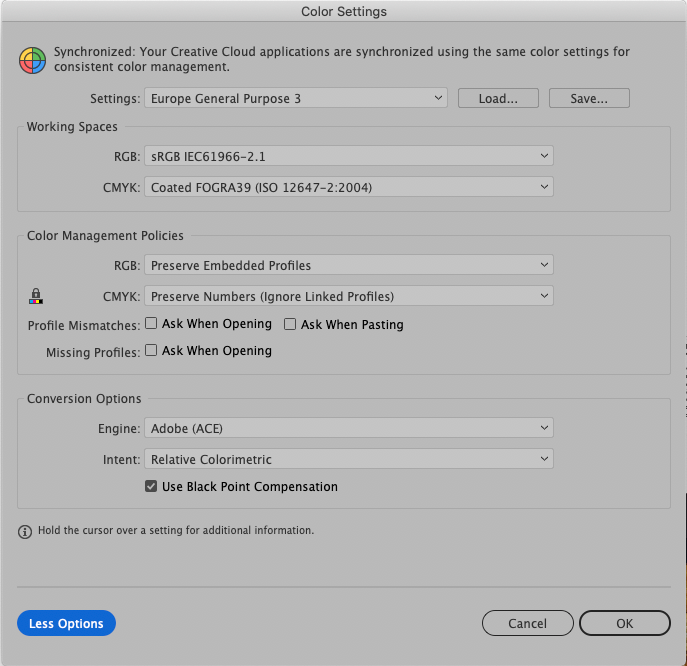
my color settings setup is as below. Though, I haven't make any changes since yesterday that I worked on my file. Also, I have faced the same issue again in the past and I changed all my document's colors one by one..
Copy link to clipboard
Copied
Those settings shouldn't cause any changes.
Maybe corrupt preferences. But if this appears sporadically, it will be difficult to sort out.
You should report this to http://illustrator.uservoice.com and maybe the engineers have an idea.

Copy link to clipboard
Copied
I would certainly report this at https://illustrator.uservoice.com
There seem to be more with dull colors problems lately:
And on Uservoice:


Copy link to clipboard
Copied
I have the same issue! And as I couldn't find a way to solve it, I have to make new files again and again. Any new solutions??
Copy link to clipboard
Copied
I suggest to contact support, they can have a look inside your system:

Copy link to clipboard
Copied
This continues to be a consistant problem for me as well. It happens with every Illustrator file I work on and it is incredibly frustrating. Is there still no fix?
Copy link to clipboard
Copied
Please describe us step to step what is happening. Which color mode is the document (check the title bar)? How is color management set up? How do you measure the values?
Copy link to clipboard
Copied
The document is in RGB color mode. I've attached a screenshot of my color management settings – basically the Illustrator default. My experience is just like everyone elses; over time the colors change/get darker. I always have to reference an external doc I've created with the correct HEX codes just to reset everything. I'm about ready to quit using Illustrator all together and move all projects to Figma.

Copy link to clipboard
Copied
It happened to me too. I ended up by changing colors my manually putting in R and G and B values in the end, and they would be changed by illustrator every time. Had do deal with clients for days, so frustrating. In the ned I could not change gradients anymore. I would change the color, but it wouldn't change on the path.
Copy link to clipboard
Copied
It happened to me too. I ended up by changing colors my manually putting in R and G and B values in the end, and they would be changed by illustrator every time. Had do deal with clients for days, so frustrating. In the ned I could not change gradients anymore. I would change the color, but it wouldn't change on the path.
By @Linus Reimer

Are you perhaps in CMYK document color mode?

Copy link to clipboard
Copied
I just had this issue and I figured it out! You have to work with color in the same color mode the doc is set to under File>Document Color Mode: If your doc is set to CMYK, then work with the colors in CMYK under the Color Tab...otherwise Illustrator is adjusting your values to compensate for the difference between cmyk and rgb. Its silly and shouldn't be doing that to us while were trying to work but that's what's happening.
Copy link to clipboard
Copied
Hello guys, try this:
edit-> assign profile -> working RGB (for me default was "profile:display (...)" and that was causing the problem).

Copy link to clipboard
Copied
omg danielm23404835
you saved my life. Literally the past 8 months i was suffering from this so so much!!!!!!!! THANK YOU

Copy link to clipboard
Copied
life saver

Copy link to clipboard
Copied
mine was "working rgb" but it still didn't work for me. So I set it to "don't color manage this document". So I wanna know... will this create any obstacles?

-
- 1
- 2

Find more inspiration, events, and resources on the new Adobe Community
Explore Now
 AdChoices