
NathanOdellin
Known Participant
September 16, 2020
Question

Illustrator Javascript - Render Swatch Legend - LAB Colour Values Incorrect

  • September 16, 2020
  • 11 replies
  • 54195 views

Hi All!

So, a question regarding the failry well known fab Script written by John Wundes:

renderSwatchLegend.jsx 

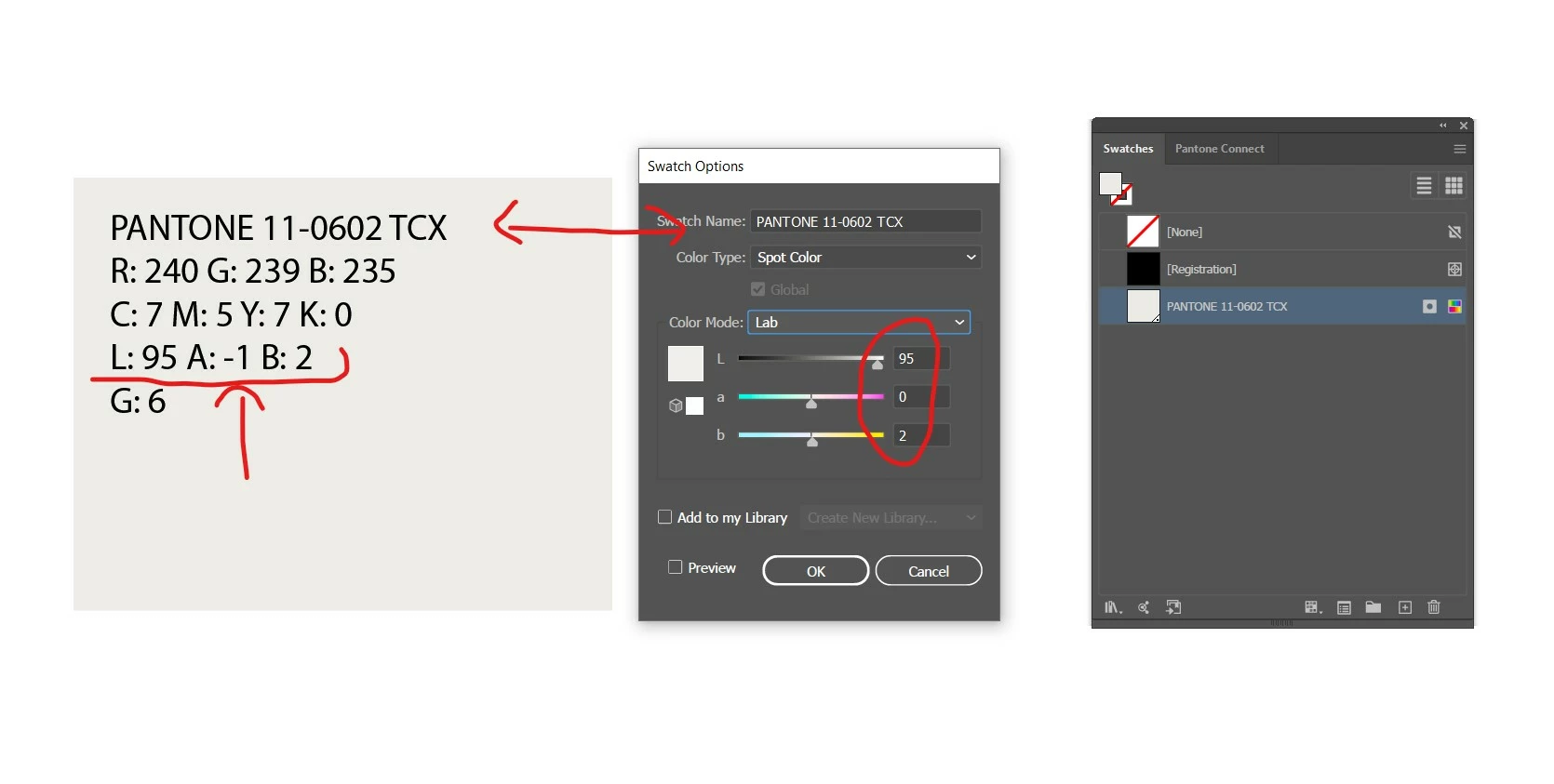
I need to create a chart that specifies just the LAB values underneith the swatches that the script creates, but curiously, the LAB values that the script produces are always wrong - they're always out by a digit and I don't know why. 


If I double click the swatch in the swatch palette, the LAB value is correct/as it should be, it is just the text that the script produces and lays onto the artboard that is incorrect. Please see following image. Any ideas why this glitch is happening?


This glitch happens consistently on every single import - the lab value that the script generates onto the artboard is never the correct value. Help! 


11 replies

Participant
June 25, 2024

I'm having problems using this too, before the last update on illustrator it worked totally fine, but now it doesn't I've tried all of the others in this thread but none worked 😓

schroef
Inspiring
September 18, 2024

@Matheus3825881488n1 


which version of the script are you using and do you get any error or dialog when running it?

Participating Frequently
March 19, 2025

Hey @schroef, you definitely have added some great functionality to this amazing script by John Wun. Any chance you could allow the HEX value to be outputted as "#:XXXXXX", meaning hash sign and all caps with no spaces? I know I'm being picky but I think this would allow people to copy paste the HEX codes more easily. This script should be made a feature inside AI, for real!

Participant
March 14, 2024

I tried to use this script but nothing happened for me. Please help me too

CarlosCanto
Community Expert
Community Expert
March 14, 2024

do you have any error messages?


try the first script to see if it works

Participant
March 17, 2024

I had tried the script too. Nothing happened. Please help me

schroef
Inspiring
July 26, 2022

in the script you can find it uses ```Math.round(outputColors[i][j])```. you can replace it by this ```outputColors[i][j].

.toPrecision(4)```

Now it will return values with 2 decimals. You need to make the w-150 to 160 otherwise text gets broken off.

Participant
September 22, 2023

Hello, does anyone have the latest script the can send, I am wondering if it is possibel to include COLORO color numbers as well?

schroef
Inspiring
September 22, 2023

What is coloro? Is that a search library?

This script concerts existing colors into color components.

If you have the full color library and its lab values. It can be implemented.


Edit

Just tried a quick Google. Not much info about if printers actually use this. Wonder if it's worth all the time to implement if I'm honest

CarlosCanto
Community Expert
Community Expert
September 16, 2020

try this updated version


/////////////////////////////////////////////////////////////////
// Render Swatch Legend v1.3 -- CC
//>=--------------------------------------
//
//  This script will generate a legend of rectangles for every swatch in the main swatches palette.
//  You can configure spacing and value display by configuring the variables at the top
//  of the script.
//   update: v1.1 now tests color brightness and renders a white label if the color is dark.
//   update: v1.2 uses adobe colour converter, rather than rgb colour conversion for a closer match.
//   update: v1.3 adds multiple colour space values based on array printColors.

// LAB values by Carlos Canto - 09/16/2020
// reference: https://community.adobe.com/t5/illustrator/illustrator-javascript-render-swatch-legend-lab-colour-values-incorrect/m-p/11438710?page=2#M244722
//>=--------------------------------------
// JS code (c) copyright: John Wundes ( john@wundes.com ) www.wundes.com
// copyright full text here:  http://www.wundes.com/js4ai/copyright.txt
//
// Edits by Adam Green (@wrokred) www.wrokred.com

//////////////////////////////////////////////////////////////////
doc = activeDocument,
    swatches = doc.swatches,
    cols = 4, // number of columns in group
    displayAs = "RGBColor", //or "CMYKColor"
    printColors = ["RGB", "CMYK", "LAB", "GrayScale"], // RGB, CMYK, LAB and/or GrayScale
    colorSeparator = " ", // Character used to separate the colours eg "|" output = R: XXX|G: XXX|B: XXX
    textSize = 10, // output text size value in points
    rectRef = null,
    textRectRef = null,
    textRef = null,
    swatchColor = null,
    w = 150;
h = 120,
    h_pad = 10,
    v_pad = 10,
    t_h_pad = 10,
    t_v_pad = 10,
    x = null,
    y = null,
    black = new GrayColor(),
    white = new GrayColor();
black.gray = 100;
white.gray = 0;
activeDocument.layers[0].locked = false;
var newGroup = doc.groupItems.add();
newGroup.name = "NewGroup";
newGroup.move(doc, ElementPlacement.PLACEATBEGINNING);
for (var c = 2, len = swatches.length; c < len; c++) {
    var swatchGroup = doc.groupItems.add();
    swatchGroup.name = swatches[c].name;
    x = (w + h_pad) * ((c - 2) % cols);
    y = (h + v_pad) * (Math.round(((c) + .03) / cols)) * -1;
    rectRef = doc.pathItems.rectangle(y, x, w, h);
    swatchColor = swatches[c].color;
    rectRef.fillColor = swatchColor;
    textRectRef = doc.pathItems.rectangle(y - t_v_pad, x + t_h_pad, w - (2 * t_h_pad), h - (2 * t_v_pad));
    textRef = doc.textFrames.areaText(textRectRef);
    textRef.contents = swatches[c].name + "\r" + getColorValues(swatchColor);
    textRef.textRange.fillColor = is_dark(swatchColor) ? white : black;
    textRef.textRange.size = textSize;
    rectRef.move(swatchGroup, ElementPlacement.PLACEATBEGINNING);
    textRef.move(swatchGroup, ElementPlacement.PLACEATBEGINNING);
    swatchGroup.move(newGroup, ElementPlacement.PLACEATEND);
}

function getColorValues(c, spot) {
    if (c.typename) {
        if (c.typename == "SpotColor") {
            return getColorValues(c.spot.color, c.spot);
        };
        switch (c.typename) {
            case "RGBColor":
                sourceSpace = ImageColorSpace.RGB;
                colorComponents = [c.red, c.green, c.blue];
                break;
            case "CMYKColor":
                sourceSpace = ImageColorSpace.CMYK;
                colorComponents = [c.cyan, c.magenta, c.yellow, c.black];
                break;
            case "LabColor":
                sourceSpace = ImageColorSpace.LAB;
                colorComponents = [c.l, c.a, c.b];
                break;
            case "GrayColor":
                sourceSpace = ImageColorSpace.GrayScale;
                colorComponents = [c.gray];
                break;
        }
        var outputColors = new Array();
        for (var i = printColors.length - 1; i >= 0; i--) {
            targetSpace = ImageColorSpace[printColors[i]];
            
            if (printColors[i] == 'LAB' && spot && spot.spotKind == 'SpotColorKind.SPOTLAB') {
                outputColors[i] = spot.getInternalColor();
            }
            else {
                outputColors[i] = app.convertSampleColor(sourceSpace, colorComponents, targetSpace, ColorConvertPurpose.previewpurpose);
            }
            for (var j = outputColors[i].length - 1; j >= 0; j--) {
                outputColors[i][j] = printColors[i].charAt(j) + ": " + Math.round(outputColors[i][j]);
                if (j == outputColors[i].length - 1) {
                    outputColors[i][j] += "\r";
                };
            };
            outputColors[i] = outputColors[i].join(colorSeparator);
        };
        return outputColors.join("");
    }
    return "Non Standard Color Type";
}

function is_dark(c) {
    if (c.typename) {
        switch (c.typename) {
            case "CMYKColor":
                return (c.black > 50 || (c.cyan > 50 && c.magenta > 50)) ? true : false;
            case "RGBColor":
                return (c.red < 100 && c.green < 100) ? true : false;
            case "GrayColor":
                return c.gray > 50 ? true : false;
            case "SpotColor":
                return is_dark(c.spot.color);
                return false;
        }
    }
}
schroef
Inspiring
July 26, 2022

@CarlosCanto 


A small edit i would make is adjust #23


swatches = doc.swatches


 to get only selected 


swatches = doc.swatches.getSelected()


Now it will only return the once you select. It needs some minor work, now the columns get a bit weird. Seems he skips the first 2, those arent needed. But he uses the 2 in other places as well.
 
EDIT  - Fixed column issue
Got it working now correctly, for those interested. See below


EDIT 2 - Added HEX code

I made another edit, it now also outputs HEX code. This one was a bit tricky. code is not as clean. But im no pro at this


EDIT 3 - Split color componenten yes/no

Okay last feature, added an option to split by color component or show color component as name then all the values. If you adjust the bool splitColorComponents. I did add 2 function from a different script. This was needed todo the convert from CMYtoRGB. I think i can get rif od it, part of that looks the same function already in this script. It now also works when you have a CMYK document, it still returns the HEX value


/////////////////////////////////////////////////////////////////
// Render Swatch Legend v1.4.4 -- CC
//>=--------------------------------------
//
//  This script will generate a legend of rectangles for every swatch in the main swatches palette.
//  You can configure spacing and value display by configuring the variables at the top
//  of the script.
//   update: v1.1 now tests color brightness and renders a white label if the color is dark.
//   update: v1.2 uses adobe colour converter, rather than rgb colour conversion for a closer match.
//   update: v1.3 adds multiple colour space values based on array printColors.
//   update: v1.4.1 Updated by CarlCanto > https://community.adobe.com/t5/illustrator-discussions/illustrator-javascript-render-swatch-legend-lab-colour-values-incorrect/m-p/11437592
//   update: v1.4.2 Only on selected Rombout Versluijs
//   update: v1.4.3 Added HEX colors Rombout Versluijs
//   update: v1.4.4 Added Split by Color Component Rombout Versluijs

// LAB values by Carlos Canto - 09/16/2020
// reference: https://community.adobe.com/t5/illustrator/illustrator-javascript-render-swatch-legend-lab-colour-values-incorrect/m-p/11438710?page=2#M244722
//>=--------------------------------------
// JS code (c) copyright: John Wundes ( john@wundes.com ) www.wundes.com
// copyright full text here:  http://www.wundes.com/js4ai/copyright.txt
//
// Edits by Adam Green (@wrokred) www.wrokred.com

//////////////////////////////////////////////////////////////////
doc = activeDocument,
swatches = doc.swatches.getSelected(),
cols = 4, // number of columns in group
displayAs = "RGBColor", //or "CMYKColor"
printColors = ["HEX", "RGB", "CMYK", "LAB", "GrayScale"], // RGB, CMYK, LAB and/or GrayScale
colorSeparator = " ", // Character used to separate the colours eg "|" output = R: XXX|G: XXX|B: XXX
splitColorComponents = false;
textSize = 10, // output text size value in points
rectRef = null,
textRectRef = null,
textRef = null,
swatchColor = null,
w = 150;
h = 120,
h_pad = 10,
v_pad = 10,
t_h_pad = 10,
t_v_pad = 10,
x = null,
y = null,
black = new GrayColor(),
white = new GrayColor();
black.gray = 100;
white.gray = 0;
activeDocument.layers[0].locked = false;
var newGroup = doc.groupItems.add();
newGroup.name = "NewGroup";
newGroup.move(doc, ElementPlacement.PLACEATBEGINNING);
for (var c = 0, len = swatches.length; c < len; c++) {
    var swatchGroup = doc.groupItems.add();
    swatchGroup.name = swatches[c].name;
    x = (w + h_pad) * ((c) % cols);
    y = (h + v_pad) * (Math.round(((c+2) + .03) / cols)) * -1;
    rectRef = doc.pathItems.rectangle(y, x, w, h);
    swatchColor = swatches[c].color;
    rectRef.fillColor = swatchColor;
    textRectRef = doc.pathItems.rectangle(y - t_v_pad, x + t_h_pad, w - (2 * t_h_pad), h - (2 * t_v_pad));
    textRef = doc.textFrames.areaText(textRectRef);
    textRef.contents = swatches[c].name + "\r" + getColorValues(swatchColor);
    textRef.textRange.fillColor = is_dark(swatchColor) ? white : black;
    textRef.textRange.size = textSize;
    rectRef.move(swatchGroup, ElementPlacement.PLACEATBEGINNING);
    textRef.move(swatchGroup, ElementPlacement.PLACEATBEGINNING);
    swatchGroup.move(newGroup, ElementPlacement.PLACEATEND);
}

function getColorValues(c, spot) {
    if (c.typename) {
        if (c.typename == "SpotColor") {
            return getColorValues(c.spot.color, c.spot);
        };
        switch (c.typename) {
            case "RGBColor":
                sourceSpace = ImageColorSpace.RGB;
                colorComponents = [c.red, c.green, c.blue];
                break;
            case "CMYKColor":
                sourceSpace = ImageColorSpace.CMYK;
                colorComponents = [c.cyan, c.magenta, c.yellow, c.black];
                break;
            case "LabColor":
                sourceSpace = ImageColorSpace.LAB;
                colorComponents = [c.l, c.a, c.b];
                break;
            case "GrayColor":
                sourceSpace = ImageColorSpace.GrayScale;
                colorComponents = [c.gray];
                break;
        }
        var outputColors = new Array();
        for (var i = printColors.length - 1; i >= 0; i--) {
            colorType = printColors[i] == "HEX" ? "Indexed": printColors[i];
            targetSpace = ImageColorSpace[colorType] ;
            
            if (printColors[i] == 'LAB' && spot && spot.spotKind == 'SpotColorKind.SPOTLAB') {
                outputColors[i] = spot.getInternalColor();
            } else if(printColors[i] == 'HEX') {
                if (app.activeDocument.documentColorSpace == DocumentColorSpace.CMYK) {
                    colorArray = [c.cyan, c.magenta, c.yellow, c.black];
                    // [Math.round(c), Math.round(m), Math.round(y), Math.round(k)]
                    rgbConv = app.convertSampleColor(ImageColorSpace["CMYK"], colorArray, ImageColorSpace["RGB"], ColorConvertPurpose.defaultpurpose);          
                    outputColors[i] = [rgbConv[0].toString(16), rgbConv[1].toString(16), rgbConv[2].toString(16)];
                } else{
                    outputColors[i] = [c.red.toString(16), c.green.toString(16), c.blue.toString(16)];

                }
            }
            else {
                outputColors[i] = app.convertSampleColor(sourceSpace, colorComponents, targetSpace, ColorConvertPurpose.previewpurpose);
            }
            for (var j = outputColors[i].length - 1; j >= 0; j--) {
                colorComp = splitColorComponents == true ? printColors[i].charAt(j) + ": " : "";
                if(isNaN(outputColors[i][j])){
                    outputColors[i][j] = colorComp + outputColors[i][j];
                } else {
                    outputColors[i][j] = colorComp + Math.round(outputColors[i][j]);
                }
                if (j == outputColors[i].length - 1) {
                    outputColors[i][j] += "\r";
                };
            };
            outputColors[i] = outputColors[i].join(colorSeparator);
            if(!splitColorComponents) outputColors[i] = printColors[i]+" "+outputColors[i]
        };
        return outputColors.join("");
    }
    return "Non Standard Color Type";
}

function is_dark(c) {
    if (c.typename) {
        switch (c.typename) {
            case "CMYKColor":
                return (c.black > 50 || (c.cyan > 50 && c.magenta > 50)) ? true : false;
            case "RGBColor":
                return (c.red < 100 && c.green < 100) ? true : false;
            case "GrayColor":
                return c.gray > 50 ? true : false;
            case "SpotColor":
                return is_dark(c.spot.color);
                return false;
        }
    }
}


Disposition_Dev
Legend
July 28, 2022

What you mean by text call outs? You mean the values its spits out?
Right now it will spit out all selected, uses the separator, splits name liek CMYK or like C:100 M:0 Y:0 K:100

and adds textsize. This all works. Ive also adding settings, so each time you open the dialog, it applies last used settings.

Its spits out all values , so RGB, CMYK, SPOT, LAB, GRAY and i added HEX


Here's my updated version with the dialog, I did not clean all code fully. I added JSON to save the settings. But i think i can do a much easier method using simply comma separated txt file. Makes the script smaller

/////////////////////////////////////////////////////////////////
// Render Swatch Legend v1.4.5 -- CC
//>=--------------------------------------
//
//  This script will generate a legend of rectangles for every swatch in the main swatches palette.
//  You can configure spacing and value display by configuring the variables at the top
//  of the script.
//   update: v1.1 now tests color brightness and renders a white label if the color is dark.
//   update: v1.2 uses adobe colour converter, rather than rgb colour conversion for a closer match.
//   update: v1.3 adds multiple colour space values based on array printColors.
//   update: v1.4.1 Updated by CarlCanto > https://community.adobe.com/t5/illustrator-discussions/illustrator-javascript-render-swatch-legend-lab-colour-values-incorrect/m-p/11437592
//   update: v1.4.2 Only on selected Rombout Versluijs
//   update: v1.4.3 Added HEX colors Rombout Versluijs
//   update: v1.4.4 Added Split by Color Component Rombout Versluijs
//   update: v1.4.5 Added Color Space selection dialog + saves settings

// LAB values by Carlos Canto - 09/16/2020
// reference: https://community.adobe.com/t5/illustrator/illustrator-javascript-render-swatch-legend-lab-colour-values-incorrect/m-p/11438710?page=2#M244722
//>=--------------------------------------
// JS code (c) copyright: John Wundes ( john@wundes.com ) www.wundes.com
// copyright full text here:  http://www.wundes.com/js4ai/copyright.txt
//
// Edits by Adam Green (@wrokred) www.wrokred.com

//////////////////////////////////////////////////////////////////

// ok and cancel button
var okBtnID = 1;
var cancelBtnID = 2;

function showDialog(swatchInfo){
    
    // SCRIPTUI JOONAS ///////////////////////////////////

/*
Code for Import https://scriptui.joonas.me — (Triple click to select): 
{"activeId":34,"items":{"item-0":{"id":0,"type":"Dialog","parentId":false,"style":{"enabled":true,"varName":"SwatchLegendDlg","windowType":"Dialog","creationProps":{"su1PanelCoordinates":false,"maximizeButton":false,"minimizeButton":false,"independent":false,"closeButton":true,"borderless":false,"resizeable":false},"text":"Swatch Legend","preferredSize":[0,0],"margins":16,"orientation":"column","spacing":10,"alignChildren":["left","top"]}},"item-7":{"id":7,"type":"Checkbox","parentId":11,"style":{"enabled":true,"varName":"rgbChkb","text":"RGB","preferredSize":[0,0],"alignment":null,"helpTip":null,"checked":false}},"item-8":{"id":8,"type":"Group","parentId":0,"style":{"enabled":true,"varName":"dialogBtnGroup","preferredSize":[0,0],"margins":0,"orientation":"row","spacing":10,"alignChildren":["right","center"],"alignment":"right"}},"item-9":{"id":9,"type":"Button","parentId":8,"style":{"enabled":true,"varName":"okBtn","text":"OK","justify":"center","preferredSize":[0,0],"alignment":null,"helpTip":null}},"item-10":{"id":10,"type":"Button","parentId":8,"style":{"enabled":true,"varName":"cancelBtn","text":"Cancel","justify":"center","preferredSize":[0,0],"alignment":null,"helpTip":null}},"item-11":{"id":11,"type":"Panel","parentId":0,"style":{"enabled":true,"varName":"colorSpacesPnl","creationProps":{"borderStyle":"etched","su1PanelCoordinates":false},"text":"Select Color Spaces","preferredSize":[0,0],"margins":10,"orientation":"column","spacing":5,"alignChildren":["left","top"],"alignment":null}},"item-12":{"id":12,"type":"Checkbox","parentId":11,"style":{"enabled":true,"varName":"hexChkb","text":"HEX","preferredSize":[0,0],"alignment":null,"helpTip":null,"checked":false}},"item-13":{"id":13,"type":"Checkbox","parentId":11,"style":{"enabled":true,"varName":"cmykChkb","text":"CMYK","preferredSize":[0,0],"alignment":null,"helpTip":null,"checked":false}},"item-14":{"id":14,"type":"Checkbox","parentId":11,"style":{"enabled":true,"varName":"labChkb","text":"LAB","preferredSize":[0,0],"alignment":null,"helpTip":null,"checked":false}},"item-15":{"id":15,"type":"Checkbox","parentId":11,"style":{"enabled":true,"varName":"grayChkb","text":"GRAY","preferredSize":[0,0],"alignment":null,"helpTip":null,"checked":false}},"item-16":{"id":16,"type":"Panel","parentId":0,"style":{"enabled":true,"varName":"optionsPnl","creationProps":{"borderStyle":"etched","su1PanelCoordinates":false},"text":"options","preferredSize":[0,0],"margins":10,"orientation":"row","spacing":5,"alignChildren":["left","fill"],"alignment":null}},"item-17":{"id":17,"type":"EditText","parentId":18,"style":{"enabled":true,"varName":"separatorStr","creationProps":{"noecho":false,"readonly":false,"multiline":false,"scrollable":false,"borderless":false,"enterKeySignalsOnChange":false},"softWrap":false,"text":" ","justify":"left","preferredSize":[30,0],"alignment":null,"helpTip":"Character used to separate the colours eg \"|\" output = R: XXX|G: XXX|B: XXX"}},"item-18":{"id":18,"type":"Group","parentId":16,"style":{"enabled":true,"varName":"separatorGrp","preferredSize":[0,0],"margins":0,"orientation":"row","spacing":5,"alignChildren":["left","center"],"alignment":null},"hidden":true},"item-19":{"id":19,"type":"StaticText","parentId":18,"style":{"enabled":true,"varName":"separatorLbl","creationProps":{"truncate":"none","multiline":false,"scrolling":false},"softWrap":false,"text":"Separator","justify":"left","preferredSize":[0,0],"alignment":null,"helpTip":null}},"item-20":{"id":20,"type":"Group","parentId":16,"style":{"enabled":true,"varName":"splitCompsGrp","preferredSize":[0,0],"margins":0,"orientation":"row","spacing":5,"alignChildren":["left","center"],"alignment":null},"hidden":true},"item-21":{"id":21,"type":"StaticText","parentId":20,"style":{"enabled":true,"varName":"splitCompLbl","creationProps":{"truncate":"none","multiline":false,"scrolling":false},"softWrap":false,"text":"Split","justify":"left","preferredSize":[0,0],"alignment":null,"helpTip":null}},"item-22":{"id":22,"type":"Checkbox","parentId":20,"style":{"enabled":true,"varName":"splitCompsChbk","text":"Components","preferredSize":[0,0],"alignment":null,"helpTip":null}},"item-23":{"id":23,"type":"Group","parentId":16,"style":{"enabled":true,"varName":"textSizeGrp","preferredSize":[0,0],"margins":0,"orientation":"row","spacing":5,"alignChildren":["left","center"],"alignment":null},"hidden":true},"item-24":{"id":24,"type":"StaticText","parentId":23,"style":{"enabled":true,"varName":"textSizeLbl","creationProps":{"truncate":"none","multiline":false,"scrolling":false},"softWrap":false,"text":"Text Size","justify":"left","preferredSize":[0,0],"alignment":null,"helpTip":null}},"item-25":{"id":25,"type":"EditText","parentId":23,"style":{"enabled":true,"varName":"textSizeStr","creationProps":{"noecho":false,"readonly":false,"multiline":false,"scrollable":false,"borderless":false,"enterKeySignalsOnChange":false},"softWrap":false,"text":"10","justify":"left","preferredSize":[0,0],"alignment":null,"helpTip":null}},"item-26":{"id":26,"type":"Group","parentId":16,"style":{"enabled":true,"varName":"separatorGrp","preferredSize":[0,70],"margins":0,"orientation":"column","spacing":5,"alignChildren":["left","center"],"alignment":"center"}},"item-27":{"id":27,"type":"StaticText","parentId":26,"style":{"enabled":true,"varName":"separatorLbl","creationProps":{"truncate":"none","multiline":false,"scrolling":false},"softWrap":false,"text":"Separator","justify":"left","preferredSize":[0,20],"alignment":null,"helpTip":""}},"item-28":{"id":28,"type":"EditText","parentId":29,"style":{"enabled":true,"varName":"separatorStr","creationProps":{"noecho":false,"readonly":false,"multiline":false,"scrollable":false,"borderless":false,"enterKeySignalsOnChange":false},"softWrap":false,"text":" ","justify":"left","preferredSize":[30,20],"alignment":"center","helpTip":"Character used to separate the colours eg \"|\" output = R: XXX|G: XXX|B: XXX"}},"item-29":{"id":29,"type":"Group","parentId":16,"style":{"enabled":true,"varName":"splitCompsGrp","preferredSize":[0,70],"margins":0,"orientation":"column","spacing":5,"alignChildren":["center","center"],"alignment":"center"}},"item-30":{"id":30,"type":"StaticText","parentId":26,"style":{"enabled":true,"varName":"splitCompLbl","creationProps":{"truncate":"none","multiline":false,"scrolling":false},"softWrap":false,"text":"Split Components","justify":"left","preferredSize":[0,20],"alignment":null,"helpTip":""}},"item-31":{"id":31,"type":"Checkbox","parentId":29,"style":{"enabled":true,"varName":"splitCompsChbk","text":"","preferredSize":[0,20],"alignment":"center","helpTip":"Split color component name by value. eg it shows CMYK 0 100 100 0 when off, C: 0 M: 100 Y:100 K:0 when checked","checked":false}},"item-33":{"id":33,"type":"StaticText","parentId":26,"style":{"enabled":true,"varName":"textSizeLbl","creationProps":{"truncate":"none","multiline":false,"scrolling":false},"softWrap":false,"text":"Text Size","justify":"left","preferredSize":[0,20],"alignment":null,"helpTip":""}},"item-34":{"id":34,"type":"EditText","parentId":29,"style":{"enabled":true,"varName":"textSizeStr","creationProps":{"noecho":false,"readonly":false,"multiline":false,"scrollable":false,"borderless":false,"enterKeySignalsOnChange":false},"softWrap":false,"text":"10","justify":"left","preferredSize":[30,20],"alignment":null,"helpTip":"Set text size of value per color"}}},"order":[0,11,12,7,13,14,15,16,29,28,31,34,26,27,30,33,18,19,17,20,21,22,23,24,25,8,10,9],"settings":{"importJSON":true,"indentSize":false,"cepExport":false,"includeCSSJS":true,"showDialog":true,"functionWrapper":false,"afterEffectsDockable":false,"itemReferenceList":"None"}}
*/ 

// SWATCHLEGENDDLG
// ====================
var SwatchLegendDlg = new Window("dialog"); 
    SwatchLegendDlg.text = "Swatch Legend"; 
    SwatchLegendDlg.orientation = "column"; 
    SwatchLegendDlg.alignChildren = ["left","top"]; 
    SwatchLegendDlg.spacing = 10; 
    SwatchLegendDlg.margins = 16; 

// COLORSPACESPNL
// ==============
var colorSpacesPnl = SwatchLegendDlg.add("panel", undefined, undefined, {name: "colorSpacesPnl"}); 
    colorSpacesPnl.text = "Select Color Spaces"; 
    colorSpacesPnl.orientation = "column"; 
    colorSpacesPnl.alignChildren = ["left","top"]; 
    colorSpacesPnl.spacing = 5; 
    colorSpacesPnl.margins = [10, 15, 10, 10]; 

var hexChkb = colorSpacesPnl.add("checkbox", undefined, undefined, {name: "hexChkb"}); 
    hexChkb.text = "HEX"; 
    hexChkb.value = swatchInfo.hexChkb; 

var rgbChkb = colorSpacesPnl.add("checkbox", undefined, undefined, {name: "rgbChkb"}); 
    rgbChkb.text = "RGB"; 
    rgbChkb.value = swatchInfo.rgbChkb; 

var cmykChkb = colorSpacesPnl.add("checkbox", undefined, undefined, {name: "cmykChkb"}); 
    cmykChkb.text = "CMYK"; 
    cmykChkb.value = swatchInfo.cmykChkb; 

var labChkb = colorSpacesPnl.add("checkbox", undefined, undefined, {name: "labChkb"}); 
    labChkb.text = "LAB"; 
    labChkb.value = swatchInfo.labChkb; 

var grayChkb = colorSpacesPnl.add("checkbox", undefined, undefined, {name: "grayChkb"}); 
    grayChkb.text = "GRAY"; 
    grayChkb.value = swatchInfo.grayChkb; 

// OPTIONSPNL
// ==========
var optionsPnl = SwatchLegendDlg.add("panel", undefined, undefined, {name: "optionsPnl"}); 
    optionsPnl.text = "options"; 
    optionsPnl.orientation = "row"; 
    optionsPnl.alignChildren = ["left","fill"]; 
    optionsPnl.spacing = 5; 
    optionsPnl.margins = [10, 15, 10, 10]; 

// SPLITCOMPSGRP
// =============
var splitCompsGrp = optionsPnl.add("group", undefined, {name: "splitCompsGrp"}); 
    splitCompsGrp.preferredSize.height = 70; 
    splitCompsGrp.orientation = "column"; 
    splitCompsGrp.alignChildren = ["center","center"]; 
    splitCompsGrp.spacing = 5; 
    splitCompsGrp.margins = 0; 
    splitCompsGrp.alignment = ["left","center"]; 

var separatorStr = splitCompsGrp.add('edittext {properties: {name: "separatorStr"}}'); 
    separatorStr.helpTip = "Character used to separate the colours eg \u0022|\u0022 output = R: XXX|G: XXX|B: XXX"; 
    separatorStr.text = swatchInfo.colorSeparator; 
    separatorStr.preferredSize.width = 30; 
    separatorStr.preferredSize.height = 20; 
    separatorStr.alignment = ["center","center"]; 

var splitCompsChbk = splitCompsGrp.add("checkbox", undefined, undefined, {name: "splitCompsChbk"}); 
    splitCompsChbk.helpTip = "Split color component name by value. eg it shows CMYK 0 100 100 0 when off, C: 0 M: 100 Y:100 K:0 when checked"; 
    splitCompsChbk.preferredSize.height = 20; 
    splitCompsChbk.value = swatchInfo.splitColorComponents; 
    splitCompsChbk.alignment = ["center","center"]; 

var textSizeStr = splitCompsGrp.add('edittext {properties: {name: "textSizeStr"}}'); 
    textSizeStr.helpTip = "Set text size of value per color"; 
    // textSizeStr.text = "10"; 
    textSizeStr.text = swatchInfo.textSize; 
    textSizeStr.preferredSize.width = 30; 
    textSizeStr.preferredSize.height = 20; 

// SEPARATORGRP
// ============
var separatorGrp = optionsPnl.add("group", undefined, {name: "separatorGrp"}); 
    separatorGrp.preferredSize.height = 70; 
    separatorGrp.orientation = "column"; 
    separatorGrp.alignChildren = ["left","center"]; 
    separatorGrp.spacing = 5; 
    separatorGrp.margins = 0; 
    separatorGrp.alignment = ["left","center"]; 

var separatorLbl = separatorGrp.add("statictext", undefined, undefined, {name: "separatorLbl"}); 
    separatorLbl.text = "Separator"; 
    separatorLbl.text = "Separator"; 
    separatorLbl.preferredSize.height = 20; 

var splitCompLbl = separatorGrp.add("statictext", undefined, undefined, {name: "splitCompLbl"}); 
    splitCompLbl.text = "Split Components"; 
    splitCompLbl.preferredSize.height = 20; 

var textSizeLbl = separatorGrp.add("statictext", undefined, undefined, {name: "textSizeLbl"}); 
    // textSizeLbl.text = "Text Size"; 
    textSizeLbl.preferredSize.height = 20; 

// SEPARATORGRP1
// =============
// var separatorGrp1 = optionsPnl.add("group", undefined, {name: "separatorGrp1"}); 
    // separatorGrp1.orientation = "row"; 
    // separatorGrp1.alignChildren = ["left","center"]; 
    // separatorGrp1.spacing = 5; 
    // separatorGrp1.margins = 0; 

// var separatorLbl1 = separatorGrp1.add("statictext", undefined, undefined, {name: "separatorLbl1"}); 
    // separatorLbl1.text = "Separator"; 

// var separatorStr1 = separatorGrp1.add('edittext {properties: {name: "separatorStr1"}}'); 
    // separatorStr1.helpTip = "Character used to separate the colours eg \u0022|\u0022 output = R: XXX|G: XXX|B: XXX"; 
    // separatorStr1.text = " "; 
    // separatorStr1.preferredSize.width = 30; 

// SPLITCOMPSGRP1
// ==============
// var splitCompsGrp1 = optionsPnl.add("group", undefined, {name: "splitCompsGrp1"}); 
    // splitCompsGrp1.orientation = "row"; 
    // splitCompsGrp1.alignChildren = ["left","center"]; 
    // splitCompsGrp1.spacing = 5; 
    // splitCompsGrp1.margins = 0; 

// var splitCompLbl1 = splitCompsGrp1.add("statictext", undefined, undefined, {name: "splitCompLbl1"}); 
    // splitCompLbl1.text = "Split"; 

// var splitCompsChbk1 = splitCompsGrp1.add("checkbox", undefined, undefined, {name: "splitCompsChbk1"}); 
    // splitCompsChbk1.text = "Components"; 

// TEXTSIZEGRP
// ===========
// var textSizeGrp = optionsPnl.add("group", undefined, {name: "textSizeGrp"}); 
    // textSizeGrp.orientation = "row"; 
    // textSizeGrp.alignChildren = ["left","center"]; 
    // textSizeGrp.spacing = 5; 
    // textSizeGrp.margins = 0; 

// var textSizeLbl1 = textSizeGrp.add("statictext", undefined, undefined, {name: "textSizeLbl1"}); 
    // textSizeLbl1.text = "Text Size"; 

// var textSizeStr1 = textSizeGrp.add('edittext {properties: {name: "textSizeStr1"}}'); 
    // textSizeStr1.text = "10"; 

// DIALOGBTNGROUP
// ==============
var dialogBtnGroup = SwatchLegendDlg.add("group", undefined, {name: "dialogBtnGroup"}); 
    dialogBtnGroup.orientation = "row"; 
    dialogBtnGroup.alignChildren = ["right","center"]; 
    dialogBtnGroup.spacing = 10; 
    dialogBtnGroup.margins = 0; 
    dialogBtnGroup.alignment = ["right","top"]; 

var cancelBtn = dialogBtnGroup.add("button", undefined, undefined, {name: "cancelBtn"}); 
    cancelBtn.text = "Cancel"; 

var okBtn = dialogBtnGroup.add("button", undefined, undefined, {name: "okBtn"}); 
    okBtn.text = "OK"; 


    // END SCRIPTUI JOONAS ///////////////////////////////
    //////////////////////////////////////////////////////

    okBtn.onClick = function() {
        SwatchLegendDlg.close(okBtnID);
    }

    cancelBtn.onClick = function() {
        SwatchLegendDlg.close(cancelBtnID);
    }

    defaultElement = okBtn;
    cancelElement = cancelBtn;

    SwatchLegendDlg.center();

    var result = SwatchLegendDlg.show();

    if (cancelBtnID == result) {
        return result; // close to quit
    }

    swatchInfo.hexChkb = hexChkb.value;
    swatchInfo.rgbChkb = rgbChkb.value;
    swatchInfo.cmykChkb = cmykChkb.value;
    swatchInfo.labChkb = labChkb.value;
    swatchInfo.grayChkb = grayChkb.value;
    swatchInfo.colorSpaces = [swatchInfo.hexChkb, swatchInfo.rgbChkb, swatchInfo.cmykChkb, swatchInfo.labChkb, swatchInfo.grayChkb];
    swatchInfo.colorSeparator = separatorStr.text;
    swatchInfo.splitColorComponents = splitCompsChbk.value;
    swatchInfo.textSize = Number(textSizeStr.text);
    return result;
}

//////////////////////////////////////////////////////////////////

//////////////////////////////////////////////////////////////////
doc = activeDocument,
swatches = doc.swatches.getSelected(),
cols = 4, // number of columns in group
displayAs = "RGBColor", //or "CMYKColor"
printColors = ["HEX", "RGB", "CMYK", "LAB", "GrayScale"], // RGB, CMYK, LAB and/or GrayScale
// colorSeparator = " ", // Character used to separate the colours eg "|" output = R: XXX|G: XXX|B: XXX
// splitColorComponents = false;
// textSize = 10, // output text size value in points
rectRef = null,
textRectRef = null,
textRef = null,
swatchColor = null,
w = 150;
h = 120,
h_pad = 10,
v_pad = 10,
t_h_pad = 10,
t_v_pad = 10,
x = null,
y = null,
black = new GrayColor(),
white = new GrayColor();
black.gray = 100;
white.gray = 0;
activeDocument.layers[0].locked = false;
var newGroup = doc.groupItems.add();
newGroup.name = "NewGroup";
newGroup.move(doc, ElementPlacement.PLACEATBEGINNING);

function main(swatchInfo){
    swatchInfo = swatchInfo;
    for (var c = 0, len = swatches.length; c < len; c++) {
        var swatchGroup = doc.groupItems.add();
        swatchGroup.name = swatches[c].name;
        x = (w + h_pad) * ((c) % cols);
        y = (h + v_pad) * (Math.round(((c+2) + .03) / cols)) * -1;
        rectRef = doc.pathItems.rectangle(y, x, w, h);
        swatchColor = swatches[c].color;
        rectRef.fillColor = swatchColor;
        textRectRef = doc.pathItems.rectangle(y - t_v_pad, x + t_h_pad, w - (2 * t_h_pad), h - (2 * t_v_pad));
        textRef = doc.textFrames.areaText(textRectRef);
        textRef.contents = swatches[c].name + "\r" + getColorValues(swatchColor);
        textRef.textRange.fillColor = is_dark(swatchColor) ? white : black;
        textRef.textRange.size = swatchInfo.textSize;
        rectRef.move(swatchGroup, ElementPlacement.PLACEATBEGINNING);
        textRef.move(swatchGroup, ElementPlacement.PLACEATBEGINNING);
        swatchGroup.move(newGroup, ElementPlacement.PLACEATEND);
    }
}

function getColorValues(c, spot) {
    if (c.typename) {
        if (c.typename == "SpotColor") {
            return getColorValues(c.spot.color, c.spot);
        };
        switch (c.typename) {
            case "RGBColor":
                sourceSpace = ImageColorSpace.RGB;
                colorComponents = [c.red, c.green, c.blue];
                break;
            case "CMYKColor":
                sourceSpace = ImageColorSpace.CMYK;
                colorComponents = [c.cyan, c.magenta, c.yellow, c.black];
                break;
            case "LabColor":
                sourceSpace = ImageColorSpace.LAB;
                colorComponents = [c.l, c.a, c.b];
                break;
            case "GrayColor":
                sourceSpace = ImageColorSpace.GrayScale;
                colorComponents = [c.gray];
                break;
        }
        var outputColors = new Array();
        for (var i = printColors.length - 1; i >= 0; i--) {
            colorType = printColors[i] == "HEX" ? "Indexed": printColors[i];
            targetSpace = ImageColorSpace[colorType];
            // alert(i)
            // alert(swatchInfo.colorSpaces[i])
            // only output selected spaces from dialog
            if (swatchInfo.colorSpaces[i]==true){
                if (printColors[i] == 'LAB' && spot && spot.spotKind == 'SpotColorKind.SPOTLAB') {
                    outputColors[i] = spot.getInternalColor();
                } else if(printColors[i] == 'HEX') {
                    if (app.activeDocument.documentColorSpace == DocumentColorSpace.CMYK) {
                        colorArray = [c.cyan, c.magenta, c.yellow, c.black];
                        // [Math.round(c), Math.round(m), Math.round(y), Math.round(k)]
                        rgbConv = app.convertSampleColor(ImageColorSpace["CMYK"], colorArray, ImageColorSpace["RGB"], ColorConvertPurpose.defaultpurpose);          
                        outputColors[i] = [rgbConv[0].toString(16), rgbConv[1].toString(16), rgbConv[2].toString(16)];
                    } else{
                        outputColors[i] = [c.red.toString(16), c.green.toString(16), c.blue.toString(16)];

                    }
                }
                else {
                    outputColors[i] = app.convertSampleColor(sourceSpace, colorComponents, targetSpace, ColorConvertPurpose.previewpurpose);
                }
                for (var j = outputColors[i].length - 1; j >= 0; j--) {
                    colorComp = swatchInfo.splitColorComponents == true ? printColors[i].charAt(j) + ": " : "";
                    if(isNaN(outputColors[i][j])){
                        outputColors[i][j] = colorComp + outputColors[i][j];
                    } else {
                        outputColors[i][j] = colorComp + Math.round(outputColors[i][j]);
                    }
                    if (j == outputColors[i].length - 1) {
                        outputColors[i][j] += "\r";
                    };
                };
                outputColors[i] = outputColors[i].join(" "+swatchInfo.colorSeparator);
                if(!swatchInfo.splitColorComponents) outputColors[i] = printColors[i]+" "+outputColors[i]
            }
        };
        return outputColors.join("");
    }
    return "Non Standard Color Type";
}

function is_dark(c) {
    if (c.typename) {
        switch (c.typename) {
            case "CMYKColor":
                return (c.black > 50 || (c.cyan > 50 && c.magenta > 50)) ? true : false;
            case "RGBColor":
                return (c.red < 100 && c.green < 100) ? true : false;
            case "GrayColor":
                return c.gray > 50 ? true : false;
            case "SpotColor":
                return is_dark(c.spot.color);
                return false;
        }
    }
}


///////////////////////////////////////////////////////////////////////////////

// JSON
// Source: https://github.com/JavierAroche/descriptor-info/blob/master/example/helpers/JSON.jsx
/**
* JSON - from: https://github.com/douglascrockford/JSON-js
*/
if(typeof JSON!=='object'){JSON={};}(function(){'use strict';function f(n){return n<10?'0'+n:n;}function this_value(){return this.valueOf();}if(typeof Date.prototype.toJSON!=='function'){Date.prototype.toJSON=function(){return isFinite(this.valueOf())?this.getUTCFullYear()+'-'+f(this.getUTCMonth()+1)+'-'+f(this.getUTCDate())+'T'+f(this.getUTCHours())+':'+f(this.getUTCMinutes())+':'+f(this.getUTCSeconds())+'Z':null;};Boolean.prototype.toJSON=this_value;Number.prototype.toJSON=this_value;String.prototype.toJSON=this_value;}var cx,escapable,gap,indent,meta,rep;function quote(string){escapable.lastIndex=0;return escapable.test(string)?'"'+string.replace(escapable,function(a){var c=meta[a];return typeof c==='string'?c:'\\u'+('0000'+a.charCodeAt(0).toString(16)).slice(-4);})+'"':'"'+string+'"';}function str(key,holder){var i,k,v,length,mind=gap,partial,value=holder[key];if(value&&typeof value==='object'&&typeof value.toJSON==='function'){value=value.toJSON(key);}if(typeof rep==='function'){value=rep.call(holder,key,value);}switch(typeof value){case'string':return quote(value);case'number':return isFinite(value)?String(value):'null';case'boolean':case'null':return String(value);case'object':if(!value){return'null';}gap+=indent;partial=[];if(Object.prototype.toString.apply(value)==='[object Array]'){length=value.length;for(i=0;i<length;i+=1){partial[i]=str(i,value)||'null';}v=partial.length===0?'[]':gap?'[\n'+gap+partial.join(',\n'+gap)+'\n'+mind+']':'['+partial.join(',')+']';gap=mind;return v;}if(rep&&typeof rep==='object'){length=rep.length;for(i=0;i<length;i+=1){if(typeof rep[i]==='string'){k=rep[i];v=str(k,value);if(v){partial.push(quote(k)+(gap?': ':':')+v);}}}}else{for(k in value){if(Object.prototype.hasOwnProperty.call(value,k)){v=str(k,value);if(v){partial.push(quote(k)+(gap?': ':':')+v);}}}}v=partial.length===0?'{}':gap?'{\n'+gap+partial.join(',\n'+gap)+'\n'+mind+'}':'{'+partial.join(',')+'}';gap=mind;return v;}}if(typeof JSON.stringify!=='function'){escapable=/[\\\"\u0000-\u001f\u007f-\u009f\u00ad\u0600-\u0604\u070f\u17b4\u17b5\u200c-\u200f\u2028-\u202f\u2060-\u206f\ufeff\ufff0-\uffff]/g;meta={'\b':'\\b','\t':'\\t','\n':'\\n','\f':'\\f','\r':'\\r','"':'\\"','\\':'\\\\'};JSON.stringify=function(value,replacer,space){var i;gap='';indent='';if(typeof space==='number'){for(i=0;i<space;i+=1){indent+=' ';}}else if(typeof space==='string'){indent=space;}rep=replacer;if(replacer&&typeof replacer!=='function'&&(typeof replacer!=='object'||typeof replacer.length!=='number')){throw new Error('JSON.stringify');}return str('',{'':value});};}if(typeof JSON.parse!=='function'){cx=/[\u0000\u00ad\u0600-\u0604\u070f\u17b4\u17b5\u200c-\u200f\u2028-\u202f\u2060-\u206f\ufeff\ufff0-\uffff]/g;JSON.parse=function(text,reviver){var j;function walk(holder,key){var k,v,value=holder[key];if(value&&typeof value==='object'){for(k in value){if(Object.prototype.hasOwnProperty.call(value,k)){v=walk(value,k);if(v!==undefined){value[k]=v;}else{delete value[k];}}}}return reviver.call(holder,key,value);}text=String(text);cx.lastIndex=0;if(cx.test(text)){text=text.replace(cx,function(a){return'\\u'+('0000'+a.charCodeAt(0).toString(16)).slice(-4);});}if(/^[\],:{}\s]*$/.test(text.replace(/\\(?:["\\\/bfnrt]|u[0-9a-fA-F]{4})/g,'@').replace(/"[^"\\\n\r]*"|true|false|null|-?\d+(?:\.\d*)?(?:[eE][+\-]?\d+)?/g,']').replace(/(?:^|:|,)(?:\s*\[)+/g,''))){j=eval('('+text+')');return typeof reviver==='function'?walk({'':j},''):j;}throw new SyntaxError('JSON.parse');};}}());

///////////////////////////////////////////////////////////////////////////////

///////////////////////////////////////////////////////////////////////////////
// Function: initSwatchInfo
// Usage: create our default parameters
// Input: a new Object
// Return: a new object with params set to default
// Source: Export LayerComps photoshop
///////////////////////////////////////////////////////////////////////////////
// function initswatchInfo(swatchInfo, isSelection, artboardAvail, isOverrideSticky) {
function initSwatchInfo(swatchInfo,jsonData) {
    // if (isOverrideSticky) {
    //     if (isSelection) swatchInfo.selectionOnly = true;
    //     if (!isSelection) swatchInfo.selectionOnly = false;
    //     // }
    //     if (artboardAvail) swatchInfo.artboardsEnab = true;
    //     if (!artboardAvail) swatchInfo.artboardsEnab = false;
    //     // }
    //     // Currently uses stored data
    //     // try {
    //     //     swatchInfo.destination = Folder(app.activeDocument.fullName.parent).fsName; // destination folder
    //     //     var tmp = app.activeDocument.fullName.name;
    //     //     swatchInfo.fileNamePrefix = decodeURI(tmp.substring(0, tmp.indexOf("."))); // filename body part
    //     // } catch (someError) {
    //     //     swatchInfo.destination = new String("");
    //     //     swatchInfo.fileNamePrefix = app.activeDocument.name; // filename body part
    //     // }
    //     if (artboardAvail) swatchInfo.artboardShow = true;
    //     if (!artboardAvail) swatchInfo.artboardShow = false;
    //     if (artboardAvail) swatchInfo.inclArtboardName = true;
    //     if (!artboardAvail) swatchInfo.inclArtboardName = false;
    // } else {
    //Currently uses stored data
    // }
    // Load data from JSON
    
    if (jsonData){
        swatchInfo.hexChkb = jsonData.hexChkb;
        swatchInfo.rgbChkb = jsonData.rgbChkb;
        swatchInfo.cmykChkb = jsonData.cmykChkb;
        swatchInfo.labChkb = jsonData.labChkb;
        swatchInfo.grayChkb = jsonData.grayChkb;
        swatchInfo.colorSpaces = jsonData.colorSpaces;
        swatchInfo.colorSeparator = jsonData.colorSeparator; // Character used to separate the colours eg "|" output = R: XXX|G: XXX|B: XXX
        swatchInfo.splitColorComponents = jsonData.splitColorComponents;
        swatchInfo.textSize = jsonData.textSize; // output text size value in points
    } else {
        swatchInfo.hexChkb = false;
        swatchInfo.rgbChkb = false;
        swatchInfo.cmykChkb = false;
        swatchInfo.labChkb = false;
        swatchInfo.grayChkb = false;
        swatchInfo.colorSpaces = [swatchInfo.hexChkb, swatchInfo.rgbChkb, swatchInfo.cmykChkb, swatchInfo.labChkb, swatchInfo.grayChkb];
        swatchInfo.colorSeparator = " "; // Character used to separate the colours eg "|" output = R: XXX|G: XXX|B: XXX
        swatchInfo.splitColorComponents = false;
        swatchInfo.textSize = 10; // output text size value in points
    }
}


var swatchInfo = new Object();
function getSwatchInfo() {
    if (app.documents.length <= 0) {
        alert("No active document");
        // Dialog mdoe doesnt work in Illustrator
        // if (DialogModes.NO != app.playbackDisplayDialogs) {
        // }
        return "cancel"; // quit, returning "cancel" (dont localize) makes the actions palette not record our script
    } else if (swatches.length==0){
        alert("No swatches selected");
        return "cancel"; // quit, 
    } 
    try {
        if (swatches[0].name=="[None]" || swatches[1].name=="[Registration]"){
            alert("This swatch can be used");
            return "cancel"; // quit, 
        }
    } catch(e){
        // pass silent
    }
    // load JSON stored data if exists
    jsonData = loadJSON(swatchInfo)
    initSwatchInfo(swatchInfo, jsonData);
    if (cancelBtnID == showDialog(swatchInfo)) {
        return "cancel"; // quit, returning "cancel" (dont localize) makes the actions palette not record our script
    } else {
    // if (DialogModes.ALL == app.playbackDisplayDialogs) {
    // }
    // alert(swatchInfo)
        main(swatchInfo);

        saveToJSON(swatchInfo);
    }
    
}

getSwatchInfo()

function saveToJSON(swatchInfo){
    hexChkb =swatchInfo.hexChkb;
    rgbChkb =swatchInfo.rgbChkb;
    cmykChkb =swatchInfo.cmykChkb;
    labChkb =swatchInfo.labChkb;
    grayChkb =swatchInfo.grayChkb;
    colorSpaces =swatchInfo.colorSpaces;
    colorSeparator =swatchInfo.colorSeparator;
    splitColorComponents =swatchInfo.splitColorComponents;
    textSize =swatchInfo.textSize;
    var swatchLegenda = {
        hexChkb : hexChkb,
        rgbChkb : rgbChkb,
        cmykChkb : cmykChkb,
        labChkb : labChkb,
        grayChkb : grayChkb,
        colorSpaces : [hexChkb, rgbChkb, cmykChkb, labChkb, grayChkb],
        colorSeparator : colorSeparator,
        splitColorComponents : splitColorComponents,
        textSize : textSize,
    };

    // var descObject = descriptorInfo.getProperties( desc, descFlags );
    var jsonString = JSON.stringify(swatchLegenda);
    var pathFile = File($.fileName).path;
    var f = File(pathFile+"/swatchLegend.json");
    f.open('w'); // w for 'write'
    f.write(jsonString);
    f.close();
}


function loadJSON(){
    // var jsonString = JSON.stringify(swatchLegenda);
    var pathFile = File($.fileName).path;
    var f = File(pathFile+"/swatchLegend.json");
    if (f.exists){
        f.open('r'); // r for read
        var jsonData = f.read();
        f.close();
        return JSON.parse(jsonData)
    } else {
        return false
    }
    // textSize =swatchInfo.textSize;
    // var swatchLegenda = {
    //     hexChkb : hexChkb,
    //     rgbChkb : rgbChkb,
    //     cmykChkb : cmykChkb,
    //     labChkb : labChkb,
    //     grayChkb : grayChkb,
    //     colorSpaces : [hexChkb, rgbChkb, cmykChkb, labChkb, grayChkb],
    //     colorSeparator : colorSeparator,
    //     splitColorComponents : splitColorComponents,
    //     textSize : textSize,
    // };

}
/*

var prefs = {}

          prefs.txtbox = "something"

          prefs.btnsave = "something"

          prefs.btnretrive = "something"

save object to file:

var file = File(directory);

     file.open('w')

     file.write(prefs.toSource())

     file.close()

open saved object:

    file.open("r")

    prefs = eval(file.read())

    file.close();

*/


I understand the color values are output. I'm referring to the textFrame into which those values are output. Should that textFrame align inside the swatch at the bottom left? below the swatch at the bottom right? rotated 90 degrees and vertically centered to the swatch but outside the left edge. etc. could even add formatting options to easily prettify the output swatches rather than simple black default font. 


I completely know this is all frivolous... but it could be fun anyhow.

CarlosCanto
Community Expert
Community Expert
September 16, 2020

hmmm. there might be hope, let me make some testing...The plot thickens!

Ton Frederiks
Community Expert
Community Expert
September 16, 2020

Yes, the plot is getting very thick!

Let me add to my latest reply: the RGB values that the script gives you are the same values you would get when you open the Pantone swatch and manually switch to RGB: In an RGB document.

Ton Frederiks
Community Expert
Community Expert
September 16, 2020

Knowing what we know now, the script will only give correct values for CMYK swatches in a CMYK document an RGB swatches in an RGB document. All other values are calculated using the current color settings.

NathanOdellin
Known Participant
September 16, 2020

The plot thickens!


My problem is that I download my pantones from Pantone Colour Manager as 'LAB' swatches - I can only download as either LAB or sRGB and this is for textile printing. 

My file is set up using Adobe RGB space as I'm digitally printing fabric. 

Long story short, the LAB value that the script creates and writes out is never going to be precise, so in my user case, I'll just have to use the RGB values that the script writes out - if I'm thinking this through correctly, those RGB values the script writes out should be correct? 

Ton Frederiks
Community Expert
Community Expert
September 16, 2020

Yes as far as I can conclude, the RGB values that the script gives you are the same values you would get when you open the Pantone swatch and manually switch to RGB. 

CarlosCanto
Community Expert
Community Expert
September 16, 2020

it's been clear since the very start Nathan, what I'm trying to tell you is that the LAB values you see in the UI are not accessible to scripting. The Scripting API provides a conversion method, we get the values in CMYK or RGB then we convert them to LAB. That's where the rounding comes from.

NathanOdellin
Known Participant
September 16, 2020

Hi Carlos, yes sorry - all is clear now, I understand what is happening. 

I've never understood why Illustrator doesn't display LAB natively, but this is obviously why the script is needing to take the cmyk/RGB data and then produce the Lab value (That is slightly different). 

Makes sense to me now, thank you for explaining and repeating this to me. 


CarlosCanto
Community Expert
Community Expert
September 16, 2020

It comes down to rounding, decimals get lost from Pantone to CMYK (or RGB) then to LAB.

NathanOdellin
Known Participant
September 16, 2020

I’m not sure that is correct. Rounding would make sense if there were half values etc but this isn’t the case.

On every single imported swatch - I.e on every swatch the script runs through and presents on the art board, the values are always one digit more out, without fail. The L value often remains the same, but the A B Values are always off by one digit. This isn’t rounding, there’s something going wrong.

CarlosCanto
Community Expert
Community Expert
September 16, 2020

we don't have access to LAB values in the scripting API, that's the reason conversion was needed

Ton Frederiks
Community Expert
Community Expert
September 16, 2020

An Book Color, Carlos, is that available in scripting?

CarlosCanto
Community Expert
Community Expert
September 16, 2020

The Scripting API recognizes Pantone Colors as SpotLAB, but when we dig down to get the actual color values we get either CMYK or RGB according to your Document Color Mode.

Ton Frederiks
Community Expert
Community Expert
September 16, 2020

I don't think the script is correct in showing the Lab values.

It looks like it is showing the Lab values of the color when it is converted to CMYK.

NathanOdellin
Known Participant
September 16, 2020

Argh! IF so, that is super frustrating. LAB values are the most accurate print values there are, so it's crucial they match. 


What is puzzling to me though, is that the script does any conversions at all - WHY???????

It should just be extracting the actual data from the swatch, so why is it changing numerical values at all? 


The actual swatch values are exacting, certainly from Pantones. So why does the script then start to ínterpret' them? Makes no sense at all.