
Participant
November 21, 2024
Question

Illustrator Live Trace in v2025 forces ~75% path simplicity, any way to gain back the control?

  • November 21, 2024
  • 3 replies
  • 1191 views

Live trace is the main use for Illustrator in my workflow.


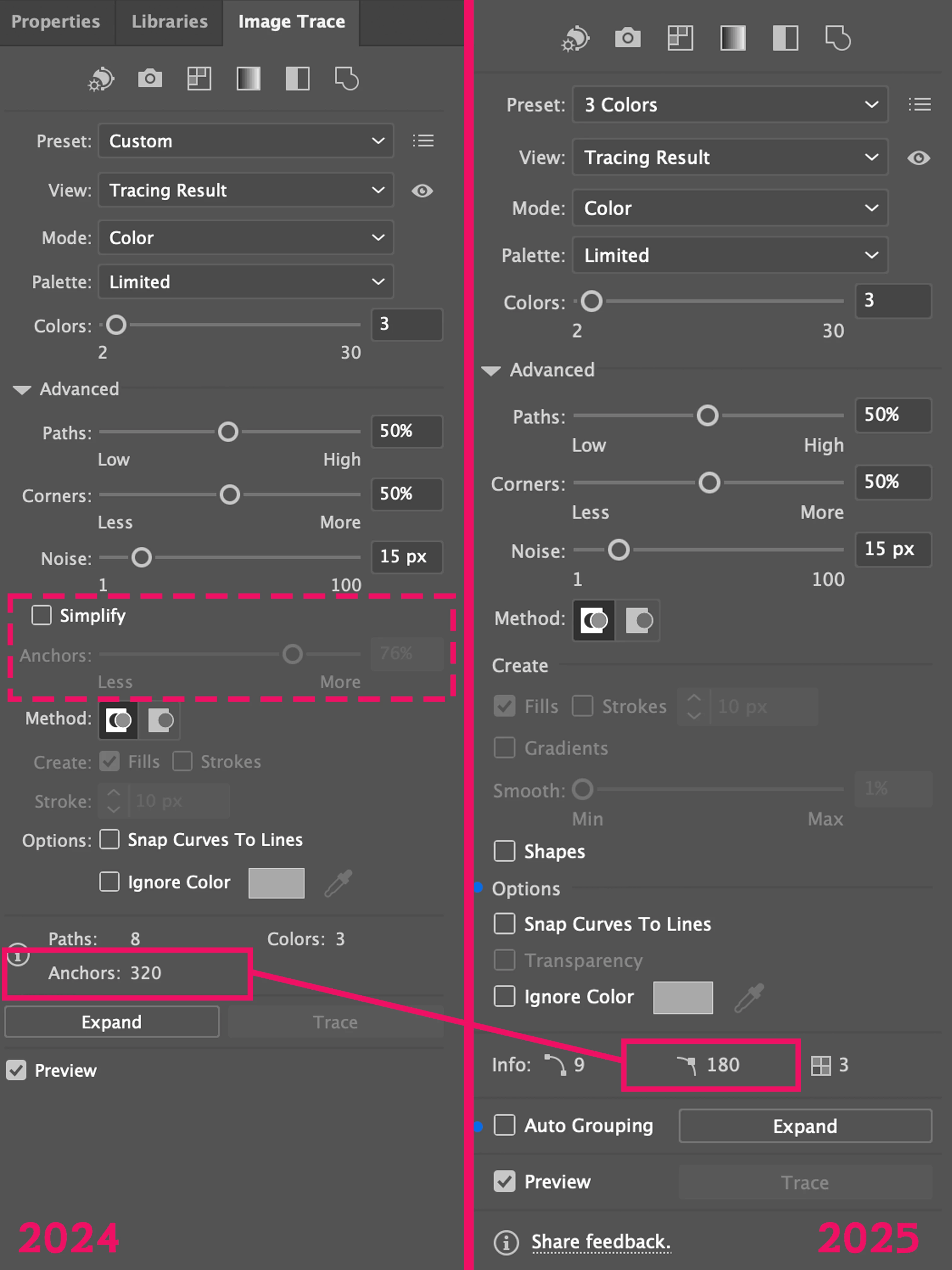
I noticed the removal of the 'simplify' option from 2024's Live Trace options to reduce the complexity of traced paths.


In 2025 it seems to be enabled by default, and the option to disable has been removed. The result is about a 25% reduction in path anchors. In most cases thats fine, but for certain traces its means considerably worse results compared to 2024.


Is there any way to gain back the option to disable it?


3 replies

Participant
December 21, 2024

So ADOBE, are you going to correct this in the next release ?

Anubhav M
Community Manager
Community Manager
December 23, 2024

Hello @carlos_leren_0397,

Thanks for sharing your concern. Currently, I don't have details on when these modifications will take effect. I will update this thread as soon as I receive more information.

Please don't hesitate to reach out if you have further inquiries or require assistance. We will be glad to help.


Anubhav

Participant
November 25, 2024

I am also having the same problems, I trace maps (streets) and the new trace tool gives much worse results than before. I also guess because simplification is enabled and I am showing fewer anchor points than before. The streets are distored and unnatural, with the same trace settings.


See comparison below.

Participant
November 26, 2024

Yeah its a good example of the issue, high res traces I'm having to switch back to 2024

Anubhav M
Community Manager
Community Manager
November 29, 2024

Hello @Charles339606960bal, @carlos_leren_0397,

Thanks for sharing your insights. I will surely forward this to the product. I would also suggest you share your feedback by completing this survey. Feel free to reach out if you have any questions or need more tips!

Anubhav

Anubhav M
Community Manager
Community Manager
November 22, 2024

Hello @Charles339606960bal,

Thanks for reaching out. Would you mind trying the following steps to see if they help:
To edit a trace result like any other vector object, you must expand it. Once expanded, you can’t adjust the tracing options:

  1. Select the trace result on the canvas.
  2. Select Expand in the Image Trace panel. Expand converts the result into editable paths that are grouped.
  3. Edit the paths as required:
    • Double-click the result to enter isolation mode to edit without ungrouping.
    • Select Ungroup in the Contextual Task Bar to ungroup and edit.
  4. Select Object > Path > Simplify to remove excess anchor points, if necessary.


Looking forward to hearing from you.

Anubhav

Participant
November 24, 2024

Thanks for the reply Anubhav,


The issue isn't that I want to further simplify the paths, its that I am looking to produce a non-simplified trace with more anchor points. In 2025 there is no longer an option to disable simplify, as the option has been removed – I assume to remove complexity from the UI, but I am coming across situations where trace quality is worse because of this.