trashcaneron
Inspiring
January 30, 2019
Answered

Illustrator Measure Tool Missing

  • January 30, 2019
  • 4 replies
  • 34328 views

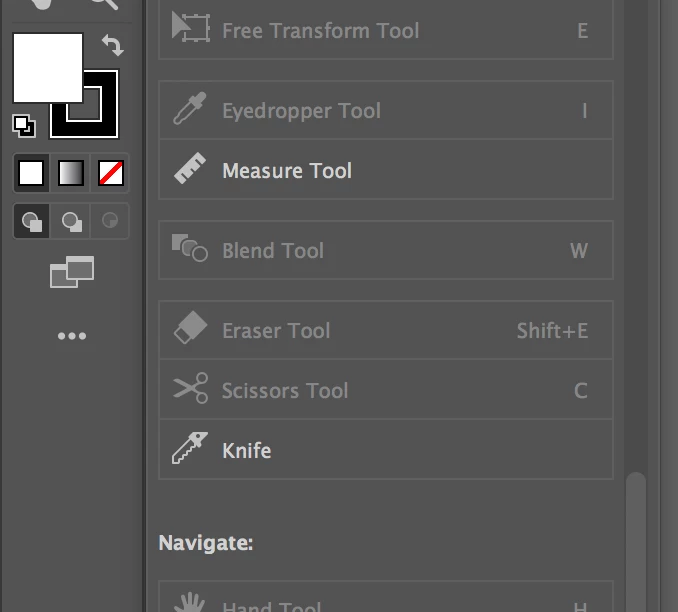
There's no place to right click the eyedropper in order to select the measure tool. Where'd it go? AI CC 19.

This topic has been closed for replies.
Correct answer michelew83603738

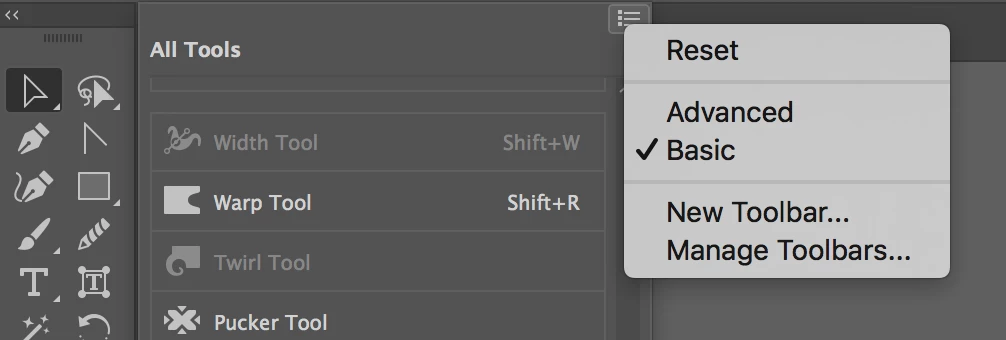
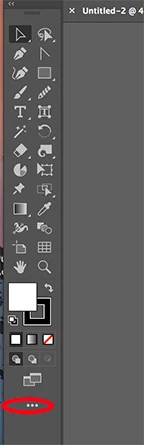
They have changed the tool bar so that only a shortened version appears, but if you click the 3 dots at the bottom of the bar, you will see all of your tools. You can click and drag any of the tools to the tool bar or as kurtgold​ said, set it to the basic or advanced tool set that you are familiar with. See below:
4 replies

Participant
February 7, 2022
215A8410-JPG.jpg
Participant
September 23, 2019

Just - FYI - For me I also had to fiddle with this workspace dropdown in order to get the Measure tool into my tools pallette. 

Monika Gause
Community Expert
Community Expert
September 23, 2019
Forget Illustrator's measure tool. It doesn't snap, so it's not precise. Use the line segment tool for measuring.
trashcaneron
Inspiring
October 23, 2019

Agree. But - measuring angles? 

Om Nath Jha
Legend
January 31, 2019

Hi there,

You can also enable the Advanced toolbar from the Windows menu. Please check the attached screenshot.

Thanks,

Om

trashcaneron
Inspiring
March 7, 2019

Kind of odd to move it IMHO, but cool thanks!

Kurt Gold
Community Expert
Community Expert
January 30, 2019

What happens if you go to Window > Work Space and then choose Basic (classic) instead of just Basic?

michelew83603738
Community Expert
michelew83603738Community ExpertCorrect answer
Community Expert
January 30, 2019

They have changed the tool bar so that only a shortened version appears, but if you click the 3 dots at the bottom of the bar, you will see all of your tools. You can click and drag any of the tools to the tool bar or as kurtgold​ said, set it to the basic or advanced tool set that you are familiar with. See below: