ladylight
New Participant
August 10, 2020
Answered

Illustrator not respecting Color Values

  • August 10, 2020
  • 2 replies
  • 442 views

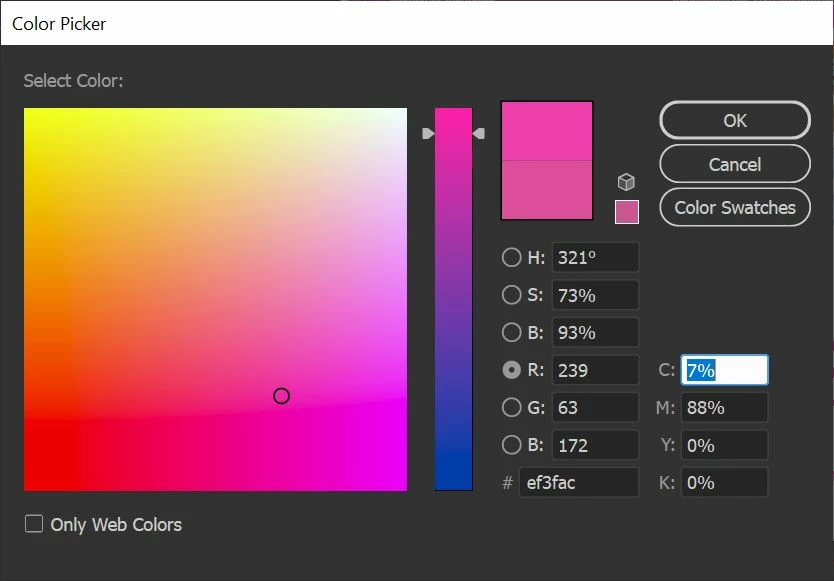
We use a very specific Hexidecimal Color for our Company logo: #ef3fac

In attempting to choose any object to color - graphic, line art, text, path, WHATEVER, I do the following:

  1. Click the Object
  2. Click the Color Picker
  3. Input #ef3fac, hit tab to ensure Illustrator will apply that specific hex color
  4. Click off the object
  5. Reclick the Color Picker to verify the color chosen is what I input
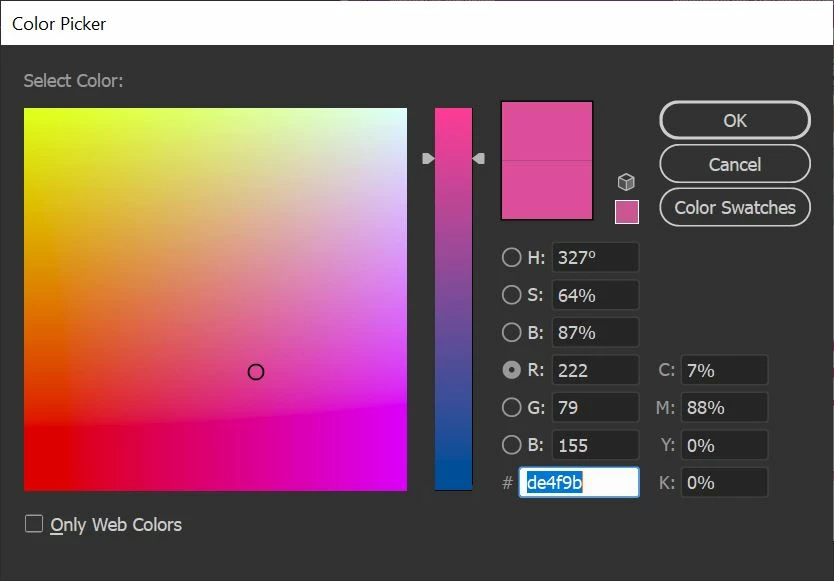
  6. See that it's not


Why is Illustrator doing this to me?

This topic has been closed for replies.
Correct answer Ton Frederiks

Are you working in an RGB document?

Hex colors only make sense in an RGB document, in a CMYK document they will get converted.

2 replies

Ton Frederiks
Ton FrederiksCorrect answer
Community Expert
August 10, 2020

Are you working in an RGB document?

Hex colors only make sense in an RGB document, in a CMYK document they will get converted.

Jacob Bugge
Community Expert
August 10, 2020

ladylight,


It looks like a bug related to the old Color Picker bug in an earlier version where you had to select the lower rectangle to the right of the rainbow and DoubleClick to apply that to change the top rectangle and the values: the lower colour being the right one. There were a few threads about it, but they are gone, unfortyunately.


As you can see, the two restangles are different in the first screenshot, and identical in the second (and identical to the lower one in the first).


What happens if you set the the colour in the Color palette, in the misleadingly named Web Safe RGB?


There is no need to use the Color Picker when you know the HEX values.