
Participant
September 29, 2017
Answered

Illustrator Novice Question

  • September 29, 2017
  • 2 replies
  • 631 views

Hi. This is my first question to the forum so please be gentle. I'd like to know if there is a simple way to quickly add a white box with black stroke, around a number. Basically I need to add a series of arrows from a PDF pointing to various photographs within a document. I then need to add a reference number e.g. 805. The font for the number would be black. I'd then like the number to be central in a white rectangle with black edge. I'd like just to be able to type 805 then press something and 'hey presto' it's within its box. The numbers could be 1-4 digits.

Hope that makes sense.

Thanks

Graham
    This topic has been closed for replies.
    Correct answer edgrimley

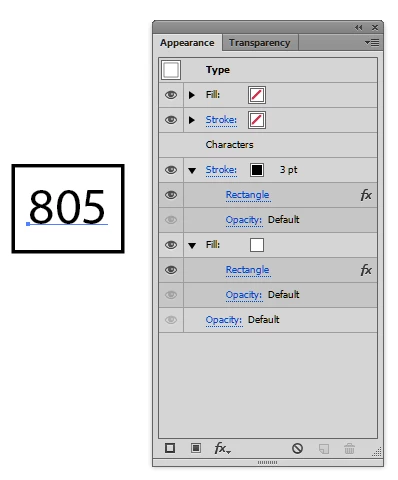
    It could be done using the appearance panel. Type the number you want. From the appearance panel add a new stroke, then add the effect Convert to Shape-Rectangle, size it as needed. Do the same with a new fill (any color) place it below Characters as shown in screenshot. Copy and just replace the numbers as often as required.

    2 replies

    edgrimleyCorrect answer
    Participating Frequently
    September 29, 2017

    It could be done using the appearance panel. Type the number you want. From the appearance panel add a new stroke, then add the effect Convert to Shape-Rectangle, size it as needed. Do the same with a new fill (any color) place it below Characters as shown in screenshot. Copy and just replace the numbers as often as required.

    grezza1Author
    Participant
    September 30, 2017

    Thank you. That's just what I needed.

    Monika Gause
    Community Expert
    Community Expert
    September 29, 2017

    Type the text.

    Then open Window > Appearance

    Select the text object with the selection tool (important)

    In the appearance panel add a new fill or stroke (you'll need both)

    Move both below the "Characters" (that works like moving layers)

    Color the fill white and the stroke black

    Now in the appearance panel click on the white fill and Effect > Convert to shape > Rectangle

    Adjust to your need

    Then Alt-drag this effect over the stroke to make a copy

    Create a graphic style out of this

    You can then apply it to the other text objects.

    grezza1Author
    Participant
    September 29, 2017

    Hi Monika

    Thanks so much for the fast reply. I'm having trouble. I've followed your steps but when I add stroke in the Appearance Panel it appears just to add the stroke to the text. When I convert shape to rectangle, I get the option to add extra width and height, but nothing happens?

    Any suggestions?

    Monika Gause
    Community Expert
    Community Expert
    September 29, 2017

    You need to use the buttons

    Please show something.