Inspiring
August 15, 2022
Answered

Illustrator Object attribute/ method tips in VS Code

  • August 15, 2022
  • 1 reply
  • 1696 views

I am a novice in illustrator script. Now I try to write JS with VS Code, but the properties and methods of AI objects are very troublesome to me,including whether it is in upper or lower case letters. How can I have property and method prompts when writing JS with VS Code? It's like writing VBA in VBE.

I also tried to find relevant information on this forum, including the following links and documents on the vs code official website, but they seemed much professional and complicated.

https://community.adobe.com/t5/illustrator-discussions/jsdoc-for-illustrator-vscode/m-p/11831850 

https://github.com/aenhancers/Types-for-Adobe 

https://code.visualstudio.com/learn 


So far I have not understood how it is used! It seems that it needs to do some configuration files first, but I don't know where to start. I don't even know how to judge whether I have successfully installed node.js and typescript and git, and how they are installed.


I'm not a professional programmer. I just write some JS at ordinary times. I don't know whether there are simple steps 1, 2 and 3.... to realize this function? It would be better if you could attach pictures.


Many Thx for help and ideas, any other suggestions, I am also very grateful!


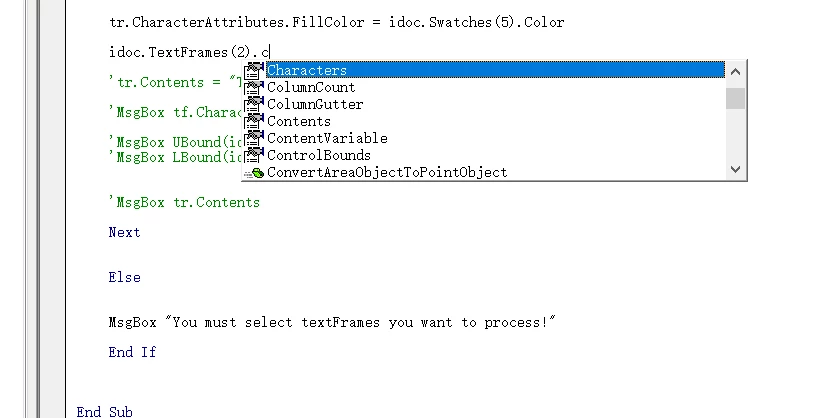
Object attribute/ method tips in VBE:

This topic has been closed for replies.
Correct answer Silly-V

You have to use TypeScript these days. The way old ES3 ExtendScript works is that you have #include statements which bring in files. But in the modern way, what you do is specify the compilation target as "ES3" in your tsconfig.json of the TS project and then you can write modern-format type-checked auto-completing code which can compile down to the one long ES3-style JSX file which is a stitched-together version of all your typescript files which have been compiled down to ES3 and put into one large body of text. It takes a bit of time to set up your first typescript project, essentially VSCode gives us the ability to create an auto-completion environment just like the old VB stuff, but even better because you're in control. But once you have got your first project up, you can just copy and paste it to create new projects. A very big benefit is being able to include or exclude various code from different locations, such as using a shared code folder or using some bits of code from separate scripts in each other. This is powered by the type checking, so if anything is wrong, the message will tell you. As opposed to the ESTK and its include statements which one would have to run and see it break to know if any of the files have changed or they aren't there anymore. Here is a sample project I've started with a long time ago, and now it's really updated and I need to update the repo. However, it shows a package structure and a tsconfig.json, and you can download this code to see if it's able to run.

In this old project I have used a .d.ts declaration file which specifies the polyfills such as Array.prototype.map prototype, and I have "allowJS" as true, so the JS files referenced by the .d.ts file are brought in. (EDIT: I just looked at it and forgot I have already updated it to convert the polyfills to TS) However, I since have realized that allowJS can cause some issues for me and it's better to have converted the polyfills files to typescript and include them 'normally', as a .ts file which is inside the "include" block of the tsconfig. I have turned the allowJS off these days, and use the include block along with the "exclude" and "files" blocks when needed.

My summary of this is:

  • The 'types for Adobe' files should be referenced at the "types" block of the tsconfig.
  • The code which will be used for the script is in the "include" block, often times as "./src/**/*.ts" to capture simply every ts file in the src folder. Note that you don't have to name it 'src' even, everything is up to you - but most just say 'src' and if you talk to anyone else they will immediately know about 'src'.
  • Sometimes you may write a script that would do well to just borrow some code from another script. You can simply use the include block to stick in various random ts files from arbitrary filesystem locations. However, maybe one of the inclusion patterns specifies a whole folder of files, but you want every file except certain ones from there. In this case, use the "exclude" block to exclude those undesired files.
  • However still, there may be a situation where you want to include some items, including folders of files, but maybe it's a folder that has a folder and actually you want to include the parent folder, exclude the child folder but still include just a couple of files from that excluded folder. In this case, use the "files" block to override the exclusion block (which can exclude folders and files) to override the exclusion statement and bring in those specific files. The items in the "files" block cannot be folders as opposed to the include/exclude blocks.


Anyways, that's a bit more of an advanced topic - but to start out if you can make your TS project run, then your magical world of auto-completing intellisense and the code writing itself for you is going to be opened! The question is, how many scripts you're doing and how much javascript do you foresee yourself doing in the future in general. Every javascript project can be a typescript project and it yields substantial benefits. I would say if you even intend to do a single javascript project that will ever need future maintenance, TS is the only way to fly!

PS: you can use typescript right away with no additional meta-codes which post-process the files. This way, every separate code file has to contain either variables by themselves or a function but no return statements. The resulting compiled file will have all the functions listed out in the resulting javascript file. But, I like to have every script of mine to be wrapped in a wrapper method, so it is completely scoped in and we can pass arguments to this one big function and therefore be able to activate this script via external means. A simplest way is to make another JSX file (it could be vanilla) and use an extendscript #include statement to bring the code in, into the contents of a method in this JSX file. The arguments passed to the parent function which contains the #include will be referenceable via the arguments keyword in the included code.
So that is why there's this whole 'build-code' folder in the project, you can activate the tasks with Ctrl+Shift+B to run tsc-watch and "Build-Export-Watch". The first tsc-watch simply does tsc every time you save, and it writes the file to the _CONTENTS.js file. But, there is extra node js javascript that puts a file watcher on that _CONTENTS file and every time there is a change to that file, it will take that text and put it inside the .template.js file, into a wrapper function.

So, you do not have to do all this, because technically 'all this' is a replacement of having that other JSX file which simply does an #include of the _CONTENTS file. However the reason I did it is because I personally wish to end up with one single file I can email to people.


Oh yea, but you can also just use regular javascript and use JSDoc. You either use tsconfig.json and use allowJS : true - and you don't even have to do any tsc or any typescript, or use jsconfig.json. (but you do have to use a lot of JSDoc comments)

1 reply

Silly-V
Silly-VCorrect answer
Legend
August 15, 2022

You have to use TypeScript these days. The way old ES3 ExtendScript works is that you have #include statements which bring in files. But in the modern way, what you do is specify the compilation target as "ES3" in your tsconfig.json of the TS project and then you can write modern-format type-checked auto-completing code which can compile down to the one long ES3-style JSX file which is a stitched-together version of all your typescript files which have been compiled down to ES3 and put into one large body of text. It takes a bit of time to set up your first typescript project, essentially VSCode gives us the ability to create an auto-completion environment just like the old VB stuff, but even better because you're in control. But once you have got your first project up, you can just copy and paste it to create new projects. A very big benefit is being able to include or exclude various code from different locations, such as using a shared code folder or using some bits of code from separate scripts in each other. This is powered by the type checking, so if anything is wrong, the message will tell you. As opposed to the ESTK and its include statements which one would have to run and see it break to know if any of the files have changed or they aren't there anymore. Here is a sample project I've started with a long time ago, and now it's really updated and I need to update the repo. However, it shows a package structure and a tsconfig.json, and you can download this code to see if it's able to run.

In this old project I have used a .d.ts declaration file which specifies the polyfills such as Array.prototype.map prototype, and I have "allowJS" as true, so the JS files referenced by the .d.ts file are brought in. (EDIT: I just looked at it and forgot I have already updated it to convert the polyfills to TS) However, I since have realized that allowJS can cause some issues for me and it's better to have converted the polyfills files to typescript and include them 'normally', as a .ts file which is inside the "include" block of the tsconfig. I have turned the allowJS off these days, and use the include block along with the "exclude" and "files" blocks when needed.

My summary of this is:

  • The 'types for Adobe' files should be referenced at the "types" block of the tsconfig.
  • The code which will be used for the script is in the "include" block, often times as "./src/**/*.ts" to capture simply every ts file in the src folder. Note that you don't have to name it 'src' even, everything is up to you - but most just say 'src' and if you talk to anyone else they will immediately know about 'src'.
  • Sometimes you may write a script that would do well to just borrow some code from another script. You can simply use the include block to stick in various random ts files from arbitrary filesystem locations. However, maybe one of the inclusion patterns specifies a whole folder of files, but you want every file except certain ones from there. In this case, use the "exclude" block to exclude those undesired files.
  • However still, there may be a situation where you want to include some items, including folders of files, but maybe it's a folder that has a folder and actually you want to include the parent folder, exclude the child folder but still include just a couple of files from that excluded folder. In this case, use the "files" block to override the exclusion block (which can exclude folders and files) to override the exclusion statement and bring in those specific files. The items in the "files" block cannot be folders as opposed to the include/exclude blocks.


Anyways, that's a bit more of an advanced topic - but to start out if you can make your TS project run, then your magical world of auto-completing intellisense and the code writing itself for you is going to be opened! The question is, how many scripts you're doing and how much javascript do you foresee yourself doing in the future in general. Every javascript project can be a typescript project and it yields substantial benefits. I would say if you even intend to do a single javascript project that will ever need future maintenance, TS is the only way to fly!

PS: you can use typescript right away with no additional meta-codes which post-process the files. This way, every separate code file has to contain either variables by themselves or a function but no return statements. The resulting compiled file will have all the functions listed out in the resulting javascript file. But, I like to have every script of mine to be wrapped in a wrapper method, so it is completely scoped in and we can pass arguments to this one big function and therefore be able to activate this script via external means. A simplest way is to make another JSX file (it could be vanilla) and use an extendscript #include statement to bring the code in, into the contents of a method in this JSX file. The arguments passed to the parent function which contains the #include will be referenceable via the arguments keyword in the included code.
So that is why there's this whole 'build-code' folder in the project, you can activate the tasks with Ctrl+Shift+B to run tsc-watch and "Build-Export-Watch". The first tsc-watch simply does tsc every time you save, and it writes the file to the _CONTENTS.js file. But, there is extra node js javascript that puts a file watcher on that _CONTENTS file and every time there is a change to that file, it will take that text and put it inside the .template.js file, into a wrapper function.

So, you do not have to do all this, because technically 'all this' is a replacement of having that other JSX file which simply does an #include of the _CONTENTS file. However the reason I did it is because I personally wish to end up with one single file I can email to people.


Oh yea, but you can also just use regular javascript and use JSDoc. You either use tsconfig.json and use allowJS : true - and you don't even have to do any tsc or any typescript, or use jsconfig.json. (but you do have to use a lot of JSDoc comments)
Inspiring
August 19, 2022

Thanks @Silly-V .

Because of my limited knowledge, I still can't use it correctly...🙁

Silly-V
Legend
August 19, 2022

Thanks @Silly-V 


Where can I find these files you mentioned above?


YourFolder/AdobeTypes/index.d.ts

YourFolder/AdobeTypes/JavaScript.d.ts

... and so on

Put the types for adobe .d.ts files inside it.


Then what is JSDoc, which often appears in your posts?


The types are located in this repository: https://github.com/aenhancers/Types-for-Adobe/tree/master/Illustrator/2015.3

As you see, they have some reference files in this file, so you have to find them and ensure they are in your folder too, and if that path changes, then make sure to edit the <reference> statements.


Here is an example of using JSDoc with very simple files: I have 1 folder, in there I have a .d.ts file which contains the typing stuff. And there is one jsx file which will use this type information.


You don't have to do reference paths if you have this types file actually opened up in your VSCode window.

To use JSDoc, you write a multi-line comment which has this format: /** @TyPe {string} */.

When you are hovering over this special comment in the JSX file you can see it knows stuff:


But the moment you close the opened .d.ts file, this disappears.

To handle this you can either make a jsconfig.json file in the project, or a tsconfig.json file that has allowJS on.

But for very simple, we can just add the reference statement:

Now that the reference statement is in place, the type information appears again.

Now, check this out: use the comment at the top that says ///@ts-check which will cause type-script-powered type-checking to be going on in your file.

Now it knows that what you want isn't it:


It will complain and draw your attention to the issue.

You can use quick-actions by pressing Ctrl+. to bring up any auto-helpful menus.

Most useful is "add missing properties":


This will auto-write the properties and put sample values into them to satisfy the type checker.


It really helps when you start having a lot of more complex objects.

And, when you use the code it will auto-complete relevant properties with type-ahead:


When I was writing prop_1, it gave me only things that work on strings and when I did prop_2, it showed only properties/methods and apply to the number data type.


If you can replicate this simple setup, afterwards you can take the example and put in the types for adobe declaration files to take advantage of auto-completion of Illustrator-specific data types. The types at the repo are helpful, but they are for 2015. I have taken my types files and edited them to include more meaningful checks, such as when the input type was "string" but I know that the only 'string' this particular object takes is "row" or "column" or "stack". So I edited the types file to help auto-complete only these 3 strings when using that object, and it also puts up an error in the problems panel when I accidentally typed "colunm".