
Eleni1010
Known Participant
July 19, 2017
Answered

Illustrator opens with blank window

  • July 19, 2017
  • 5 replies
  • 36474 views

hi, so I recently downloaded illustrator and I have come across a problem.

so when I open up illustrator the screen is blank and it doesn't come up with the recent documents and when I try to open a new document it won't let me. now I have seen other forums and tried the solutions they haven't worked. I have also re-installed Illustrator and it hasn't worked. I really would appreciate if someone could help

- Eleni
Correct answer wrensauer

Hi Eleni,

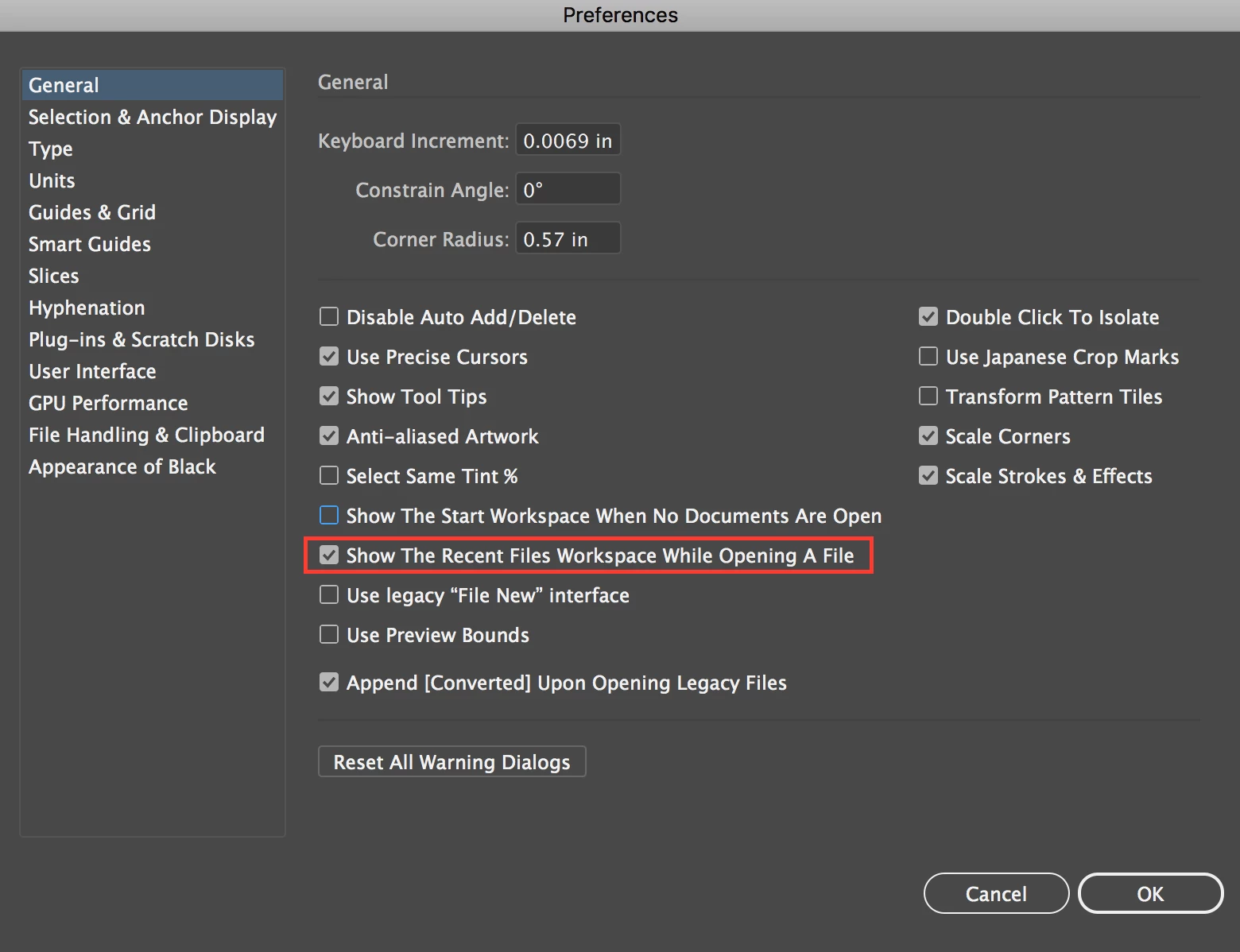
Here's an English version of et3d_'s screenshot, you'll want to uncheck the box I have annotated:

Let us know if that resolves the issue for you.

Best,

Wren

5 replies

Participant
May 23, 2022

This is what mine shows me, please I need help

Participating Frequently
July 31, 2017

Eleni -

Have you tried closing Illustrator and holding down the following keys on your keyboard while you re-open the program?

Mac - Command + Option + Shift

Windows - Control + Alt + Shift

Keep the keys held down until you see a blank screen after the Illustrator splash screen that shows while it is opening.

Please let me know if this does not work.

et3d_
Known Participant
July 21, 2017

Then try digging there

<rootdir>\Users\[user name]\AppData\Roaming\Adobe\Adobe Illustrator

CC Settings\[language]\

C:\Users\[user name]\AppData\Roaming\Adobe\Adobe Illustrator 21 Settings\[language]\x64

(you can get there faster with Win R %appdata%)

There should be config file, try open it and verify if using CTRL K settings, value do change

another option is to copy prefs and everything from a working copy of ilustrator (should be same version though)

Eleni1010
Eleni1010Author
Known Participant
July 21, 2017

I've open the config file but im not sure what I'm doing.

(Mind you i am 15 year old girl who doesn't really know lots about computers.) I am having difficulty with this help!

Eleni1010
Eleni1010Author
Known Participant
July 24, 2017

BUMP

wrensauer
wrensauerCorrect answer
Inspiring
July 19, 2017

Hi Eleni,

Here's an English version of et3d_'s screenshot, you'll want to uncheck the box I have annotated:

Let us know if that resolves the issue for you.

Best,

Wren

Participant
January 13, 2024

Hi, I have the exact same problem, but I can't get this menu. When I open illustrator, nothing is there, and I can't even use the exit/minimise buttons in the corner (I have to force quit). Sometimes I can open half a previously saved file, but nothing is intractable. I feel like I might have accidentally deleted some essential files to do with illustrator, as I have been clearing up my laptop en masse recently, but all my other Adobe apps are fine... I've also uninstalled and redownloaded illustrator, and tried some older versions too, but nothing has worked so far.. Please help? 

Anubhav M
Community Manager
Community Manager
January 13, 2024

Hello @Emily347689503esz,

Sorry to hear about your experience. Would you mind trying the following steps and checking if they help:
- Close all Adobe applications
- Navigate to the following folder location and rename the UXP folder to UXP.old:
(Windows) Navigate to C:\Program Files\Common Files\Adobe\UXP
(macOS) Navigate to Macintosh HD/Library/Application Support/Adobe/UXP

- Relaunch Illustrator

If Illustrator continues to crash/not respond, kindly try the suggestions shared in this help article (https://adobe.ly/3SrcK4p) and check if they help. Also, kindly submit the crash report using your Adobe email address and share it here for quick tracking. Steps are shared here: (https://adobe.ly/3Hj1znR). We appreciate your time and patience in helping us resolve this issue.

Looking forward to hearing from you.


Thanks,

Anubhav

et3d_
Known Participant
July 19, 2017

Hi,

Using CTRL+K

sorry it's in french.

Adobe CC2017