
March 17, 2022
Answered

Illustrator: Pinch-zoom does not work on touchpad on Windows

  • March 17, 2022
  • 1 reply
  • 13016 views

Hi:


I noticed that the pinch-zoom gesture works for Illustrator on Mac but not on Windows. I was using a Macbook Pro15 (mid-2018) before and an HP ZBook 17 now with Windows. The pinch-zoom works fine for the other apps (e.g. InkScape).


Any suggestions?


Thank you,


QZ
Correct answer Anubhav M

Hello @23625029,


Sorry to hear about the problem. In order to use Pinch-Zoom gestures in Illustrator using the touchpad, you will need to hold down the [Alt] modifier key on your keyboard and then try pinching in or out to zoom.


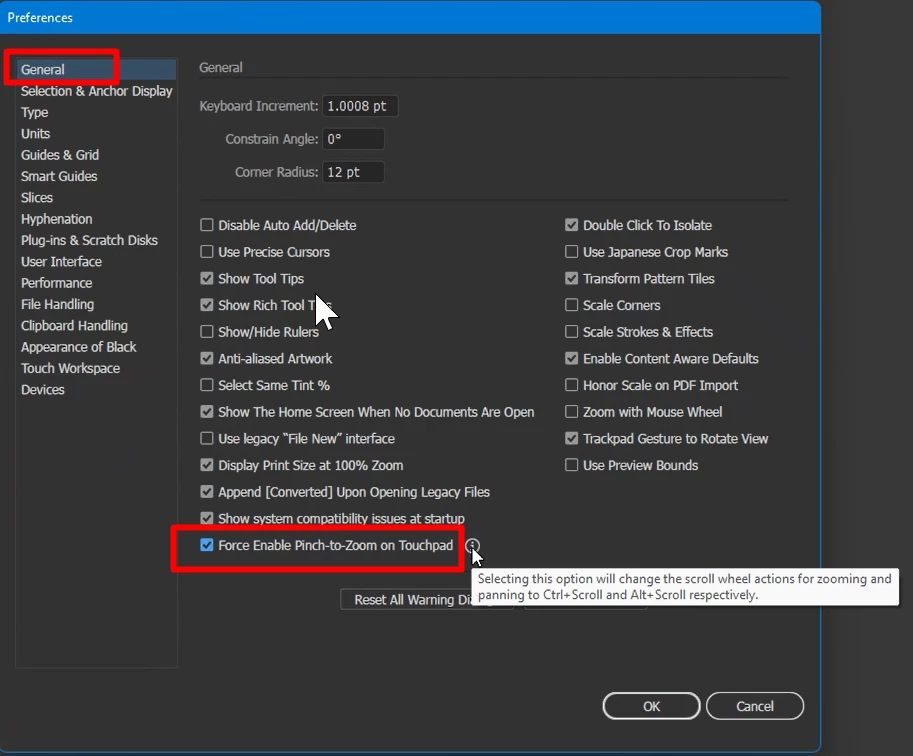
Alternatively, you may enable Force Enable Pinch-to-Zoom on Touchpad under the General preferences for Illustrator. Doing so will remove the need to hold down the modifier key while zooming.

Note: Selecting this option will change the scroll wheel actions for zooming and panning to Ctrl+Scroll and Alt+Scroll respectively.


Kindly update this thread if you need further help. We'd be happy to assist.


Thanks,

Anubhav

1 reply

Anubhav M
Community Manager
Anubhav MCommunity ManagerCorrect answer
Community Manager
April 19, 2022

Hello @23625029,


Sorry to hear about the problem. In order to use Pinch-Zoom gestures in Illustrator using the touchpad, you will need to hold down the [Alt] modifier key on your keyboard and then try pinching in or out to zoom.


Alternatively, you may enable Force Enable Pinch-to-Zoom on Touchpad under the General preferences for Illustrator. Doing so will remove the need to hold down the modifier key while zooming.

Note: Selecting this option will change the scroll wheel actions for zooming and panning to Ctrl+Scroll and Alt+Scroll respectively.


Kindly update this thread if you need further help. We'd be happy to assist.


Thanks,

Anubhav

Participant
January 11, 2023

I can't find this option on my mac - i have the same pinch to zoom issue. It only goes back to normal when i close the app and reopen again


Anubhav M
Community Manager
Community Manager
January 17, 2023

Hello @thepelummmy,


Thanks for reaching out. Would you mind checking the option for "Zoom with Mouse Wheel" and checking if it helps?


Looking forward to your response.


Thanks,

Anubhav