
Copy link to clipboard
Copied
Hi All,
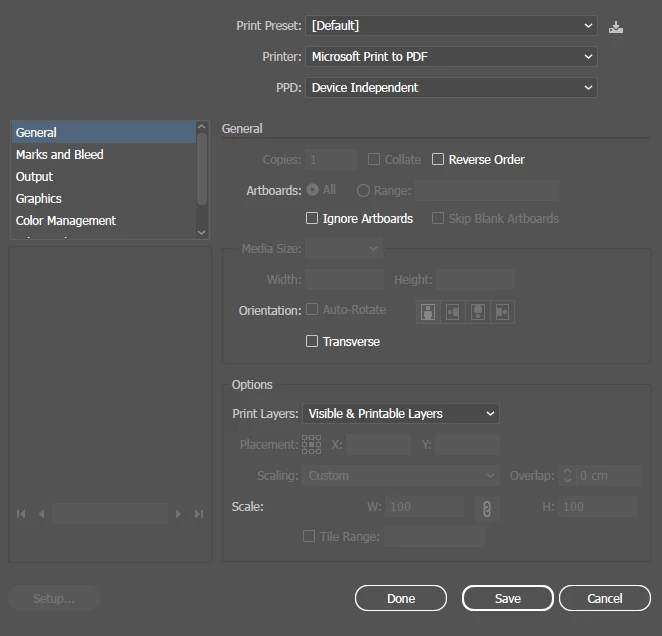
I'm trying to print an .ai file to a PDF and I used to be able to print drawings larger than an 8.5"x11" as several sheets that I'd tape together. All of a sudden, all of those options are disabled when I click print. How do I enable the settings below "Print Layers"?
Copy link to clipboard
Copied
Hi @tylersfibers,
Thank you for sharing the screenshot and details. It seems that print settings are grayed out, which can happen depending on the selected printer or document setup.
Could you try these steps?
1. Switch to a different printer, such as Adobe PDF. Sometimes, the current selection might limit these options (https://adobe.ly/48Ruxbn).
2. Confirm the artboard size supports your intended output.
3. If the issue persists, reset Illustrator preferences.
Let us know how it goes!
Best,
Anshul Saini
Copy link to clipboard
Copied
Hi Anshul,
None of this worked. I've reset the settings and checked for app updates and updates for my laptop. The options are still unavailable. It doesn't matter what printer I choose from the dropdown menu, I don't get any print preview or the option to tile full pages for a larger print.
Thanks
Copy link to clipboard
Copied
Thanks for the update and for letting us know the steps you’ve already tried. To understand the issue better, could you confirm:
1. Is your artboard size larger than the standard page size (e.g., 8.5”x11”)?
2. Does this happen with all files or only specific ones? If possible, could you create a new document with a larger artboard and test if the options are still disabled?
3. Are you able to see any changes when selecting Adobe PDF as the printer instead of a physical printer?
4. Can you share a screenshot of your Print dialog settings after selecting "Adobe PDF" as the printer and let us know if there are any custom settings applied in your document.
This information will help us identify if the issue is with the document setup, printer configuration, or Illustrator itself.
Looking forward to your response so we can assist further!
Best,
Anshul Saini
Get ready! An upgraded Adobe Community experience is coming in January.
Learn more