JakeRawlins
Participant
November 19, 2016
Answered

Illustrator "hangs" after it starts up

  • November 19, 2016
  • 1 reply
  • 10897 views

Hey,

My Illustrator (2017) simply hangs up after it starts up and goes past the splash screen. Illustrator freezes and it fails to respond at all. Would like some help. I am using a Windows 10, Asus laptop. Let me know if there's any more information I can provide.

This topic has been closed for replies.
Correct answer PXC

Works like a charm after the restart. Thanks very much. Do you reckon this issue will recur?


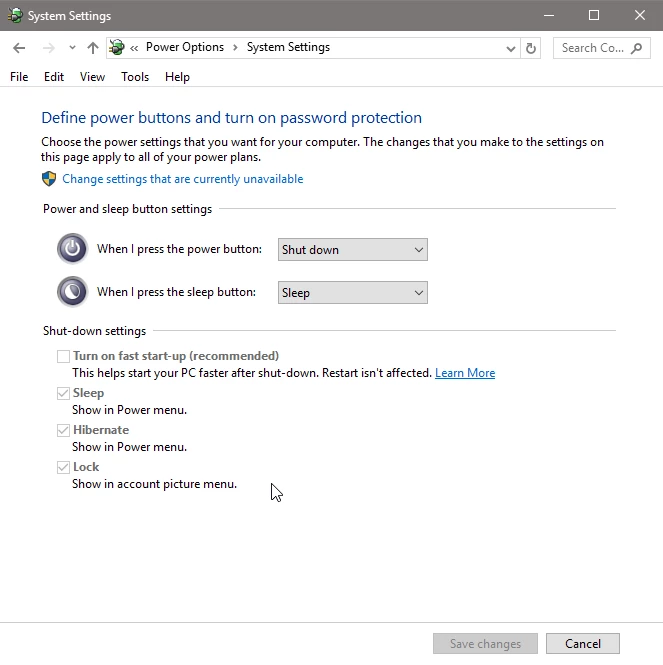
JakeRawlins​, not sure whether or not this will completely resolve the issue but I've turn the fast start-up off (Control Panel\All Control Panel Items\Power Options\System Settings). So far so good - no more freezes

Fast Startup combines elements of a cold shutdown and the hibernate feature. When you shut down your computer with Fast Startup enabled, Windows closes all applications and logs off all users, just as in a normal cold shutdown. At this point, Windows is in a state very similar to when it’s freshly booted up: No users have logged in and started programs, but the Windows kernel is loaded and the system session is running. Windows then alerts device drivers that support it to prepare for hibernation, saves the current system state to the hibernation file, and turns off the computer.

When you start the computer again, Windows does not have to reload the kernel, drivers, and system state individually. Instead, it just refreshes your RAM with the loaded image from the hibernation file and delivers you to the login screen. (Ref. The Pros and Cons of Windows 10’s “Fast Startup” Mode )

1 reply

Michael Riordan
Inspiring
November 19, 2016

I hate to keep providing the same answer but often the first line of defense against software problems is to rebuild preferences.

Restart Illustrator and then IMMEDIATELY Press and hold Alt+Control+Shift (Windows) or Option+Command+Shift (Mac OS). You have to be lightning fast at this so hover your fingers over the keys as you restart Illustrator and MASH the nano-second after you launch Illustrator. If you do not get a dialogue box asking if you want to trash preferences, you were too slow and will need to close illustrator and try again…and probably try again. Let us know if the problem persists after that.

Michael Riordan

Owner/Adobe Certified Instructor

Digital DesignLab

Oak Park, IL

http://www.learnadobesoftware.com

JakeRawlins
Participant
November 24, 2016

Tried it several times and it didn't work. Maybe my reflexes are slow. I tried uninstalling and installing Illustrator and it would work for a few days and then it hangs again.

Inspiring
November 28, 2016

you could try to manually disable 'The Start Workspace When Documents Are Open' option. Close your Illustrator. Then edit the C:\Users\[username]\AppData\Roaming\Adobe\Adobe Illustrator 21 Settings\[language, e.g. en_US]\[os version, e.g. x64]\Adobe Illustrator Pref. Find the following block and change it to:

/Hello {

/RecentFileWS 0

/ShowHomeScreenWS 0

/NewDoc 0

}

Save the file and Start Illustrator. Does it work now?