Inspiring
October 6, 2022
Answered

Illustrator - Reset Ruler's (x, y) to a given Image's (x, y)

  • October 6, 2022
  • 1 reply
  • 1123 views

Hey guys,


I am trying to reset the ruler of Illustrator to a given (x, y) position from an image.


From what I can see I have this:

function ResetOrigins(doc, bounds) {
    preferences.setBooleanPreference("isRulerOriginTopLeft", true);
    preferences.setBooleanPreference("isRulerIn4thQuad", true);

    var abd = doc.artboards[0];

    abd.rulerOrigin = new Array(bounds[0], bounds[1]);
    doc.rulerOrigin = new Array(bounds[0], bounds[1]);
}


var lay = activeDocument.layers.getByName("background");
var img = lay.pageItems[0];
ResetOrigins(app.activeDocument, img.position);

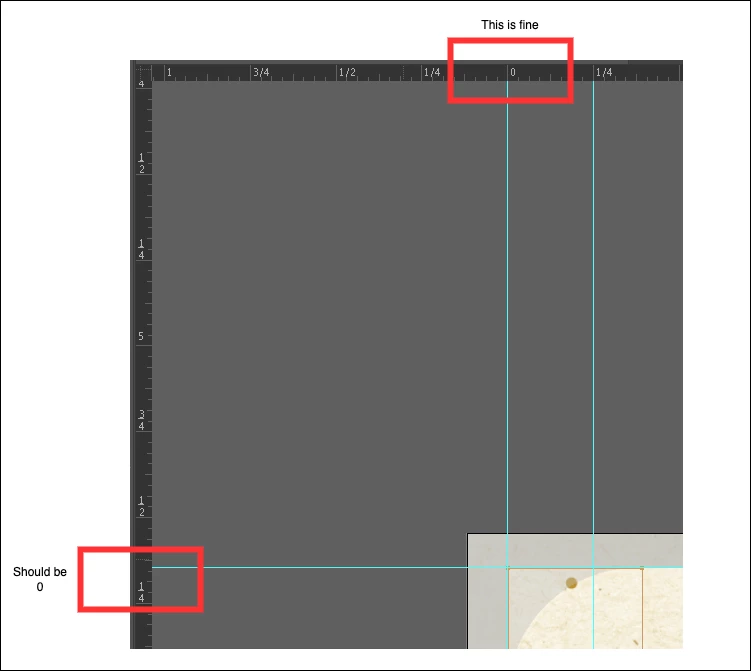
 

But the Y doesn't seem to be working as intended and reset it to the Image's position.

This topic has been closed for replies.
Correct answer m1b

Hi @JSuX, There are some little gotcha's here.


First: you are better off not changing the document's rulerOrigin. If you do, your bounds will also have to be adjusted by the same amount or they will not match your item's bounds anymore. I have commented this line out for now.


Second: Illustrator is a bit confusing about which way the Y axis ascends. In some coordinate systems or contexts it goes up and others down. I have never bothered to understand which is which because, in practice, I'm used to flipping the Y when it goes wrong. Which I did here.


Let me know if it works for you.

- Mark


function ResetOrigins(doc, bounds) {

    preferences.setBooleanPreference("isRulerOriginTopLeft", true);
    preferences.setBooleanPreference("isRulerIn4thQuad", true);

    var abd = doc.artboards[0];

    var newOrigin = [bounds[0], bounds[1]];

    // we want the new ruler position expressed
    // in the artboard coordinate system:
    newOrigin = doc.convertCoordinate(newOrigin, CoordinateSystem.DOCUMENTCOORDINATESYSTEM, CoordinateSystem.ARTBOARDCOORDINATESYSTEM);

    // if you change doc's rulerOrigin,
    // the bounds will now be wrong!
    //  If you really need to change,
    // you can calculate the relative change
    // and apply that to the bounds var.

    // I've commented this out for now:
    // doc.rulerOrigin = [0, 0];

    // the Y axis for the artboard is flipped!
    abd.rulerOrigin = [newOrigin[0], -newOrigin[1]];

}

var lay = activeDocument.layers.getByName("background");
var img = lay.pageItems[0];
ResetOrigins(app.activeDocument, img.position);


1 reply

m1b
Community Expert
m1bCommunity ExpertCorrect answer
Community Expert
October 6, 2022

Hi @JSuX, There are some little gotcha's here.


First: you are better off not changing the document's rulerOrigin. If you do, your bounds will also have to be adjusted by the same amount or they will not match your item's bounds anymore. I have commented this line out for now.


Second: Illustrator is a bit confusing about which way the Y axis ascends. In some coordinate systems or contexts it goes up and others down. I have never bothered to understand which is which because, in practice, I'm used to flipping the Y when it goes wrong. Which I did here.


Let me know if it works for you.

- Mark


function ResetOrigins(doc, bounds) {

    preferences.setBooleanPreference("isRulerOriginTopLeft", true);
    preferences.setBooleanPreference("isRulerIn4thQuad", true);

    var abd = doc.artboards[0];

    var newOrigin = [bounds[0], bounds[1]];

    // we want the new ruler position expressed
    // in the artboard coordinate system:
    newOrigin = doc.convertCoordinate(newOrigin, CoordinateSystem.DOCUMENTCOORDINATESYSTEM, CoordinateSystem.ARTBOARDCOORDINATESYSTEM);

    // if you change doc's rulerOrigin,
    // the bounds will now be wrong!
    //  If you really need to change,
    // you can calculate the relative change
    // and apply that to the bounds var.

    // I've commented this out for now:
    // doc.rulerOrigin = [0, 0];

    // the Y axis for the artboard is flipped!
    abd.rulerOrigin = [newOrigin[0], -newOrigin[1]];

}

var lay = activeDocument.layers.getByName("background");
var img = lay.pageItems[0];
ResetOrigins(app.activeDocument, img.position);


JSuXAuthor
Inspiring
October 7, 2022

This seems to work, thank you for taking the time, @m1b