
PrepressPro1
Legend
February 1, 2019
Answered

Illustrator Save As PDF Multiple Artboards

  • February 1, 2019
  • 2 replies
  • 3668 views

I'm finding when I have multiple artboards and save as a PDF from Illustrator with Illustrator editing capability (Illustrator default setting for saving PDF) and set the range of pages for a PDF, the PDF only shows the pages in Acrobat which I have set in the Page Range but when I open this PDF up again in Illustrator I see all the Artboards and all the content. Is there a way to save out illustrator compatible PDF's of each artboard with a page range and have the PDF not retain all the extra information from the other artboards? I understand I can delete all the other artboards and art but I'm thinking there might be a better way.
    This topic has been closed for replies.
    Correct answer barbara_a7746676

    What you are experiencing is normal. You saved the PDF with a page range so the PDF contains only the artboards within that range.

    Saving a PDF is more similar to printing than it is to saving. For example, if you have a file with 3 artboards and you save to a PDF with the page range of 1-2, you are printing only pages 1-2. But the original file still has 3 artboards.

    Your thinking is correct, that deleting the extra artboards is the way to go.

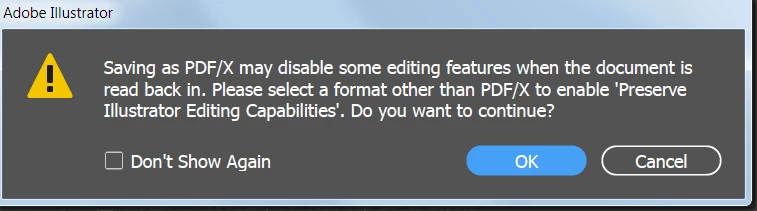
    If you save as PDF using PDF X3 or PDFX 4, and then open the resulting PDF in Illustrator, you will not be able to edit the content in Illustrator. When you save as any of the PDF X's, you should see a warning that Illustrator editing capabilities will be turned off:

    So think in terms of 'printing' rather than 'saving' when creating a PDF.

    2 replies

    barbara_a7746676
    Community Expert
    barbara_a7746676Community ExpertCorrect answer
    Community Expert
    February 2, 2019

    What you are experiencing is normal. You saved the PDF with a page range so the PDF contains only the artboards within that range.

    Saving a PDF is more similar to printing than it is to saving. For example, if you have a file with 3 artboards and you save to a PDF with the page range of 1-2, you are printing only pages 1-2. But the original file still has 3 artboards.

    Your thinking is correct, that deleting the extra artboards is the way to go.

    If you save as PDF using PDF X3 or PDFX 4, and then open the resulting PDF in Illustrator, you will not be able to edit the content in Illustrator. When you save as any of the PDF X's, you should see a warning that Illustrator editing capabilities will be turned off:

    So think in terms of 'printing' rather than 'saving' when creating a PDF.

    ceyhun_akgun
    Legend
    February 1, 2019

    You can use PDF X3 or PDF X 4 options?

    The default PDF option used is like saving an Illustrator document.

    The PDF saved in this way is prepared to share with other members of the team.

    No PDF for last printing. For this, I suggest you use PDFX3 or PDFX4.

    Graphic Designer Educator / PrePress Consultant