
Known Participant
August 24, 2023
Question

Illustrator :: Script :: How to find Linked Images PPI Value

  • August 24, 2023
  • 1 reply
  • 1912 views

Hi All,


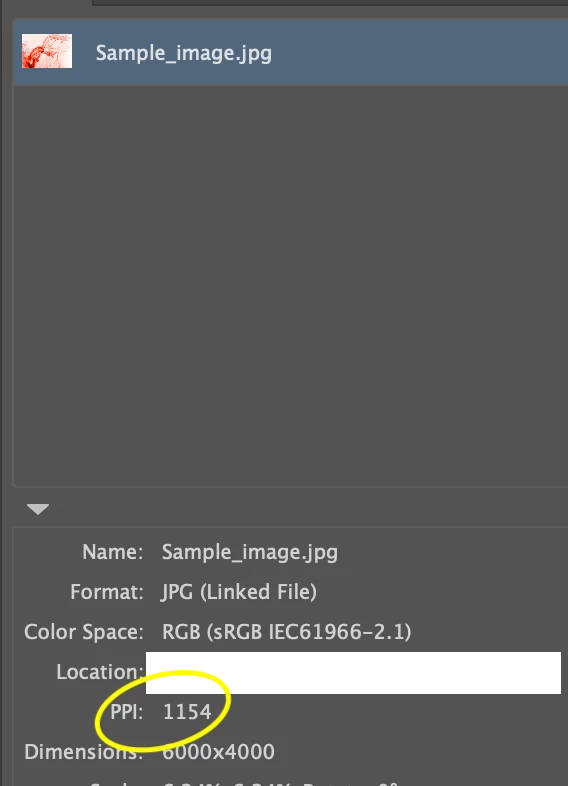
I am relatively new to this. I'm creating a script to get the PPI value for linked images in an illustrator file.


Please can any one help me to find this.


Thanks in advance!


Reference screenshot:
 

This topic has been closed for replies.

1 reply

CarlosCanto
Community Expert
August 24, 2023

try this script by Moluapple

alert(72/app.selection[0].matrix.mValueA);
alert(72/app.selection[0].matrix.mValueD);


more info here

https://community.adobe.com/t5/illustrator-discussions/resolution-check-in-illustrator/m-p/4254998#M152496

Known Participant
August 25, 2023

@m1b please check attached pdf and advice.


m1b
Community Expert
August 28, 2023

Simliar to Carlos' modification, here is my other version, now with pixel dimensions of image.

/**
 * Displays the pixel dimensions and ppi of the selected raster item.
 * @7111211 m1b
 * @discussion https://community.adobe.com/t5/illustrator-discussions/illustrator-script-how-to-find-linked-images-ppi-value/m-p/14034494
 */
(function () {

    var doc = app.activeDocument,
        item = doc.selection[0],
        dims = getDimensions(item);

    if (dims)
        alert('dimensions:\nppi: ' + dims.ppi + '\nrotation: ' + dims.rotation + '\nimageSize: ' + dims.imageSize.join(' x ') + ' pixels');

})();

/**
 * Returns resolution (ppi) of item.
 * @9397041 {RasterItem|PlacedItem} item
 * @Returns {Array<Number>} [X-ppi, Y-ppi]
 */
function getDimensions(item) {

    if (!(
        item.constructor.name == 'RasterItem'
        || item.constructor.name == 'PlacedItem'
    ))
        return;

    var dims = {};

    // get rotation to nearest factor of 90°
    var rotation = findRotationOfRectangularItem(item);

    var dimsA = getDimsOfRotatedItem(item, rotation),
        dimsB = getDimsOfRotatedItem(item, rotation + 90);

    // the ppi will be radically huge if the rotation
    // is 90° off, so we return the sensible one:
    var dims = (dimsA.ppi[0] < dimsB.ppi[0]) ? dimsA : dimsB;

    return dims;

    /**
     * Returns the resolution (ppi) of an item
     * having a defined rotation.
     * @9397041 {PlacedItem|RasterItem} item
     * @9397041 {Number} rotation
     * @Returns {Array<Number>} - { ppi: , width: height: }
     */
    function getDimsOfRotatedItem(item, rotation) {

        // duplicate and "unrotate"
        var workingImage = item.duplicate();
        var tm = app.getRotationMatrix(-rotation);
        workingImage.transform(tm, true, true, true, true, true);

        var ppi = [Math.abs(round(72 / workingImage.matrix.mValueA, 0)), Math.abs(round(-72 / workingImage.matrix.mValueD, 0))],
            width = round(ppi[0] * (workingImage.width / 72), 0),
            height = round(ppi[1] * (workingImage.height / 72), 0);

        // clean up
        workingImage.remove();

        // calculate ppi
        return { ppi: ppi, rotation: rotation, imageSize: [width, height] };

    };

};

/**
 * Returns the rotation amount in degrees
 * that the item needs to be rotated such
 * that it has a minimal bounding box area.
 * Assuming that `item` is a rectangular
 * object, such as a PlacedItem, RasterItem
 * or a rectangular path item, the resulting
 * rotation will rotate it so that the sides
 * of the rectangle align to a factor of 90°.
 * In other words, it will return the value
 * required to "unrotate" the item.
 * @7111211 m1b
 * @version 2023-08-25
 * @9397041 {PageItem} item - an Illustrator page item.
 * @Returns {Number}
 */
function findRotationOfRectangularItem(item) {

    // we will rotate a copy and leave the original
    var workingItem = item.duplicate(),

        convergenceThreshold = 0.001, // the precision
        inc = 45, // the starting rotation increment
        rotationAmount = 0,
        prevArea = area(workingItem);

    while (Math.abs(inc) >= convergenceThreshold) {

        workingItem.rotate(inc);

        var newArea = area(workingItem);

        if (newArea < prevArea) {
            prevArea = newArea;
            rotationAmount -= inc;
            inc *= 0.5;
        }

        else {
            workingItem.rotate(-inc); // Undo the last rotation
            inc *= -0.5;
        }

    }

    // clean up
    workingItem.remove();

    return round(rotationAmount, 2);

    /**
     * Returns area of bounding box of `item`.
     * @9397041 {PageItem} item
     * @Returns {Number}
     */
    function area(item) {
        return item.width * item.height;
    };

};

/**
 * Rounds `n` to `places` decimal places.
 * @9397041 {Number} n - the number to round
 * @9397041 {Number} places - number of decimal places, can be negative
 * @Returns {Number}
 */
function round(n, places) {
    var m = Math.pow(10, places != undefined ? places : 3);
    return Math.round(n * m) / m;
};