
Known Participant
August 24, 2023
Question

Illustrator :: Script :: How to find Linked Images PPI Value

  • August 24, 2023
  • 1 reply
  • 1935 views

Hi All,


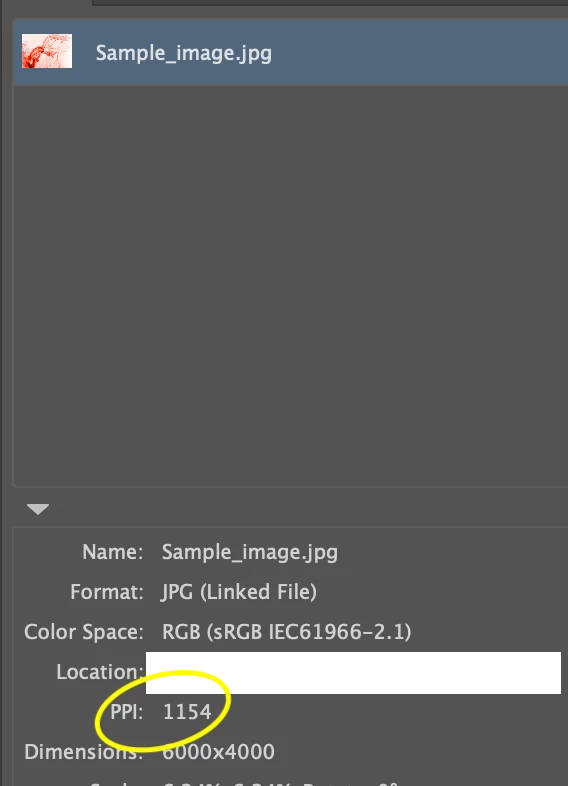
I am relatively new to this. I'm creating a script to get the PPI value for linked images in an illustrator file.


Please can any one help me to find this.


Thanks in advance!


Reference screenshot:
 

This topic has been closed for replies.

1 reply

CarlosCanto
Community Expert
Community Expert
August 24, 2023

try this script by Moluapple

alert(72/app.selection[0].matrix.mValueA);
alert(72/app.selection[0].matrix.mValueD);


more info here

https://community.adobe.com/t5/illustrator-discussions/resolution-check-in-illustrator/m-p/4254998#M152496

m1b
Community Expert
Community Expert
August 24, 2023

Hi, here is a functions I wrote that expands on this idea a bit.

/**
 * Displays the resolution (ppi) of the selected item.
 * @7111211 m1b
 * @discussion https://community.adobe.com/t5/illustrator-discussions/illustrator-script-how-to-find-linked-images-ppi-value/m-p/14034494
 */
(function () {

    var doc = app.activeDocument,
        item = doc.selection[0],
        ppi = getPPI(item);

    if (ppi)
        alert(ppi);

})();

/**
 * Returns resolution (ppi) of item.
 * Note: see known limitation in getLinkScaleAndRotation.
 * @9397041 {RasterItem|PlacedItem} item
 * @Returns {Array<Number>} [X-ppi, Y-ppi]
 */
function getPPI(item) {

    if (!(
        item.constructor.name == 'RasterItem'
        || item.constructor.name == 'PlacedItem'
    ))
        return;

    // get current scale and rotation
    var sr = getLinkScaleAndRotation(item),
        rotation = sr[2];

    // duplicate and "unrotate"
    var workingImage = item.duplicate();
    var tm = app.getRotationMatrix(-rotation);
    workingImage.transform(tm, true, true, true, true, true);

    // calculate ppi
    var ppi = [Math.abs(round(72 / app.selection[0].matrix.mValueA, 0)), Math.abs(round(-72 / app.selection[0].matrix.mValueD, 0))];

    // clean up
    workingImage.remove();

    return ppi;

};

/**
 * Return the scale, rotation and size of
 * a PlacedItem or RasterItem.
 * IMPORTANT: this relies on Illustrator's
 * 'BBAccumRotation' tag to determine rotation.
 * Files converted to Illustrator format from
 * other sources may not have this and will
 * show 0 rotation, and the ppi will be
 * incorrectly calculated.
 * @7111211 m1b
 * @version 2023-03-09
 * @9397041 {PlacedItem|RasterItem} item - an Illustrator item.
 * @9397041 {Boolean} round - whether to round numbers to nearest integer.
 * @Returns {Array} [scaleX%, scaleY%, rotation°, width, height]
 */
function getLinkScaleAndRotation(item, round) {

    if (item == undefined)
        return;

    var m = item.matrix,
        rotatedAmount,
        unrotatedMatrix,
        scaledAmount;

    var flipPlacedItem = (item.typename == 'PlacedItem') ? 1 : -1;

    try {
        rotatedAmount = item.tags.getByName('BBAccumRotation').value * 180 / Math.PI;
    } catch (error) {
        rotatedAmount = 0;
    }
    unrotatedMatrix = app.concatenateRotationMatrix(m, rotatedAmount * flipPlacedItem);

    if (
        unrotatedMatrix.mValueA == 0
        && unrotatedMatrix.mValueB !== 0
        && unrotatedMatrix.mValueC !== 0
        && unrotatedMatrix.mValueD == 0
    )
        scaledAmount = [unrotatedMatrix.mValueB * 100, unrotatedMatrix.mValueC * -100 * flipPlacedItem];
    else
        scaledAmount = [unrotatedMatrix.mValueA * 100, unrotatedMatrix.mValueD * -100 * flipPlacedItem];

    if (scaledAmount[0] == 0 || scaledAmount[1] == 0)
        return;

    if (round)
        return [round(scaledAmount[0]), round(scaledAmount[1]), round(rotatedAmount)];
    else
        return [scaledAmount[0], scaledAmount[1], rotatedAmount];

};

/**
 * Rounds `n` to `places` decimal places.
 * @9397041 {Number} n - the number to round
 * @9397041 {Number} places - number of decimal places, can be negative
 * @Returns {Number}
 */
function round(n, places) {
    var m = Math.pow(10, places != undefined ? places : 3);
    return Math.round(n * m) / m;
};


m1b
Community Expert
Community Expert
August 24, 2023

Here's another version that does the same thing (mostly just for my learning), but it calculates the rotation of the placedItem or rasterItem differently, without relying on the "BBAccumRotation" tag value, which isn't always there   (see the findRotationOfRectangularItem function to see how I did it).

- Mark


/**
 * Displays the resolution (ppi) of the selected item.
 * @7111211 m1b
 * @discussion https://community.adobe.com/t5/illustrator-discussions/illustrator-script-how-to-find-linked-images-ppi-value/m-p/14034494
 */
(function () {

    var doc = app.activeDocument,
        item = doc.selection[0],
        ppi = getPPI(item);

    if (ppi)
        alert(ppi);

})();

/**
 * Returns resolution (ppi) of item.
 * @9397041 {RasterItem|PlacedItem} item
 * @Returns {Array<Number>} [X-ppi, Y-ppi]
 */
function getPPI(item) {

    if (!(
        item.constructor.name == 'RasterItem'
        || item.constructor.name == 'PlacedItem'
    ))
        return;

    // get rotation to nearest factor of 90°
    var rotation = findRotationOfRectangularItem(item);

    var ppi_A = getResolutionOfRotatedItem(item, rotation),
        ppi_B = getResolutionOfRotatedItem(item, rotation + 90);

    // the ppi will be radically huge if the rotation
    // is 90° off, so we return the sensible one:
    if (ppi_A[0] < ppi_B[0])
        return ppi_A;

    return ppi_B;

    /**
     * Returns the resolution (ppi) of an item
     * having a defined rotation.
     * @9397041 {PlacedItem|RasterItem} item
     * @9397041 {Number} rotation
     * @Returns {Array<Number} - [X_ppi, Y_ppi]
     */
    function getResolutionOfRotatedItem(item, rotation) {

        // duplicate and "unrotate"
        var workingImage = item.duplicate();
        var tm = app.getRotationMatrix(-rotation);
        workingImage.transform(tm, true, true, true, true, true);

        var ppi = [Math.abs(round(72 / workingImage.matrix.mValueA, 0)), Math.abs(round(-72 / workingImage.matrix.mValueD, 0))];

        // clean up
        workingImage.remove();

        // calculate ppi
        return ppi;

    };

};

/**
 * Returns the rotation amount in degrees
 * that the item needs to be rotated such
 * that it has a minimal bounding box area.
 * Assuming that `item` is a rectangular
 * object, such as a PlacedItem, RasterItem
 * or a rectangular path item, the resulting
 * rotation will rotate it so that the sides
 * of the rectangle align to a factor of 90°.
 * In other words, it will return the value
 * required to "unrotate" the item.
 * @7111211 m1b
 * @version 2023-08-25
 * @9397041 {PageItem} item - an Illustrator page item.
 * @Returns {Number}
 */
function findRotationOfRectangularItem(item) {

    // we will rotate a copy and leave the original
    var workingItem = item.duplicate(),

        convergenceThreshold = 0.001,
        inc = 45, // the starting rotation increment
        rotationAmount = 0,
        prevArea = area(workingItem);

    while (Math.abs(inc) >= convergenceThreshold) {

        workingItem.rotate(inc);

        var newArea = area(workingItem);

        if (newArea < prevArea) {
            prevArea = newArea;
            rotationAmount -= inc;
            inc *= 0.5;
        }

        else {
            workingItem.rotate(-inc); // Undo the last rotation
            inc *= -0.5;
        }

    }

    // clean up
    workingItem.remove();

    return round(rotationAmount, 2);

    /**
     * Returns area of bounding box of `item`.
     * @9397041 {PageItem} item
     * @Returns {Number}
     */
    function area(item) {
        return item.width * item.height;
    };

};

/**
 * Rounds `n` to `places` decimal places.
 * @9397041 {Number} n - the number to round
 * @9397041 {Number} places - number of decimal places, can be negative
 * @Returns {Number}
 */
function round(n, places) {
    var m = Math.pow(10, places != undefined ? places : 3);
    return Math.round(n * m) / m;
};