
Illustrator Script(s) for Hiding/Deleting Specific Layers
Hello all,
I'm in need of a working Script that is capable of hiding/deleting specific layers in an Illustrator document. I have searched quite a bit and can't seem to find anything that can be specifically applied to my needs.
The template we are working with in Illustrator is very basic and will never change. It contains the following main layers:
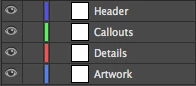
I need this Script to be able to perform the following steps:
1) All Layers Visible
Export PNG @ High (300 ppi)
Type Optimize (Hinted)
Background: White
Save to "Folder 1"
Close Document (Don't Save)
2) Hide Layer: Callouts
Hide Layer: Details
Export PNG @ High (300 ppi)
Type Optimize (Hinted)
Background: White
Save to "Folder 2"
Close Document (Don't Save)
3) Hide Layer: Header
Hide Layer: Callouts
Hide Layer: Details
Export PNG @ High (300 ppi)
Art Optimized (Supersampling)
Background: White
Save to "Folder 3"
Close Document (Don't Save)
Is it possible for a script to do all three of these things within a single Script/Action, thereby removing the "Close Document (Don't Save)" from Steps 1 and 2? What would the script look like for doing all three at once vs each step as its own individual process? If not possible, creating three separate scripts and running them three times will still be far more efficient than the system we're currently using.
*Also, if the "Hide Layer" function is not an option, could a "Delete Layer" function be used instead since I'm wanting it to close the document without saving anyways?
I also have one other thing that I need it to do, but I'm not sure it's possible. Maybe it's something that needs to be done via an Action in Photoshop after the PNG files have been created. I need to try and add the filename to the bottom right of the PNG file that is created in Step 2. I've illustrated there in the below image:

Now, these will be run in large batches on 30-100+ files at a time. I have quite a bit of experience creating/using Actions in Photoshop and to my disappointment, Actions don't seem to function anywhere nearly as well in Illustrator. What's frustrating is that this is quite possibly the easiest thing to do in Photoshop:
.png)
Create an action, start record, and it instantly reads every click you make as a step in building the action. Why Adobe hasn't built this functionality into Illustrator baffles me.
It has been years since I've even looked at anything programming related so I'm turning to you all with hopes that you can help me out.
Thank you in advance!
 AdChoices