

Jason Burnett
Inspiring
December 16, 2024
Question

Illustrator Script to Automate Shape Slicing

  • December 16, 2024
  • 2 replies
  • 511 views

Given a closed polygon in Illustrator expanded to a filled path, I need to covert the shape to a single line ffor embroidery and wondered if someone could help me write a script to do it.

Basically the idea is that given a shape, find the bottom-left most coordinate and start a path. Extend the path horizontally until you almost intersect another path. When you do place an anchor and move vertically a certain distance following the outer shapes path. Place another anchor point and begin moving the to right until it almost reaches the shape border. Place and anchor and raise the path following the shape's path a certain distance. Place another anchore and start over for the entire shape. Thee result, when fed to an embroidery machine, would be a solid embroidered shape made from a single thread.
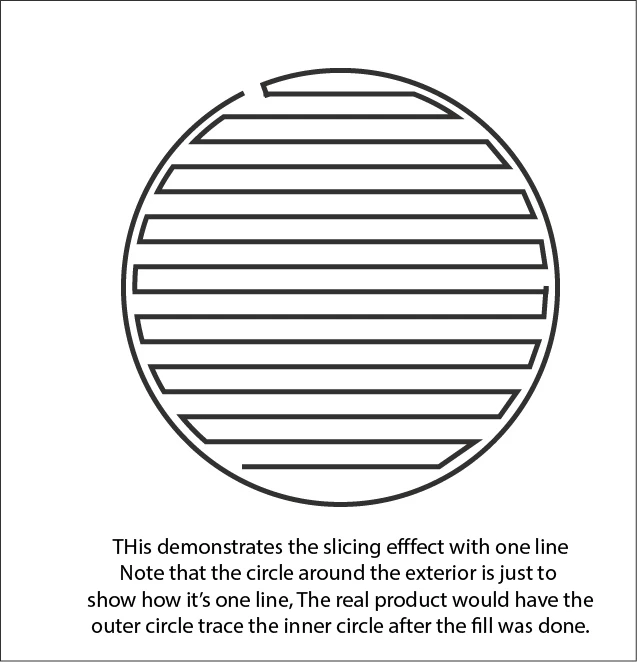


I have the modern js to do the path, but I don't know how to incorporate it into Illustrator to make it work. 
If you know of an existing script or plugin that does this or if you have any scripting knowledge and would help me make the script that I have work in Illustrator, I would greatly appreciate it. Thanks

This topic has been closed for replies.

2 replies

Kurt Gold
Community Expert
Community Expert
December 17, 2024

This could be done with a bumpy action.


Would that be suitable or does it have to be a javascript approach?

renél80416020
Inspiring
December 18, 2024

Bonjour @Kurt Gold , c'est un mélange des deux.

J'essais de poster le contenue d'un fichier svg (html)


<?xml version="1.0" encoding="iso-8859-1"?>
<!-- Generator: Adobe Illustrator 16.0.0, SVG Export Plug-In . SVG Version: 6.00 Build 0)  -->
<!DOCTYPE svg PUBLIC "-//W3C//DTD SVG 1.1//EN" "http://www.w3.org/Graphics/SVG/1.1/DTD/svg11.dtd">
<svg version="1.1" id="Calque_1" xmlns="http://www.w3.org/2000/svg" xmlns:xlink="http://www.w3.org/1999/xlink" x="0px" y="0px"
	 width="595.28px" height="841.89px" viewBox="0 0 595.28 841.89" style="enable-background:new 0 0 595.28 841.89;"
	 xml:space="preserve">
<polyline style="fill:none;stroke:#E62337;stroke-width:2;stroke-miterlimit:10;" points="176.11,643.14 84.29,643.14 72.65,630.92 
	205.26,630.92 230.89,618.7 67.23,618.7 65.62,606.48 253.82,606.48 274.71,594.26 67.16,594.26 71.6,582.04 293.12,582.04 
	309.65,569.82 78.95,569.82 89.58,557.61 324.7,557.61 338.68,545.39 104.88,545.39 131.65,533.17 351.55,533.17 362.81,520.95 
	161.04,520.95 186.01,508.73 372.69,508.73 381.93,496.51 204.91,496.51 221.63,484.29 390.36,484.29 397.68,472.07 234.94,472.07 
	246.03,459.85 403.87,459.85 409.15,447.63 254.21,447.63 260.4,435.41 413.65,435.41 417.27,423.19 263.93,423.19 265.73,410.97 
	420.12,410.97 422.19,398.75 265.24,398.75 263.71,386.53 423.45,386.53 423.95,374.31 259.95,374.31 255.28,362.09 423.48,362.09 
	421.82,349.88 249.95,349.88 243.92,337.66 419.12,337.66 415.98,325.44 237.29,325.44 230.14,313.22 412.4,313.22 408.18,301 
	222.48,301 214.42,288.78 403.13,288.78 397.47,276.56 205.78,276.56 196.92,264.34 391.18,264.34 384.32,252.12 187.98,252.12 
	178.95,239.9 376.96,239.9 369.15,227.68 169.92,227.68 160.96,215.46 361.02,215.46 352.63,203.24 152.16,203.24 143.58,191.02 
	344,191.02 335.18,178.8 135.26,178.8 127.24,166.58 326.25,166.58 317.25,154.37 119.62,154.37 112.42,142.15 308.25,142.15 
	299.32,129.93 108.46,129.93 108.7,117.71 290.51,117.71 282.05,105.49 111.76,105.49 117.44,93.27 274.15,93.27 266.68,81.05 
	126.26,81.05 138.97,68.83 258.93,68.83 248.02,56.61 157.96,56.61 "/>
</svg>


Afficher le dans Illustrator ou sur un navigateur, on a du mal à voir qu'il s'agit d'un seul tracé...


renél80416020
Inspiring
December 17, 2024

Bonjour @Jason Burnett ,

Je peux peut-être vous aider ?

Dans votre script ou avec mes essais de script de "broderie"...

Progression vers le haut.

René,

Me contacter par message...