paulc79983495
Participant
February 5, 2018
Beantwortet

Illustrator showing transparency as black objects?

  • February 5, 2018
  • 3 Antworten
  • 9497 Ansichten

Hi,

I'm having the following issue in Illustrator. It started randomly. Everything used work fine and then one day this started occurring. When I use transparency effects (multiple, overlay, screen... etc etc) the object I have applied transparency to appears and a black object. See pics below, first pic is how it SHOULD look, second pic is how it DOES look.

I have tried updating my software but it still does not work. It happens across all files that use transparency, whether created on another computer or from scratch on my computer. My computer specs are also below in an image, and it handles images fine. It is only recently this has started happening.


Dieses Thema wurde für Antworten geschlossen.
Beste Antwort von Omar.Fathy

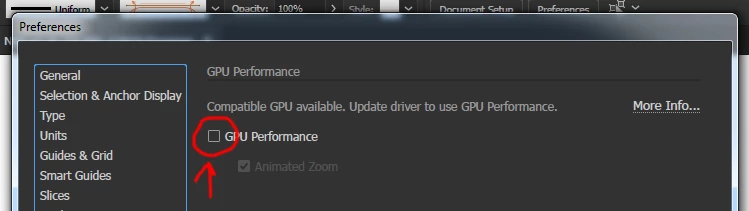
Try to disable the GPU performance option:

1-Press on the Rocket Icon in the top.

2-Remove the check mark from GPU Performance.

Then it will work well.

3 Antworten

Participant
May 19, 2020

This worked for me. Thank you!

Srishti Bali
Community Manager
Community Manager
February 8, 2018

Hi paulc,

I would like to know if the steps suggested by Omar worked for you, or the issue still persists.

Kindly update the discussion if you need further assistance with it.

Thanks,

Srishti

sumofish
Participant
October 9, 2019
I had this problem but it ended up being because the placed file was in indexed colour mode. Converted to rgb and the problem was resolved.
Participant
September 15, 2020

this converting to RGB solution worked, thank you so much , you are a saviour 😄

Omar.Fathy
Community Expert
Omar.FathyCommunity ExpertAntwort
Community Expert
February 5, 2018

Try to disable the GPU performance option:

1-Press on the Rocket Icon in the top.

2-Remove the check mark from GPU Performance.

Then it will work well.