paulc79983495
Participant
February 5, 2018
Answered

Illustrator showing transparency as black objects?

  • February 5, 2018
  • 3 replies
  • 9492 views

Hi,

I'm having the following issue in Illustrator. It started randomly. Everything used work fine and then one day this started occurring. When I use transparency effects (multiple, overlay, screen... etc etc) the object I have applied transparency to appears and a black object. See pics below, first pic is how it SHOULD look, second pic is how it DOES look.

I have tried updating my software but it still does not work. It happens across all files that use transparency, whether created on another computer or from scratch on my computer. My computer specs are also below in an image, and it handles images fine. It is only recently this has started happening.


This topic has been closed for replies.
Correct answer Omar.Fathy

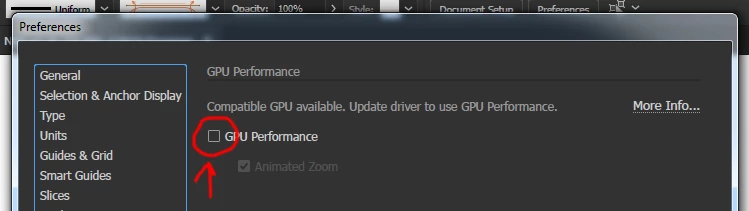
Try to disable the GPU performance option:

1-Press on the Rocket Icon in the top.

2-Remove the check mark from GPU Performance.

Then it will work well.

3 replies

Participant
May 19, 2020

This worked for me. Thank you!

Srishti Bali
Community Manager
Community Manager
February 8, 2018

Hi paulc,

I would like to know if the steps suggested by Omar worked for you, or the issue still persists.

Kindly update the discussion if you need further assistance with it.

Thanks,

Srishti

Participant
July 30, 2018

Hi.

The same happened to me. I did what Omar suggested and it worked.

This come when I converted a RGB file to a CMYK, and only on this is when the black stuff happened.

Omar.Fathy
Community Expert
Omar.FathyCommunity ExpertCorrect answer
Community Expert
February 5, 2018

Try to disable the GPU performance option:

1-Press on the Rocket Icon in the top.

2-Remove the check mark from GPU Performance.

Then it will work well.