
Illustrator stuck on grouped object and won't save
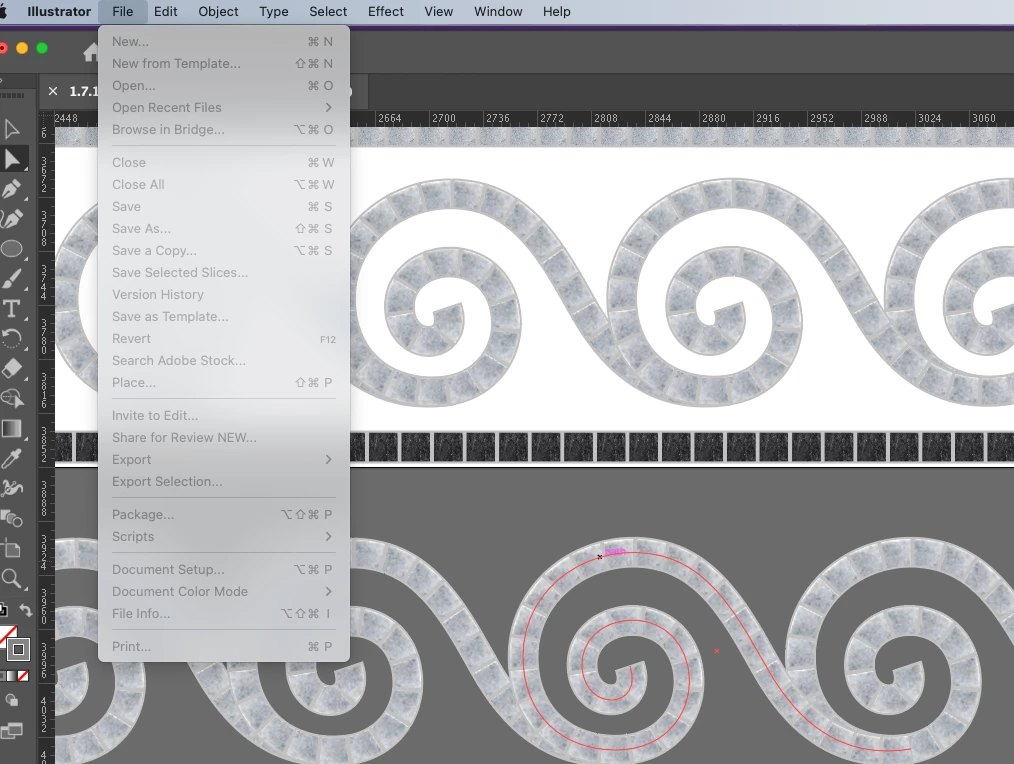
I have a file where I've selected a group of paths and now the program won't let me do anything else. I can still move the cursor around and open the layers and other windows. But if I try to drag the group to the trash it won't delete. I tried just clicking the backspace on the keyboard since the group is selected and it also won't respond or dissapear. All of the option drop down menus are also blacked-out. I've tried to save with the keyboard command and that also doesn't seem to be working. It wouldn't be a huge loss if I had to force quit the program and restart as I do have a version of the file saved from less than an hour ago, but I would like to not have to re do the work I just finished. I feel like there should be something I can reset with the file still open because I can still move around and navigate the layers and options windows.
The only thing I can think of is that it's memory again and it just needs time to think about it. But I'm worried if I just leave the program open it will crash and then I really will lose the file.
 AdChoices