
Participant
December 2, 2019
Question

Illustrator SVG Filter AI_BevelShadow_1 shadow problem

  • December 2, 2019
  • 3 replies
  • 3238 views

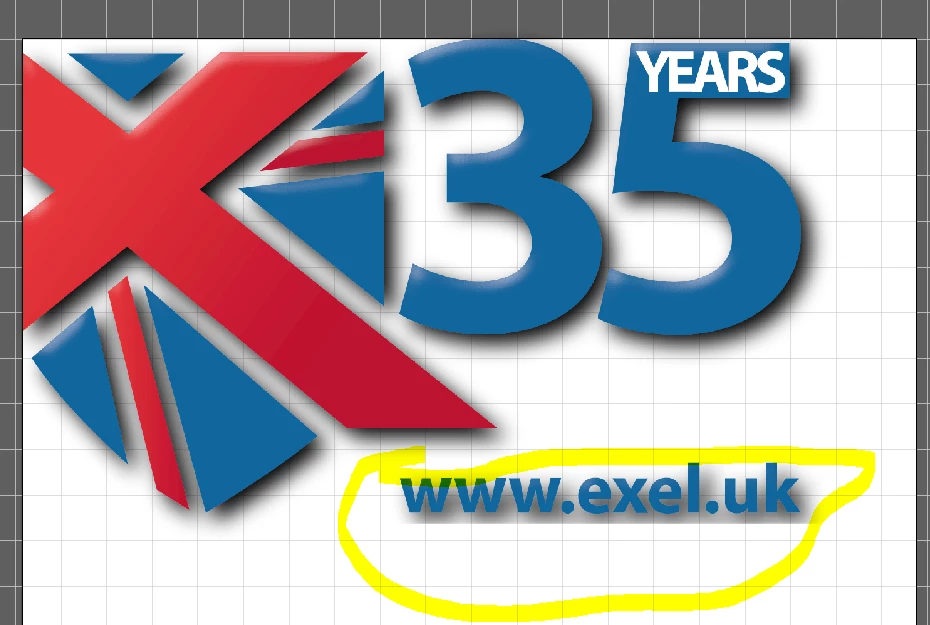
Have a design - used 'SVG Filter AI_BevelShadow_1 shadow' - shadow came out fine on most of it but for the text the shadow seemed cut by a straight edge. Changed text to an outline and tried again but it is just the same. So frustrating - any ideas?
This topic has been closed for replies.

3 replies

Monika Gause
Community Expert
Community Expert
December 3, 2019

I can't replicate this issue.

Can you post some details of the file?

the font used?

Document raster effect settings?

Did you edit the SVG code of the effect?

CarlExelAuthor
Participant
December 4, 2019

Hi, thanks for trying.


Waiting on Adobe aupport for help but it doesn't seem forthcoming - recently had a call with them though and the file I sent to them looks the same on their machine - if they go through the process it comes out the same (although when he first tried it he said it came out fine and as expected - I pushed to see if it was different to the image here, he came back and said it looked the same - so that seemed right to them!!!! Utter madness. )


Font - Myriad Pro Bold 26.8pt


Document raster - 254, this was previously at standard but i read that putting this to max might help......didn't

No editing of the SVG occured. It worked fine on the image before i added that web address element, after adding that is still worked fine on the presxisting elements but bit on the web address.


Cheers,

meganchi
Legend
December 2, 2019

Is there a reason why you wouldn't use Effect-->Stylize-->Drop Shadow instead?

CarlExelAuthor
Participant
December 3, 2019

Hi,


The SVG does more than just a shadow. Plus, if there's an option there it should work, especially as we pay for this stuff.


Their tech support advised I upgrade to latest version - I did, didn't fix it.

Cheers,

CarlExelAuthor
Participant
December 2, 2019

Have played with 'Effect>Document Raster Effects' and that didn't help - Added max around object