
Participant
March 14, 2019
Answered

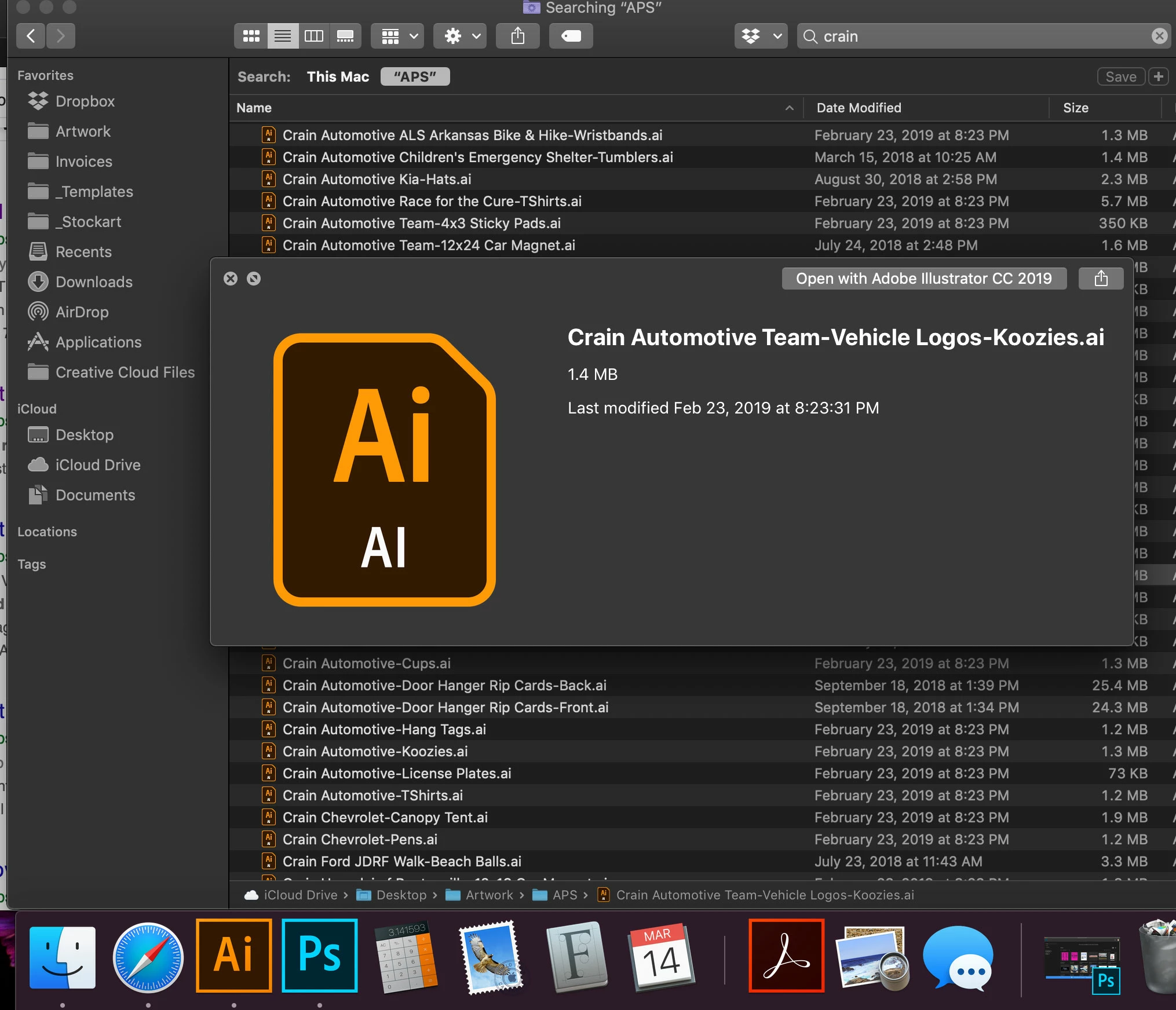
Illustrator Thumbnail Preview Not Showing Images
  • March 14, 2019
  • 11 replies
  • 35724 views

I REALLY need someone's help. I bought a new MacBook pro a couple of weeks ago and have had nothing but issues with my Illustrator since. I was running the 2019 version when I switched laptops but have had to downgrade back down to the 2018 version because the 2019 version was so laggy. I'm still having lag issues but it's not as bad. But now I have a new problem. If I search files, whether its in Illustrator or just a finder folder, I used to be able to highlight a file and hit the space bar to see a preview of my artwork, so I could then scroll through the files and open the one I want. Now, I can't see anything other than the Ai logo box. HOW DO I FIX THIS? This is literally costing me so much time as I often need to refer to other jobs for a logo or text.


Any suggestions would be much appreciated. [email removed]

This topic has been closed for replies.
Correct answer rhondak37849348

No icon preview for eps-files in Ventura (and Monterey): Here's what to do.


  1. Copy the "Illustrator.qlgenerator" from “Macintosh HD/System/Library/QuickLook" to your desktop or any other folder you have read/write access to.
  2. Open "Illustrator.qlgenerator" by right clicking it and select "Show package contents".
  3. Open "Info.plist" in the "Contents" folder with a text editor.
  4. Find the line "<string>com.adobe.illustrator.ai-image</string>" 
  5. Insert "<string>com.adobe.encapsulated-postscript</string>" below it with the same indentation and save the "Info.plist" file.
  6. Drag the "Illustrator.qlgenerator" into "Macintosh HD/Library/QuickLook" folder. Don't freak out if the folder is empty.


NOTE: Pay attention to the above words in Bold. I kept trying to paste the copy back into “Macintosh HD/System/Library/QuickLook" and of course, you can't do that.


If you did everything right, you should now have .EPS previews back again. That's a workaround until apple fixes it in the System/Library, hopefully soon.

https://discussions.apple.com/thread/254424837

11 replies

rhondak37849348
rhondak37849348Correct answer
Inspiring
February 6, 2023

No icon preview for eps-files in Ventura (and Monterey): Here's what to do.


  1. Copy the "Illustrator.qlgenerator" from “Macintosh HD/System/Library/QuickLook" to your desktop or any other folder you have read/write access to.
  2. Open "Illustrator.qlgenerator" by right clicking it and select "Show package contents".
  3. Open "Info.plist" in the "Contents" folder with a text editor.
  4. Find the line "<string>com.adobe.illustrator.ai-image</string>" 
  5. Insert "<string>com.adobe.encapsulated-postscript</string>" below it with the same indentation and save the "Info.plist" file.
  6. Drag the "Illustrator.qlgenerator" into "Macintosh HD/Library/QuickLook" folder. Don't freak out if the folder is empty.


NOTE: Pay attention to the above words in Bold. I kept trying to paste the copy back into “Macintosh HD/System/Library/QuickLook" and of course, you can't do that.


If you did everything right, you should now have .EPS previews back again. That's a workaround until apple fixes it in the System/Library, hopefully soon.

https://discussions.apple.com/thread/254424837

Participating Frequently
May 5, 2023

I cant find "Illustrator.qlgenerator" in my mac. 


Anubhav M
Community Manager
Community Manager
May 31, 2023

Hello @BukhariTorro,


Thanks for reaching out. Would you mind trying to use Adobe Bridge to preview/manage your files (https://helpx.adobe.com/bridge/get-started.html) and checking if it helps?


Looking forward to hearing from you.


Thanks,

Anubhav

rhondak37849348
Inspiring
February 6, 2023

This fixed my issue.

"No icon preview for eps-files in Ventura"

https://discussions.apple.com/thread/254424837

I'm on Monterey 12.6 but still worked. 

100pk
Inspiring
October 19, 2022

I found this thread for the same reason: no prevoews on .ai files.

After updateing to Illustrator 2023 and InDesign 2023 I found that InDesign has thumbnails again at last. But Illustrator still not. After I found the solution in thius thread: deleting the Illustrator.ql.generator (With the also mentioned alterations I did before) from User > Library > Quicklook. A wish I have left is thumbnails on Illustrator.eps files!

Anubhav M
Community Manager
Community Manager
October 20, 2022

Hello @100pk,


Thanks for reaching out. Would you mind using Adobe Bridge to preview and manage your files and check if it helps?


Looking forward to your response.


Thanks,
Anubhav

Participant
November 21, 2022

I have the same problem after updating to 2023. I cannot use bridge with box.com files - where box lives on the mac is not accessible via bridge. What is a real fix for this? Seems an Adobe issue with the 2023 update .. 

Participating Frequently
April 13, 2022

After many months of trying different methods, I finally solved it by deleting old versions of Illustrator.

Participant
January 7, 2022

Simply place the file containing the Ai images into Adobe Bridge and you can view them in Bridge.

Inspiring
June 21, 2021

Oh, wow. I finally just (compressed and) got rid of all the old files in my /Library/QuickLook folder and now suddenly the AI previews word, as does QuickLook (via pressing the spacebar) -- wonderful to have all this back -- hope this helps a few others of you!!

Participating Frequently
June 3, 2021

CocothumbX is an app that generates custom icons based on the contents.

Too bad is only for 32bit : (

https://www.macupdate.com/app/mac/17460/cocothumbx


Participant
June 16, 2021

I had several QuickLook generator files in my Library in the Quicklook folder. I threw them all away and then shut down and restarted my iMac. Gallery view now works as it should. Running Mac OS Catalina and the latest Illy.

Participating Frequently
June 16, 2021

Oh, that's great news.

Please take a look below at the quicklook files I currently have...Maybe you could shine a light on this.

(Without derailing this thread)... There was a time when I also tried to fix quicklook so I could preview Quicktime Animation formatted movies but I could never get that working either.


Thanks,


Participant
May 27, 2021

My problem was the DropboxQL.qlgenerator. Go to "Go" in finder bar. Press option button to give you the Library option. Go to Library/Quicklook folder and remove DropboxQL.qlgenerator. That fixed it for me. Thanks to those that directed me to this folder. Big time save for me!

Participant
June 16, 2021

Fixed for me, thank you!

Inspiring
February 11, 2020

Same issue here. Tried saving with PDF compatability (which is default) but .ai files still only show the AI logo.

Participating Frequently
April 2, 2020

Go to Creative Cloud and Update Illustrator, It will solve this Issue

Inspiring
April 2, 2020

That doesn't solve it.  My experience is identical to kyrstenbrooke. This problem is frustrating and wastes valuable time, especially when it was not an issue with the previous Mac OS.

italosan
Community Expert
Community Expert
April 16, 2019

Hi, the files must be saved with "PDF compatibility".