

Illustrator to InDesign magazine creation workflow
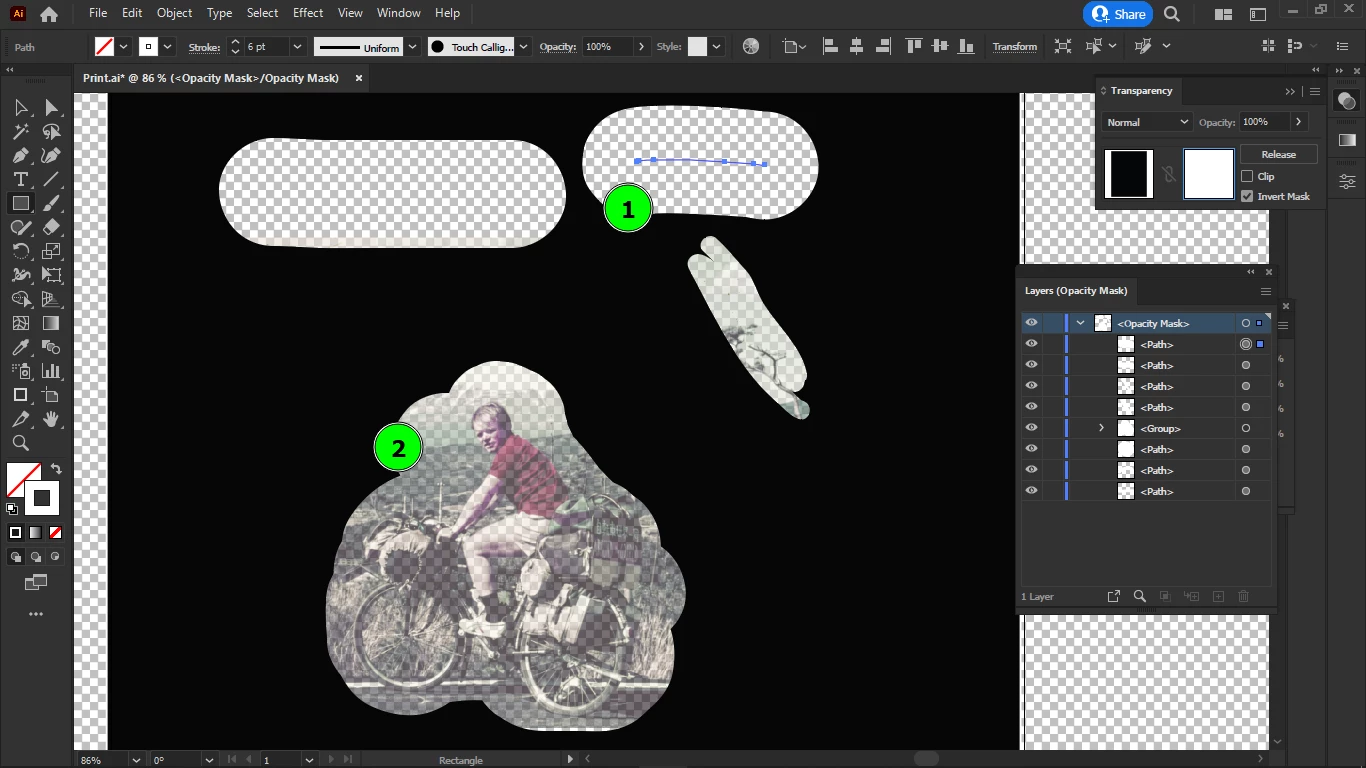
I am using opacity masks to create my magazine pages in Illustrator, then they need to be moved into InDesign, because I cannot use brushes in InDesign.
I have two kind of objects that I need the opacity masks for:
marked with 1: text boxes
marked with 2: images
I will paint both my images and text boxes with brushes, and also by using shapes.
So far in my setup, I placed my images outside of the mask into the artboard, because I cannot see any colors inside the opacity mask, since that is in grayscale mode, and also because I might want to import my design into InDesign with the images embedded.
I have a few issues:
- can I make some changes in the setup so that I could see the colors of the images, if I put them into the opacity mask while creating the shapes of the images within the opacity mask?
- if I put the images into the opacity mask, can I export my design into InDesign with my images embedded, and in color?
- how do I link or group my images to the brush strokes that reveal them (they are in the opacity mask) so that I could move them around together in the composition, either from the mask, or from the artboard?
- if I don't embed the images after I am done, is there a way to reinsert the images in InDesign in the exact same position as they were in Illustrator?
- how do I remove (clip, delete) parts of the images that are not made visible by the mask, from within the mask?
- can I use and edit "linked text" within the mask, that is in InDesign, to fit it to the shapes created in Illustrator?
- do you recommend to embed and create everything including text in Illustrator (since I abandoned all grid systems that InDesign offers, so I will hand paint a different layout in Illustrator for each page) and import it when it's ready?
- if I choose the option above, what can I keep editable?
- if I decided to make a graphical magazine and make it in Illustrator, do I have more reason to return to InDesign if I don't need the text and grid features of InDesign, or it's doable to export a print PDF with many pages from Illustrator?
- do I need to export it page by page and assemble the final print PDF in Adobe Acrobat, or Illustrator can create all the pages and export them at once?
- can Illustrator produce the same print PDFs as InDesign?
But the biggest question is, how to move the images anchored together with their uncovering brush strokes within the opacity mask or within the artboard, either would be okay option.
Thanks.
 AdChoices