
Known Participant
January 10, 2018
Answered

Illustrator tracing broken - how to fix? URGENT!

  • January 10, 2018
  • 4 replies
  • 4944 views

Hi!

I have a job going where the client needs me to supply them with SVG masks made from 3D file renders. Even if I plug a stupid-high resolution file into illustrator - it just messes up and doesn't see all the detail, which is dumb. The following is the best I could get tweaking the sliders around:
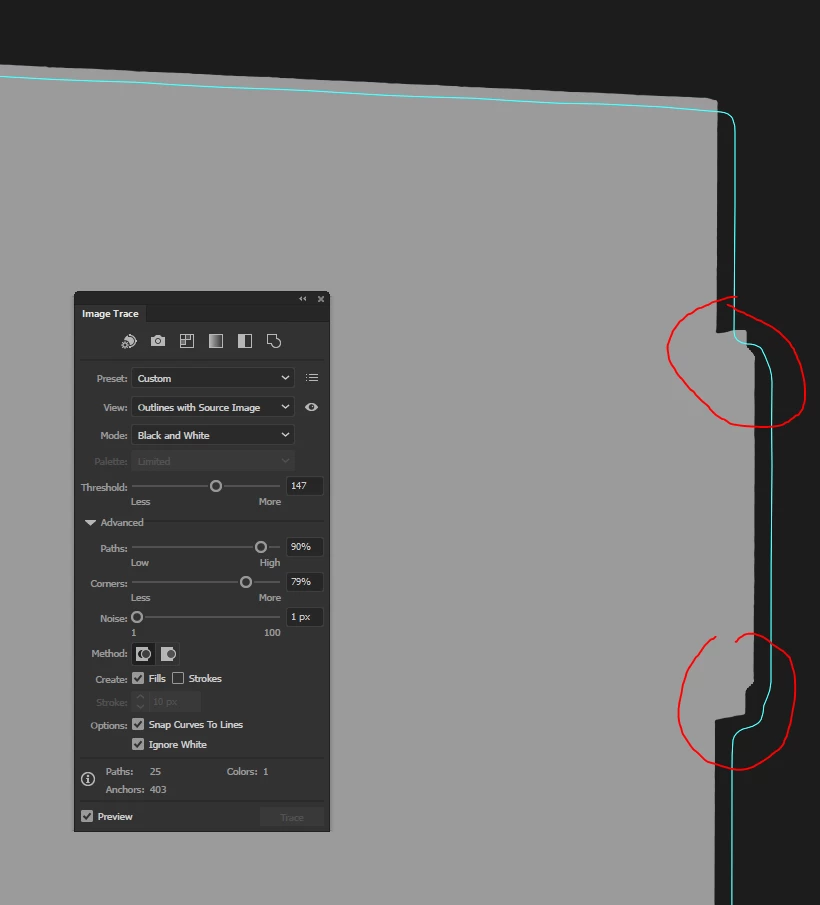
So then I had a thought: What if illustrator is limiting the max resolution of Live trace to save on performance somehow? So what I did now was I took the SAME image and I cropped in on the details I showed in the image above. The details have the same pixel count, just that the overall image is now cropped to reduce the total amount of pixels. Here's what I got with DEFAULT trace settings this time:
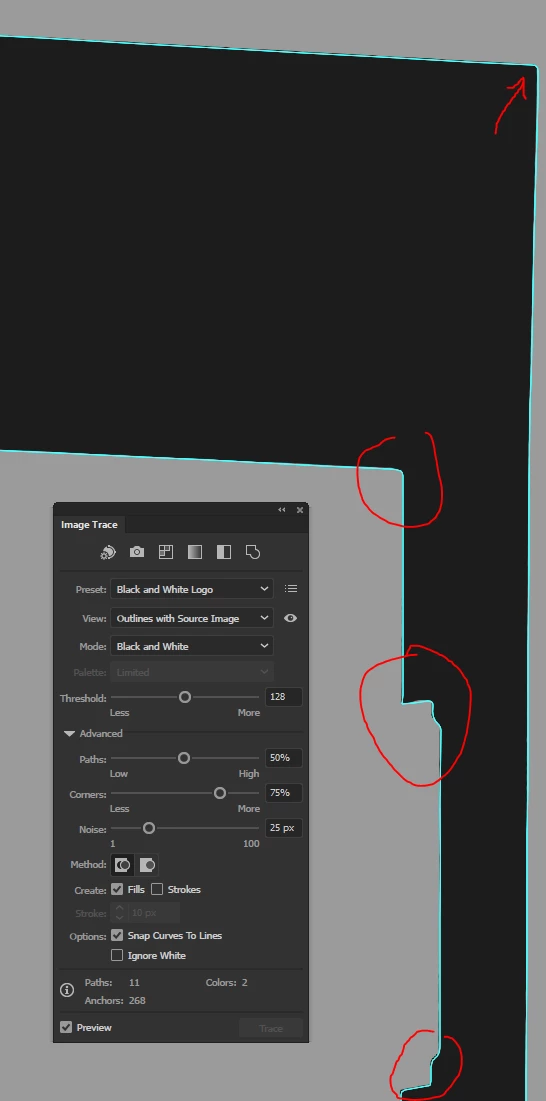
This is now an ACCURATE trace.
So  the trace tool is fine, but what's happening is somewhere it limits the max resolution for whatever reason and ends up producing a pile of sh*t when I use it. And, needless to say, I need this to deliver a job.

But I can't use it like this because that would mean me having to split a each B/W mask image into 6-8 tiles, tracing and then somehow merging back into one vector (surely not without mistakes) - completely and utterly unusable workflow!

Is there a way to throw this pixel conservation into the bin and make tracing perform as expected? Maybe a setting somewhere or a script I can inject? My machine has a GTX 1080Ti 11GB GPU, an overclocked i7-5960X 8-core CPU at 4.5GHz and 64GB RAM - I don't really care for or want any performance-saving "features" that mess up a job like this...

Thanks!

This topic has been closed for replies.
Correct answer Kris Hunt

What if you did it in Photoshop instead? Create a selection of the silhouette and then convert it to a path.

4 replies

Legend
January 15, 2018

Not my intention. Many people assume that posting in the forums will reach the "programmers" at Adobe. There is a lot wrong with this assumption, starting with the assumption that programmers decide what to fix, or that programmers come to the forums... but even if your comments are seen by someone at Adobe and commented on, that isn't a bug report/feature request. There is a department who deals with these things, and they are counted and influence decisions only if they arrive by the proper channels. Multiple reports are not just good, they may be essential. There is some evidence that bugs are only fixed if a lot of people "vote" for it,

RimVaiAuthor
Known Participant
January 15, 2018

I totally understand this. Same case with Autodesk, except there I've also had direct conversations with programmers/technicians over things like broken multithreading on DirectX viewports, autosave issues and time-outs, etc. Suppose it would be useful to have someone stroll the forums just to check out where the heat is, since we can't expect everyone to know how bug squashing works, but it's also the case that many people complain about things that are not even problems... I've seen bug reports of missing "expand" buttons when tracing, dismissed only as the person who reported it being a bit blind

Tricky one...

Doug A Roberts
Community Expert
Community Expert
January 15, 2018

regardless, when you report it, it think it's worth posting a link here so anyone in a similar situation who finds this thread can vote on it.

Kris Hunt
Kris HuntCorrect answer
Legend
January 10, 2018

What if you did it in Photoshop instead? Create a selection of the silhouette and then convert it to a path.

Mike_Gondek10189183
Community Expert
Community Expert
January 10, 2018

You did not use the same settings

Please post a copy of what you are tracing via dropbbox or similar ftp link,  so we can confirm what is happening,

RimVaiAuthor
Known Participant
January 10, 2018

Of course the settings aren't the same - I did mention that A was the BEST I could get by tweaking things and B looked perfect with the defaults after the crop.

Anywho, here's what I'm tracing: 1drv.ms/i/s!AqNXFSNGIG41jsIDzlYOUkMCVA3i6A

This is actually neural network upscale at 4X from the original render as I thought "maybe the hinges will look better traced if I had more resolution to give illustrator..?" - neither the low-res, nor high-res work...

Mike_Gondek10189183
Community Expert
Community Expert
January 10, 2018

The link is not working tried on 2 browsers.

Maybe i will try later, and will work.

Doug A Roberts
Community Expert
Community Expert
January 10, 2018

there is not.

RimVaiAuthor
Known Participant
January 10, 2018

So Illustrator is not gonna let me do my job? Lovely...just...lovely...