
lidziyap15180405
Participant
September 20, 2021
Answered

Illustrator UI Default install language set to Russian even after changing it to English from CC app

  • September 20, 2021
  • 2 replies
  • 1053 views

Why the Illusttator UI always on Russian, if I set the English!!!!!!! It is terrible! I don`t want russian UI. I spent couple hours and lost money. How to set English UI?
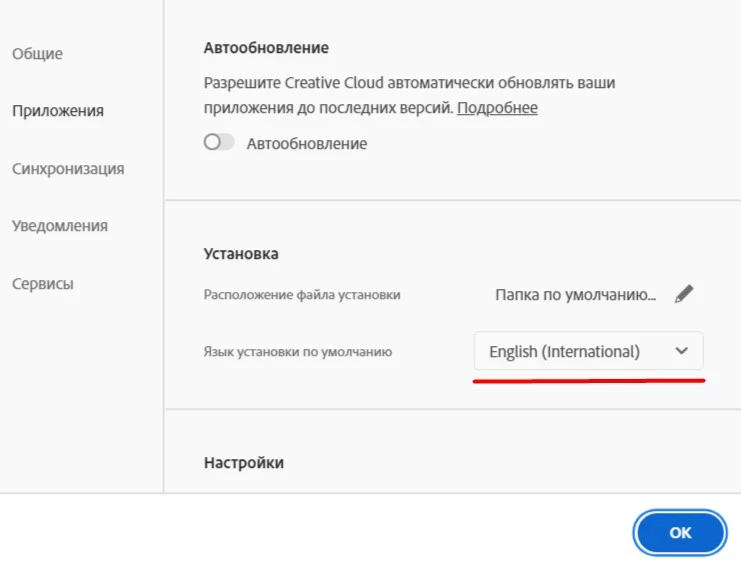


{Renamed by MOD}

This topic has been closed for replies.
Correct answer lidziyap15180405

I have always worked and am working in English UI. And I will not prove it. I do not care. Uninstallation and Reinstallation really helped. By the way, suggest next time your programmers reinstall Windows as well, and format all HDD to change the language in one app.

2 replies

Anshul_Saini
Community Manager
Community Manager
September 21, 2021

Hi there,


Sorry to hear about the trouble you are facing. I agree with @Monika Gause. However, if the Russian version is getting installed after an update or it does not change back to default English after changing the default install language. I suggest you uninstall the whole Adobe CC suite using the CC Cleaner tool and reinstall from the Creative Cloud Desktop app. After reinstalling the Creative Cloud Desktop app go to preferences and make sure Default Instal language is set to English before installing any other Adobe app. I hope it helps.


Thanks & Regards,

Anshul Saini

lidziyap15180405
lidziyap15180405AuthorCorrect answer
Participant
September 22, 2021

I have always worked and am working in English UI. And I will not prove it. I do not care. Uninstallation and Reinstallation really helped. By the way, suggest next time your programmers reinstall Windows as well, and format all HDD to change the language in one app.

Monika Gause
Community Expert
Community Expert
September 20, 2021

Did you have it installed in Russion previously? In that case make sure you uninstalled that first. Then install the English one.

lidziyap15180405
Participant
September 20, 2021

No, I always working on English. The Russian translation is terrible, feels like gibberish! Just after one update, it became Russian. 

Monika Gause
Community Expert
Community Expert
September 20, 2021

Illustrator won't be in Russian just out of the blue. The language needs to be installed.

When there is more than one language installed, Illustrator will always be working in the same language as the system.


You might need to completely uninstall Illustrator from your system and then run the Adobe Cleaner tool to get rid of any remains. Then reinstall.