Salir
  • Comunidad global
    • Idioma:
      • Deutsch
      • English
      • Español
      • Français
      • Português
  • 日本語コミュニティ
  • 한국 커뮤니티
Bloqueada

Illustrator v28.4.1 | Refined Text to Vector Graphic & Improved Pan and Zoom Experience!
Empleado de Adobe ,
Apr 01, 2024 Apr 01, 2024
whatsnew illustrator.png

Hello everyone, 


We're thrilled to announce that the latest iteration of Illustrator v28.4.1 is now live! This update includes enhancements to Text to Vector Graphics (beta), overall performance enhancements, and bug fixes.


You may visit the links to access comprehensive lists of all available features and bug fixes.



new-feature-summary-style-text-to-vector-ai-2.png


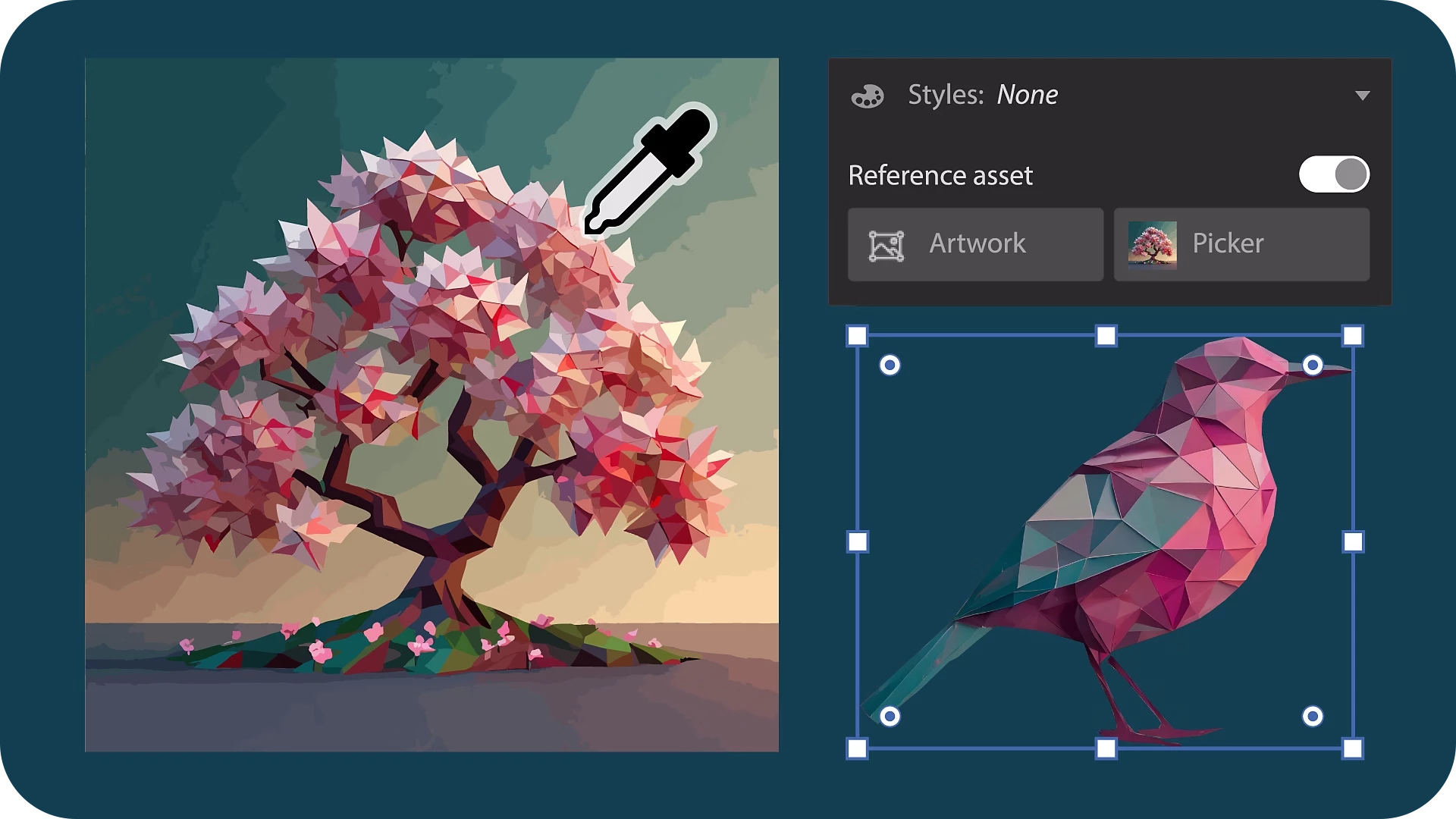
Enhanced Text to Vector
Graphic Generation

Say hello to refined Text to vector Graphic!
Effortlessly generate Subject, Scene, and Icon to elevate your illustrations. Choose a style from a reference artwork or utilize the surrounding area of your selected artwork to refine your creations. 
In addition, only the output variations linked to your selected object appear, streamlining your workflow and making it easier to find the variation you're looking for.


Improved Pan & Zoom Enhancements

Get ready for a turbocharged experience with improved pan and zoom experience!
Zoom and pan through your illustrations up to 10 times faster, ensuring seamless navigation, even with heavy & complex files. Dive into our improved navigation tools and glide through your projects with unmatched efficiency.

new-feature-summary-pan-zoom-ai.png


Fixed Issues

Here are some of the important bugs which are fixed with Illustrator v28.4.1:

  • Preferences get reset after Illustrator update. (UserVoice)

  • When an image with a color profile different from Illustrator color settings is placed by drag-and-drop, the color values of existing objects are changed. (UserVoice)
fixed.png

We would love to hear your feedback on the improvements in the Illustrator UserVoice.


For more information on the latest features, refer What's New. To help us have focused discussions, create separate posts for feedback on features related to this update.


Thanks,
Anshul Saini

upvote-ai.png

If you've found value in this post, a friendly upvote would be fantastic. Your thoughts are even more precious – share them with us in the discussion!
TEMAS
Dibujar y diseñar , Rendimiento , Herramientas
2.7K
Traducir
Informe
Directrices de la comunidad
Sé amable y respetuoso, muestra títulos de crédito de la fuente de contenido original y busca duplicados antes de publicar. Más información
community guidelines
Adobe
Nuevo aquí ,
Apr 01, 2024 Apr 01, 2024

Hey, this update is crashing my pc, everything within the software is  getting super slow, 

Traducir
Informe
Directrices de la comunidad
Sé amable y respetuoso, muestra títulos de crédito de la fuente de contenido original y busca duplicados antes de publicar. Más información
community guidelines
Empleado de Adobe ,
Apr 01, 2024 Apr 01, 2024

Hello @Francisco Jav25037816catm,

We understand that encountering technical issues can be frustrating. I tried replicating this behavior on my end but could not do so. Would you mind trying to reset Illustrator's preferences as described in this article (https://adobe.ly/4adasMs) and checking if it helps?


Disclaimer: Please note that renaming preferences folders will remove all the custom settings, and Illustrator will launch with default settings. You can also save a backup of the folders if you want to. The location is mentioned above.


If the problem persists, kindly share more details, like the exact version of the OS, your workflow, whether Illustrator behaves this way with all files, and a screen recording of the problem (https://adobe.ly/4agTiNU), so we can investigate this further.

Looking forward to hearing from you.


Thanks,

Anubhav

Traducir
Informe
Directrices de la comunidad
Sé amable y respetuoso, muestra títulos de crédito de la fuente de contenido original y busca duplicados antes de publicar. Más información
community guidelines
Principiante de comunidad ,
Apr 01, 2024 Apr 01, 2024

YOU TOTALLY MESSED UP! If  I create a text objects, then Illustrator just won't let me move ANYTHING. I've restarted the software several times and just doesn't work. Everything seems fine, until I create any text, then I'm not able to drag anything. Tested on 2 different PC's, same problem on both.  You've made Illustrator simple unusable.

Traducir
Informe
Directrices de la comunidad
Sé amable y respetuoso, muestra títulos de crédito de la fuente de contenido original y busca duplicados antes de publicar. Más información
community guidelines
Community Expert ,
Apr 01, 2024 Apr 01, 2024

Did you already reboot the system and reset the preferences?

What kind of computers are they? WHat hardware are you running Illustrator on?

Traducir
Informe
Directrices de la comunidad
Sé amable y respetuoso, muestra títulos de crédito de la fuente de contenido original y busca duplicados antes de publicar. Más información
community guidelines
Comprometido ,
Apr 01, 2024 Apr 01, 2024

Can’t replicate this on Windows 10, but I see it already reported at UserVoice: http://illustrator.uservoice.com/forums/601447/suggestions/48204059

Traducir
Informe
Directrices de la comunidad
Sé amable y respetuoso, muestra títulos de crédito de la fuente de contenido original y busca duplicados antes de publicar. Más información
community guidelines
Principiante de comunidad ,
Apr 02, 2024 Apr 02, 2024

Restarted Illustrator and hole system twice. Problem persists.
Tested on Windows 11 (Intel core i7 13700k, 64Gb RAM, RTX 3060ti) and
Widnows 10 (Core i7 7700, 32Gb RAM, Nvidia Quadro P1000)
(Personal details removed by moderator)

Traducir
Informe
Directrices de la comunidad
Sé amable y respetuoso, muestra títulos de crédito de la fuente de contenido original y busca duplicados antes de publicar. Más información
community guidelines
Principiante de comunidad ,
Apr 02, 2024 Apr 02, 2024

Happened to me on both, Windows 10 and Windows 11
(Personal details removed by moderator)

Traducir
Informe
Directrices de la comunidad
Sé amable y respetuoso, muestra títulos de crédito de la fuente de contenido original y busca duplicados antes de publicar. Más información
community guidelines
Comprometido ,
Apr 01, 2024 Apr 01, 2024

If you are seeing your artboard edges and guides vanish while you pan and zoom —  this is a known limitation, caused by a recently added method of boosting the speed of zooming and panning while in GPU Preview mode. Artboards edges, along with grids and guides, are considered as 'annotations' by the engine, and have to be temporarily disabled while contents of the document gets streamed while panning and zooming.


If you wish for this to get addressed — please upvote the report here: http://illustrator.uservoice.com/forums/601447/suggestions/48123539

Traducir
Informe
Directrices de la comunidad
Sé amable y respetuoso, muestra títulos de crédito de la fuente de contenido original y busca duplicados antes de publicar. Más información
community guidelines
Explorador ,
Apr 02, 2024 Apr 02, 2024
MÁS RECIENTES

Saving to SVG with text converted to curves is now broken!!! I submitted a bug to Adobe (Case ID: E-001201029).


Traducir
Informe
Directrices de la comunidad
Sé amable y respetuoso, muestra títulos de crédito de la fuente de contenido original y busca duplicados antes de publicar. Más información
community guidelines