

VaughnByrd21
Known Participant
January 10, 2017
Question

Illustrator vs Pantone vs Adobe Color CC

  • January 10, 2017
  • 3 replies
  • 3376 views

I've read through the many [spirited] discussions on color management and read the linked articles.

Here's my situation:

I have the Pantone color I want.

I used the 'Recolor Artwork' option in Illustrator to get the CMYK and RGB values.

Checked the values against the 'Find A Pantone Color' option on the Pantone site.

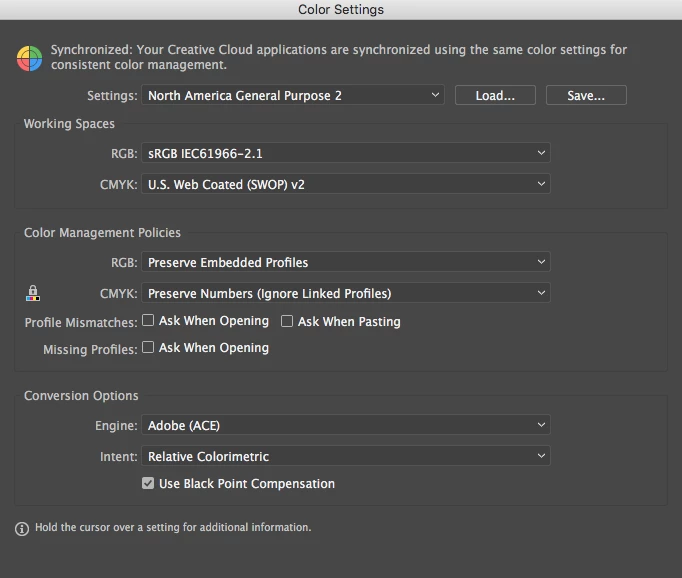
The RGB values are almost always identical...the CMYK numbers are almost always different. I'm only looking at numbers right now, not the colors. [My monitor is calibrated and I have the newest Pantone color books...see screenshot for Illustrator settings]

Went to Adobe Color CC site to set up my project theme. Used the RGB numbers, got the same color as in Illustrator and Pantone [and pretty close to the book, too].

But the CYMK color numbers WERE DIFFERENT FROM BOTH ILLUSTRATOR AND PANTONE. And when I plug in the CYMK colors from the Pantone site, I get different color in both Illustrator and Adobe Color CC.

Then [and this is the really crazy-making part] when I use the swatch from my color theme in Illustrator and click on the color, it gives me new RGB numbers as well.

I feel like a dog chasing my tail.

Since a lot of my stuff is going to print, the CMYK numbers are the most important. For some projects, I'll need PMS—for others, CMYK.

Any advice? The printer my client is using doesn't do press proofs.

Which CMYK value would you use? Aaaarrrrggggghhhh...
This topic has been closed for replies.

3 replies

VaughnByrd21
Known Participant
May 31, 2018

Thanks! Never too late. I did get a color bridge, and use the exact colors for print. For web, it does seem to be all over the place, but you're right...who's going to notice LOL!

ASLCreativeDir
Participant
December 27, 2017

Sorry we are a year out from this question, but I stumbled on it quite by accident and may have an answer. I have had a very similar problem and have been crazy about the company's color fidelity after years of wildly different variations between products.

First, I agree with getting yourself a color bridge if you don't already have one.  It will be the closest comparison available between the PMS and CMYK prints.

Pantone Color Bridge Set Coated & Uncoated I Color Inspiration

Now for the REAL answer:

Keep your PMS colors that you want and do not convert them on your machine unless you are printing in house or at a local FedEx type store.  (Convert to RGB for web of course) The PMS colors are the most accurate you can use.  For your prints - get yourself a great professional printer and develop a strong, exclusive relationship.  Let them know you are interested in the color fidelity and that you are designing with PMS colors.  Any printer worth his salt will have invested in incredible, specific programs that convert colors accurately (and here is the kicker) FOR THEIR SPECIFIC PRINTER(S).  There's the main issue- it doesn't really matter whether you have one set of CMYK conversions or ten for a specific color, each printer will render those colors slightly differently.  The ONLY way to get the real Pantone color you are looking for is to have a printer use the actual PMS ink for your project.

Now, you can always have PMS values called out to print as spot colors, but the application is limited because professional printers use a CMYK +2 system.  Cyan, Magenta, Yellow, Key, Pantone, Pantone typically isn't worth it unless you are running a 1 or 2 color job (meaning you will likely only be printing Pantone, Pantone, Key anyway).

SO - my takeaway.  On my brand identities, I use Pantone's CMYK callouts.  On all promotional items (pens, keychains, etc), I use a PMS color.  On all print materials, I design with the Pantone colors and allow my professional printer to run the CMYK conversion specific to his equipment.  There is some variation still, but nothing that John Q Public is going to notice.

Monika Gause
Community Expert
Community Expert
January 11, 2017

Get yourself a printed Pantone swatches book.

Then get a printed CMYK swatches book. Those are available on different types of paper, so get one that matches the paper as well as the process your printer will be using.

And then compare.

In case it's urgent, you will need to take your Pantone swatches book to the printer and hope that they have CMYK samples there.

You didn't even tell us where this will be printed (different printing processes and colors around the world), which type of printer this will run on or which paper. We can't tell you which definition to use. Some printers might even produce a better result with RGB definitions.

Don't rely on online conversion services. Nobody knows on what their calculations are based.

VaughnByrd21
Known Participant
January 11, 2017

Hahaha, you're probably right about the conversions.

I do have the Pantone books—that's what I based the original designs on.

I didn't know that there were printed CMYK swatch books—that's a great tip!

I finally tracked down an honest-to-God old school service bureau that does 1 day turnarounds...I think I'll go that route for now.

Plus, these colors will be used all over the place—print, exhibit booths, logowear, etc.

These are from an existing palette, not my original design, so I want to be sure they're spot on.

Thanks for the help!

Legend
January 11, 2017

If they are being used all over the place I suspect using fixed CMYK values will let you down. See, CMYK is a recipe, not a colour. The inks used are roughly cyan etc. But not the SAME cyan etc. So if you try and used fixed CMYK you will get DIFFERENT printed colour. This is why colour management was invented. But online sites are simply made by people who have no idea about real world complexity. Or do it seems. Pantone have an agenda: selling Pantone's own brand ink recipes. I hear.