
Almogit
Participant
November 20, 2022
Question

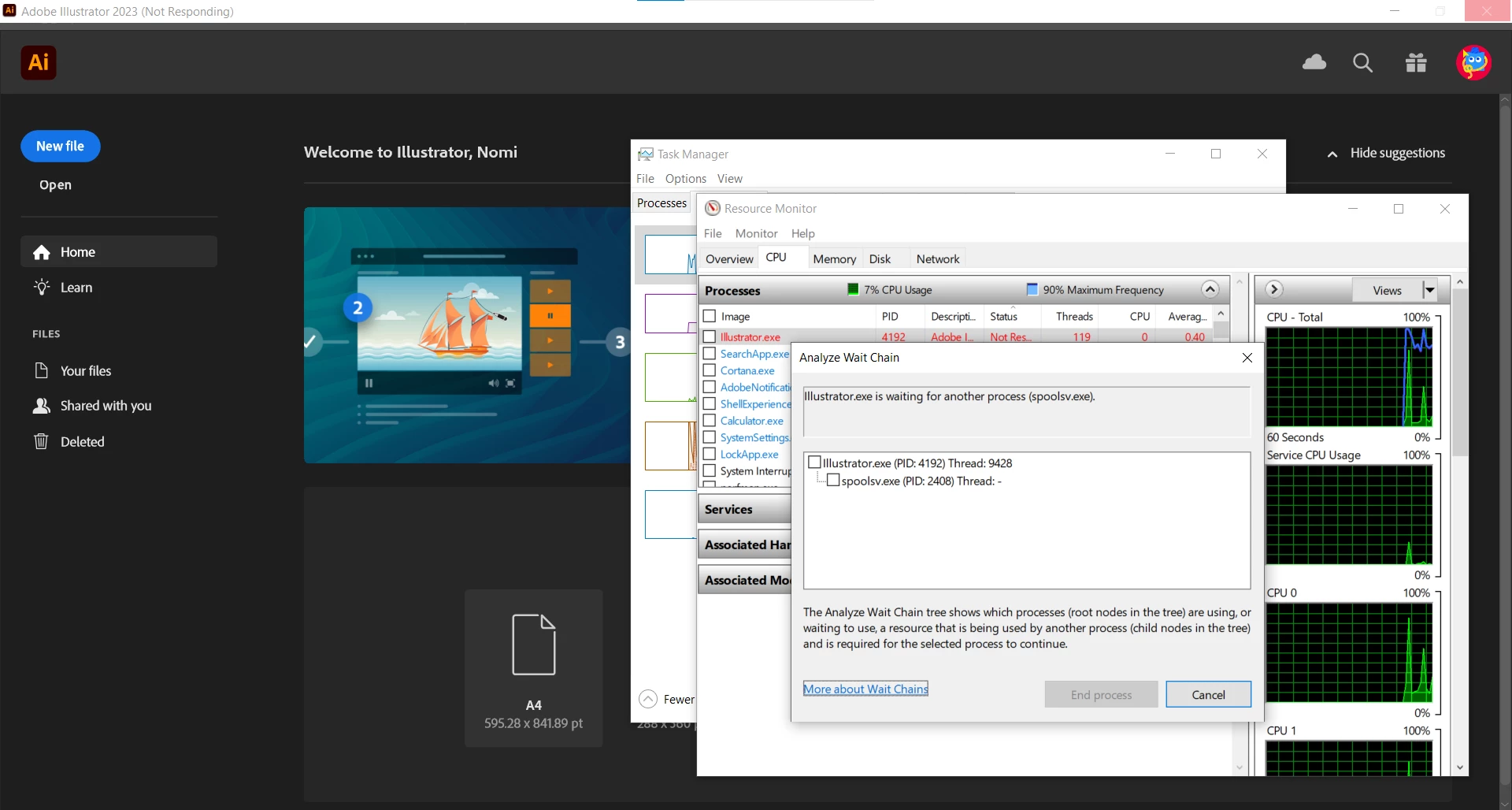
Ilustrator freeze on launch, waits for spoolsv.exe.

  • November 20, 2022
  • 3 replies
  • 724 views

It seems that everytime we open Ilustator on our desgin laptops(Dell latitude 5420 I7) we get a weird freeze that can last up to a few minutes every time we open a new project, and it seems to happen because its waiting for this proces (print spooler) for some sort of reply, any one know why this might be happening?
This topic has been closed for replies.

3 replies

Anshul_Saini
Community Manager
Community Manager
November 25, 2022

Hi @Almogit,


Thanks for reaching out. In addition to Kevin's suggestion, would you mind trying the steps suggested in this helpx article (https://helpx.adobe.com/illustrator/kb/troubleshoot-printer-issues.html)? If this doesn't help, would you mind sharing a few details like:

  • The exact version of OS & Ai
  • Is your default printer a network printer?
  • Where are your projects saved (Network Drive/ System HDD/ Shared Folder on System/ External HDD)?


We are here to help. We just need more info.


Thanks,

Anshul Saini

Kevin Stohlmeyer
Community Expert
Community Expert
November 22, 2022

Normally when you see lags on the Spoolsv.exe its an issue on your Windows print spooler.

Try going to Settings > Update & security > Troubleshoot and run the Printer troubleshooter. 

Almogit
AlmogitAuthor
Participant
November 29, 2022

This happens with a few computers, and we have ran the trouble shooters on them, it made no difference.


Kevin Stohlmeyer
Community Expert
Community Expert
November 29, 2022

Did you try removing the print drivers for that unit and reinstalling fresh? If its affecting more than one computer, I'm guessing they all have the same managed print drivers.

Monika Gause
Community Expert
Community Expert
November 20, 2022

Information about the printer is stored in the documents. Is the printer you used still there? Is any printer set up in your system?

Almogit
AlmogitAuthor
Participant
November 22, 2022

yes and yes, is there a way to delete the cached information from the document\ilustrator itself?