


Anshul_Saini
Community Manager
Community Manager
October 14, 2024
Question

Image Trace 2.0 - Trace images with more accuracy and control
  • October 14, 2024
  • 7 replies
  • 11028 views

Tired of dealing with large, complex files after tracing images in Illustrator? Struggling to edit traced objects or getting strange results when tracing gradients? If so, we’ve got the solution for you.


With Enhanced Image Trace in Illustrator 29.0, you can effortlessly convert raster images like JPEG, PNG, and PSD into high-quality vector artwork, offering greater precision and control. This upgraded feature allows you to create accurate traces with smoother curves that better reflect the original image.


Transform Complexity into Clarity: Experience Effortless Vectorization with Enhanced Image Trace in Illustrator 29.0.
Try it yourself

Trace an image in a few simple steps.


Note:

All these features are only available for Illustrator version 29.0 or later.
Update the app now.


Key features and highlights

Gradient Detection: 

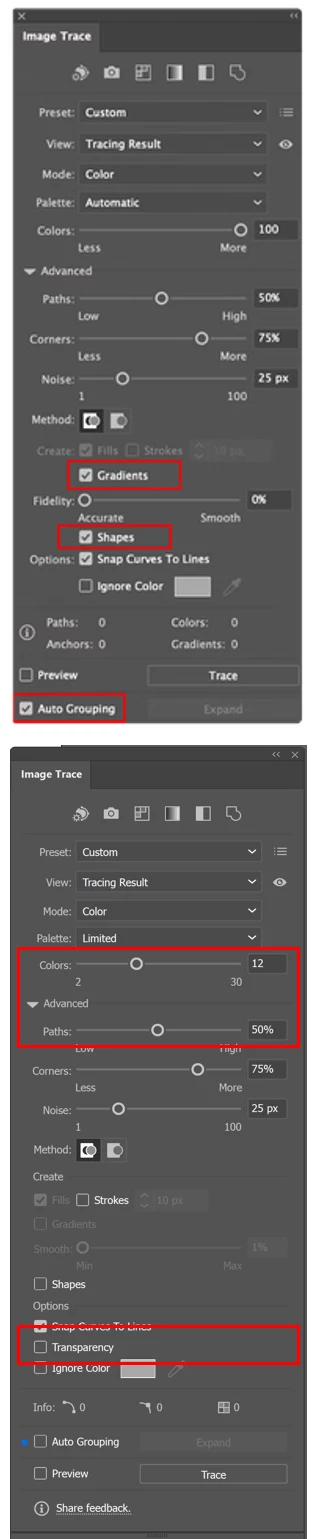
Detect and trace linear gradients in Color or Grayscale mode.
To use this feature:


  • Set the Mode to Color or Grayscale.
  • Set Palette to Automatic or Full Tone.
  • Use the Smooth slider to adjust the detection strength.
  • After tracing, refine gradients with the Gradient tool.


Live Shape Detection:
Shapes like circles, squares, and rectangles are traced as live shapes, making them easier to edit.

Auto Grouping:
The Auto Grouping option organizes paths into logical groups making the traced result easier to edit. To view these groups in the Layers panel, you need to select Expand.


Transparency Support:
Transparent areas in images will no longer be traced as white. This feature is only available in Color Mode with a minimum of 4 colors and is not supported in Grayscale or Black and White modes.


Reduced Anchor Points:
Significant reduction in anchor points and paths, leading to more efficient outputs.


This update makes Tracing Images in Illustrator much more versatile and user-friendly. For more details & FAQs about this new feature, please click here.

We’d love to hear from you!

Try out the new "Enhanced Image Trace" feature and share your feedback by completing this survey. Feel free to reach out if you have any questions or need more tips!

If this was helpful, please click the Upvote icon in the top left corner of this post. Your feedback helps us improve the experience. Thank you!


Have questions? Click 'Reply' below to ask.

Click 'Follow' below to bookmark this post for easy reference.

7 replies

Community Expert
July 3, 2025

awesome. i would also like to see a quick action in photoshop and in bridge to manage options. 

Illustrator is open almost 24/7 and just about the same for Bridge and Photoshop
Participant
February 24, 2025

Unfortunately, Adobe's Image Trace feature is quite bad. I recently discovered an AI tool called Vectorizer AI, and it converted a PNG file into a vector with incredible accuracy and aesthetics. This system has remained unchanged for years, and YouTube content creators keep criticizing Adobe for it.

I've been paying for Adobe for years, yet I can't work in Premiere without setting up proxies—it lags excessively even on my high-end machine. If Photoshop and Illustrator weren’t essential to my workflow, I honestly wouldn’t feel like using Adobe at all. Please bring innovation and aesthetics to the Image Trace feature!

Monika Gause
Community Expert
Community Expert
February 25, 2025

@BossStyle  schrieb:

This system has remained unchanged for years


Uhm, no. Image Trace is probably the one functionailty that has been changed most.

@mj
Community Expert
Community Expert
February 6, 2025

Could transparency be set as a default setting across the various trace modes, please?

mj

iMSD

Author, Adobe InDesign Masterclass

Known Participant
January 16, 2025

Hype with no proof; many are unhappy. its 2025 and no fix yet. You have our money; we don't have a working app.  There is no excuse at this point; QA failed. Give us more AI credits or a partial refund.

drw158
Participant
October 23, 2024

I just got the update to 2025, and my image trace with the same exact file it went down from 5786 points to 2233 points. I've tried every which way in illustrator 2025 and I can't get the same quality image trace I did in the 2024 version.


I've been using image trace 15+ years. These are worse results than even 2010. I am hoping y'all will consider allowing the option to bring back the high quality options to image trace and allowing for details. I'll be sticking with 2024 version. 

Participant
November 9, 2024

I completely agree with you! The new trace capability is far inferior to the previous version. With the older version, I was able to covert illustrations into scalable line art to using for coloring books. Not anymore. 😞

Monika Gause
Community Expert
Community Expert
November 9, 2024
quote

I completely agree with you! The new trace capability is far inferior to the previous version. With the older version, I was able to covert illustrations into scalable line art to using for coloring books. Not anymore. 😞


By @BrandBrooder


Please show examples of what does not work anymore.

@mj
Community Expert
Community Expert
October 18, 2024

You have a typo on Palette.

Thought you might like to know.

Best

mj

iMSD

Anubhav M
Community Manager
Community Manager
October 18, 2024

Hello @mj73_2,

Thanks for pointing out. Corrected now.

Anubhav

@mj
Community Expert
Community Expert
October 31, 2024

My plesh!

Inspiring
October 16, 2024

The results in Illustrator 29 are still a long way from the quality of standalone software.  I still use Illustrator a lot because it's faster, and it does a good job with 1 color images.  But, Illustrator does not do a good job with straight lines, or corners.  When a piece of art is more forgiving, or may even benefit from some rounding, and it's 1 color, then Illustrator is is what I will use.  Illustrator is not good for accuracy.  The two results below are both the inital results.  With the standalone software I would not do anything further.  With Illustrator there would be a lot more work to get it to be usable. 

Known Participant
January 21, 2025

Would you mind sharing the name of the 3rd party standalone app? It's unfortunate that users must purchase expensive 3rd party apps & plugins for so many different things (ex: image enlargement, sharpening, background removal, image tracing, etc).


It would seem that the world's premiere design software company could eventually catch up in these areas and allow its users to save money & computer processing. Heck, I still am forced to take screenshots of my logos because Mac screen captures produce far higher quality / sharper raster previews than Adobe apps can produce. I've spent dozens of hours over the years proving this to Adobe reps (who confirm this yet refuse to fix blurry raster exports like they say they're going to). Many other bugs remain as well.