Participating Frequently
November 29, 2016
Answered

Image Trace - how to get good results on big images?

  • November 29, 2016
  • 1 reply
  • 1546 views

Hi,

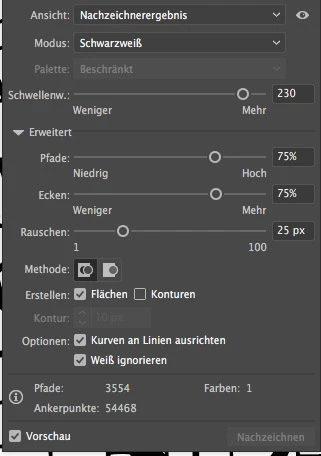
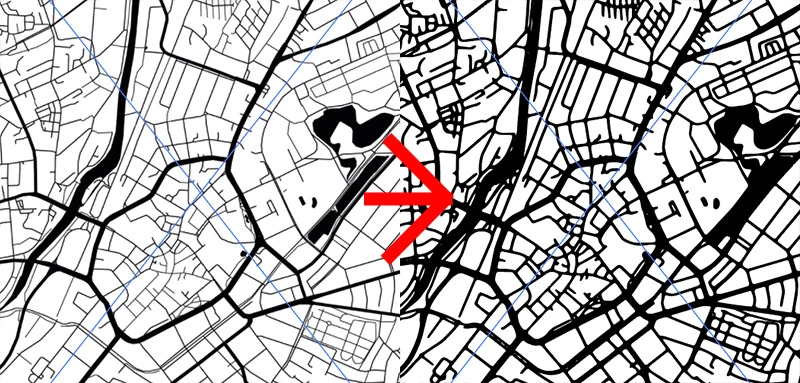
I'd like to imagetrace a map. The Image has a high resolution, round about 5600 pixels in width. Somehow I can't get good results. I tried all kind of settings without gettings good results. Surprisingly I get good results if i only take a small area of the picture and trace it with the same settings. So it seems like Illustrator blurs the image before tracing it corresponding to it's size, which means it doesn't blur a small image or only a little while it blurs the **** out of a big image. As you can see the vectorimage on the right side has less details and the lake melted together with the street.

Does anyone has any sugggestions?

Regards,

Fabian
This topic has been closed for replies.
Correct answer Monika Gause

Make smaller segments, trace them and piece it together.

But actually that will be a lot of work.

This is just not the kind of content this function has been designed for.

SInce it's a map: what about getting the data from OpenStreetMap or buying it from the authorities? For sure there is someone who has GIS data of this.

1 reply

Monika Gause
Community Expert
Monika GauseCommunity ExpertCorrect answer
Community Expert
November 29, 2016

Make smaller segments, trace them and piece it together.

But actually that will be a lot of work.

This is just not the kind of content this function has been designed for.

SInce it's a map: what about getting the data from OpenStreetMap or buying it from the authorities? For sure there is someone who has GIS data of this.

haekiAuthor
Participating Frequently
December 12, 2016

Hi Monika, thanks for your answer. I tried to get the data from OpenStreetMap, but sadly I couldn't find a way that works well for me. There are some consoletools, but they seem to be pretty complicated or crashed on my machine. So I wanted to go that way and vectorize a rasterimage. Or do you know an easy way with OpenStreetMap.

On the other hand, which shall not offend you, I think it's not cool if such an expensive application like Illustrator is not designed to take such challenges. What if I have something similar to a map where it's just impossible to get vectordata without the tool? I just don't get why illustrator can vectorize small segments but not one big one. Just makes no sense for me, does it? :-)

Monika Gause
Community Expert
Community Expert
December 12, 2016

haeki schrieb:

On the other hand, which shall not offend you, I think it's not cool if such an expensive application like Illustrator is not designed to take such challenges.

No autotrace function is designed for this kind of content, where the tracing has to be both exact and clean.

To software a pixel image is a bunch of squares. An exact trace would be a series of stair steps. This is not desirable, so the software smooths the curves. But it has no means to find out exactly which corner is really needed and which should be smoothed. So it will introduce some unwanted smoothing.

You want exact data: use GIS data and a plugin that makes this readable in Illustrator. Illustrator is actually not expensive. If you want to know what is expensive: there you are: MAPublisher - Powerful GIS, mapping and cartography software for Adobe Illustrator | Avenza Systems Inc