
Inspiring
April 27, 2023
Answered

Image Trace - PARM Error on Illustrator 27.4.1

  • April 27, 2023
  • 3 replies
  • 3814 views

Hi Experts,

after upgrading to 27.4.1, image trace stopped working, and keep gives this error:
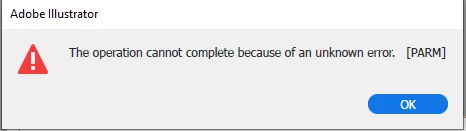
then image becomes this:

Tried the fix already suggested:

For Windows
- Close all Adobe applications.
- Go to Location C:\Users\%USERPROFILE%\AppData\Roaming\Adobe
- Rename Adobe Illustrator and Adobe Illustrator 27 Settings folders to Adobe Illustrator.old and Adobe Illustrator - 27 Settings.old
- Relaunch Illustrator from Creative Cloud

it didn't work.

tried Image Trace on many graphic formats, from existing and new documents, nothing works.

system configuration didn't change, and has 8 cores, 32gig ram, and plenty of storage space.

how can this be fixed, we are using this image trace feature on a daily basis...


tnx,

Hagai 

This topic has been closed for replies.
Correct answer Hagai Nachmani

oh OK, thank you. 


Issue appears in Version 27.3.1, 27.4, 27.4.1 and 27.5


once reverted to 27.2 everything works fine.


thank you all for your suggestions and assitance,


Hagai

3 replies

Known Participant
May 28, 2023

I have the same problem with image tracing...with version 27.5

How do I get back to version 27.2...which obviously is working here?

Thanks for help

Gerhard Winkler winkler.gerhard@gmail.com

Inspiring
May 28, 2023

hi Gerhard,

just use the Adobe "Creative Cloud Desktop" app, and choose to install "previous installation options", and de-select automatic updates.
than you will be able to role back to your desired version.


that's what i did, and it worked for me,

thanks,

Hagai 

Known Participant
May 29, 2023

thanks I will have a look...regards Gerhard

Met1
Legend
April 27, 2023
Met1
Legend
April 27, 2023

Did you try prefs reset and clean tool instal as above?

No help to you, but it works for me Windows10, Illy 27.4.1.

Met1
Legend
April 27, 2023

Search the forum, this has been reported several times, I don't have the issue so I didn't read what the recommended fixes might be...

Inspiring
April 27, 2023

I have searched and tried (as i mentioned in my post) the recommanded fixes, but none worked.

does anyone have a proven solution for this? 

especially on 27.4.1 version? 

tnx,

Hagai

Met1
Legend
April 27, 2023

This seems to be a common workaround until Adobe care to fix it: Rasterizing before tracing.

Your mileage may vary.