


- Home
- Illustrator
- Discussions
- Re: Images looking very different - Mac vs Windows...
- Re: Images looking very different - Mac vs Windows...
Images looking very different - Mac vs Windows laptop

Copy link to clipboard
Copied
Hi all,
I've put this discussion here because the problem lies with content that is coming out of Illustrator.
I make an image for web, and pop it in an email on the Mac for approval from the powers that be and it looks ENTIRELY different to when I sent the image from my laptop. It's bigger, and fuzzy and looks horrendous. even when i scale it down to the size it should be it doesn't look clear enough.
Does anyone else have this problem? Have you found a solution?



Explore related tutorials & articles
 11
Replies
11
11
Replies
11


Copy link to clipboard
Copied
Could be a whole host of things.... Screen resolutions and display settings spring immediately to mind not to mention how various monitors interpret colours.
Can you attach a screen shot of what it looks like when wrong and what it should look like?
Copy link to clipboard
Copied


top: Mac, bottom: Laptop. It's not showing the size difference but the Mac one comes out double the size.
So if I send this straight from my Mac to a recipient, it sends as a bad quality image - it needs to be embedded as this is an email signature.
If I send it from the Mac to my laptop and then send it on to a recipient - it's fine!
Any ideas? I'm losing confidence in my ability as a designer..


Copy link to clipboard
Copied
Yes when you look at the same image magnified looks fuzzy. Sort of like looking at the edge of a razor under a microscope, it is all rough looking.
What are the monitor resolutions of both devices? You may need to choose a resolution on the mac which has more pixels.
for example

Copy link to clipboard
Copied
Hahaha!! Forgive my laughter but we encounter the same issue at work!!
It's not Illustrator..Well it's probably not.... it's likely to be a combination of things...
- Mac's use Retina displays which mess with pixel depth and size of image
- So then there's the mac/windows issues as well - as it's not exactly like the two OS like each other...
- Email providers - namely outlook can mess up the image as they cache it and then by the 2nd or 3rd send sometimes you end up with a completely different image.
- Also the code of the email can be altered by the receiving PC and interpreted based on that systems preferences/settings.
Our solution has been to use a fixed width and height HTML code that uses two versions of our email signature as essentially a URL Link - so that the link is embedded not the image.
Except we link a "script" instead of the image url directly so we can change the image and any hyperlinks associated to the image for all our staff remotely without altering their actual signature... i.e.. we don't have to go to each persons computer>Outlook>File>Options>Signature....
We use a PNG and GIF version of the image for our signature in our script.
Hope this makes sense? 
But if anyone actually figures out the REAL answer to this question I would literally kill to know it.
P.S. Don't even get me started on the hassle of designing emails for business campaigns!!..... You have to code like it's the 1980's to get your design to look 90% OK on most peoples devices, systems and choice of email client/programme.
Copy link to clipboard
Copied
i.e. for illustrative purposes the script hyperlink would look like:
http://www.yourwebsite.co.uk/signature-click.php
However truth of the matter is that if this is for an email signature your entering the world of pain and problems that is designing for email and you will only ever get it 90-95% how it should look on all devices.
I would just make the powers that be aware of this - maybe try a suggestion similar to the company I work for and attach an example of the signature when sending to the powers that be.
You could even take a screen grab of the signature for sign off in situ of an actual email on your PC.

Copy link to clipboard
Copied
You mean you export an image from Illustrator and then send this image via e-mail and then the image looks wrong.
Besides what has already been mentioned:
email software might interpret images differently.
might or might not use color management
might or might not discard color profiles
do you receive both images on the same device? in case the image is received on a mobile device, some compression might again happen.

Copy link to clipboard
Copied
On the Mac is the image embedding in the email? If it is, try making it an attachment so the email program isn't interpreting the image. We run into that when sending art for approval from art dept (Macs) to sales (PCs). We have to make sure the image is an attachment and not "in" the email body.
Copy link to clipboard
Copied
unfortunately it's an email signature so it needs to be in the body of the email.

Copy link to clipboard
Copied
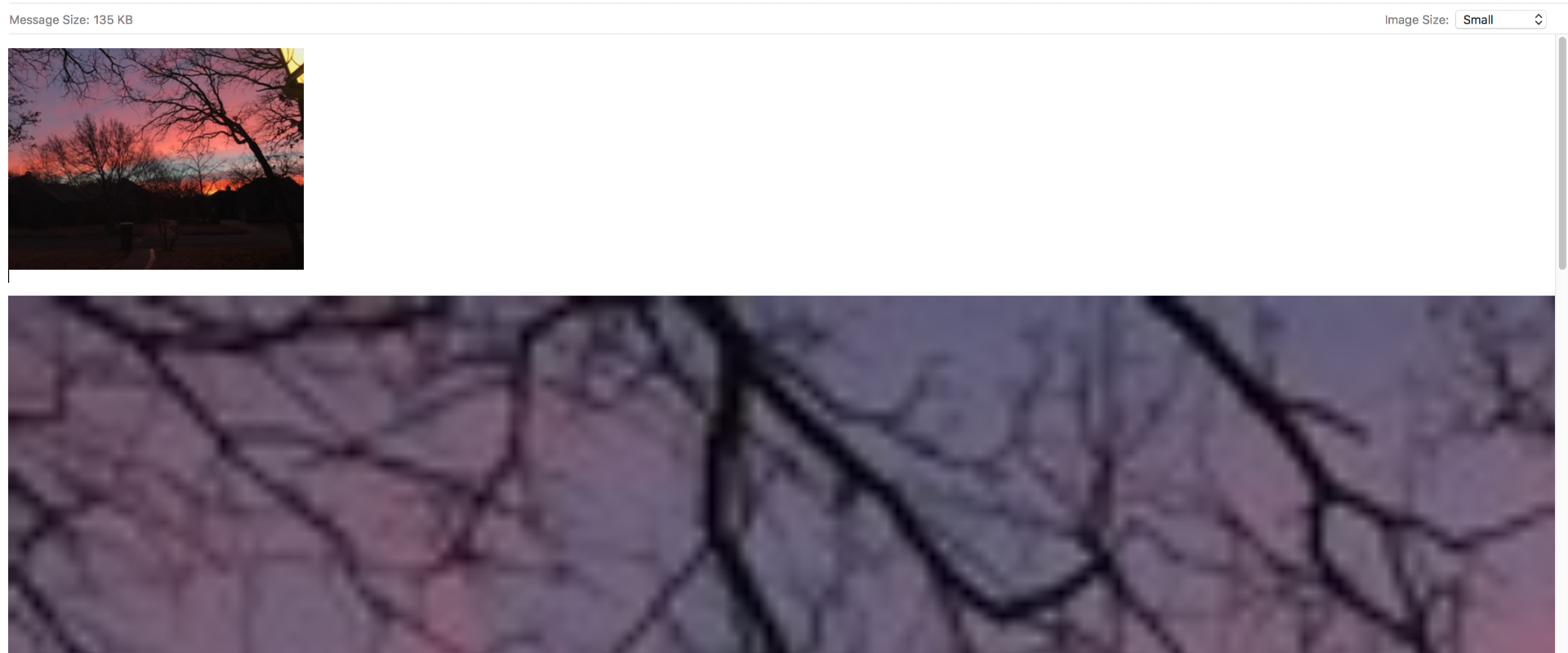
If you're sending the Mac version via the Mac Mail application, you can change the "Image Size" of any attached image.
Small
Medium
Large,
or...
Actual Size.
Any image placed within Signature, also gets affected by this Image Size Option.
Example (attached): Same photo in the Signature as placed manually.
Notice the Image Size option at the top right.
When it's on Small, the placed inline image gets 'shrunk' down visually, as well as file size. But the signature file is still the same visual, on screen size, but the quality/file size is reduced, thus the blurriness.
It's probably a matter of exporting at the right DPI and pixel size. But what the 'standard' email width is, I don't know.
Copy link to clipboard
Copied
Atleast double the resolution (72 dpi to 300 dpi is what many use) of your signature, then use html or your email editor to scale.
You can also look as using .svg as an option, but need to redesign within .svg limitations.
Copy link to clipboard
Copied
The problem with making the DPI higher is that the image size becomes bigger. I'm already at over 100kb with this one.
I've been scaling to 200% then scaling back down in the email, that seems to be working OK but it's not really a viable solution, it's a bit of a hack job!
I think i'm going to have to look into doing this via script, however this is a financial company so everything is on lock down - won't be fun!


Find more inspiration, events, and resources on the new Adobe Community
Explore Now
 AdChoices