
Participating Frequently
February 8, 2024
Question

Images replaced with ugly black boxes in Illustrator

  • February 8, 2024
  • 3 replies
  • 644 views

Hi

I wanted to edit my artwork in Illustrator that I created some time ago. When I opened the file, there, instead of embedded images I found 3 black rectangles and I have no idea how to get my images back - I tried to export it as jpeg hoping that it only looks this ugly in Illustrator, but the jpeg also has these 3 awful boxes instead of my lovely images.
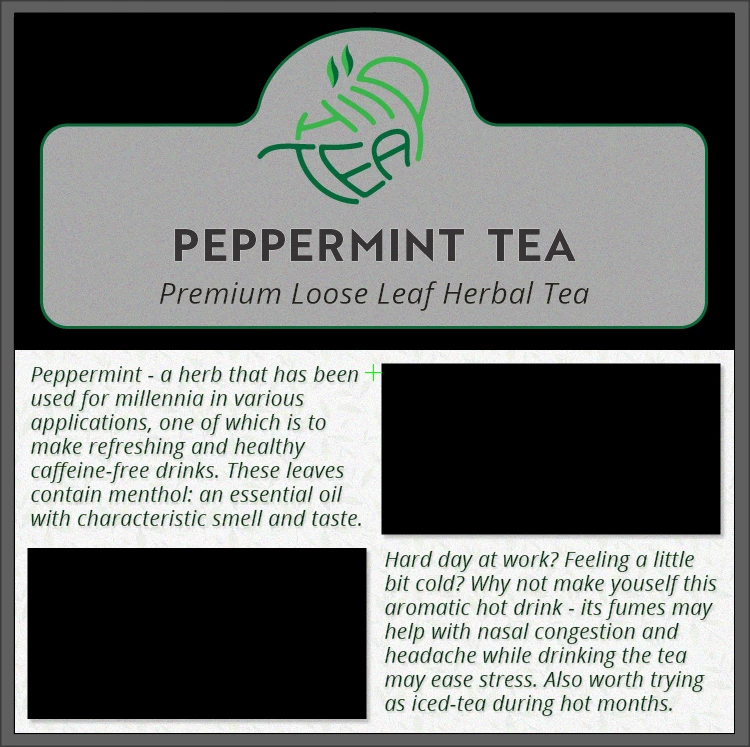
    This topic has been closed for replies.

    3 replies

    Ton Frederiks
    Community Expert
    Community Expert
    March 2, 2024

    Can you relink the images?

    Participating Frequently
    March 4, 2024

    I could if I could find them. But, first of all I want to understand why such thing has happened, whether it's Illustrator or maybe my computer?

    Ton Frederiks
    Community Expert
    Community Expert
    March 4, 2024

    According to the file info they were in your downloads folder:

    <stRef:filePath>C:\Users\Grzegorz\Downloads\bunch-fresh-mint-female-hands.jpg</stRef:filePath>

    Kurt Gold
    Community Expert
    Community Expert
    February 8, 2024

    Are you talking about an Illustrator file (.ai) with embedded images?


    If so, can you share this file?

    Participating Frequently
    March 2, 2024

    Sorry for the late reply, I had lots to do.

    File attached. However, I couldn't attach .ai file because I got the error "The attachment's filename.ai content type (application/postscript) does not match its file extension and has been removed."  - no idea why.

    So, I have made a PDF file with 'Preserve Illustrator Editing Capabilities', I hope that's ok.

    Brad @ Roaring Mouse
    Community Expert
    Community Expert
    March 2, 2024

    Yah, your embedded images are now just "black". Why this happened, I do not know. You will need to relink the files from their original source files.


    btw. your file is in RGB; Is that the mode it wa sin originally?

    If you are missing the original link files, but you have a high-res print PDF from that previous time, you should be able to extract them from that in a pinch. (If you do you have a sample legacy PDF from the previous time can you upload that here?)

    John T Smith
    Community Expert
    Community Expert
    February 8, 2024

    You need to ask program questions in the forum for the program you are using
    To ask in the forum for your program please start at https://community.adobe.com/
    Moving from Using the Community (which is about the forums) to the correct forum