
Participant
January 11, 2021
Answered

Import d'image photoshop dans illustrator

  • January 11, 2021
  • 3 replies
  • 690 views

Bonsoir

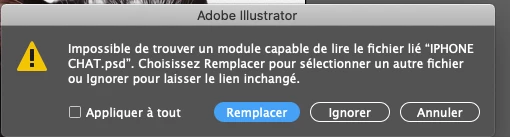
J'ai un souci lorsuqe j'importe une image photosphop dans illustrator que je fais une modifications à nouveau dans l'image… la mise à jour ne se fait pas… et illustrator refise d'importer l'image… j'ai à chaque fois un message d'erreur… Qulequ'un a t'il déjà rencontré ce problème et pourrait m'aider ?

Merci d'avance.MA
This topic has been closed for replies.
Correct answer barbara_a7746676

For some reason, Illustrator cannot find the linked Photoshop file. That could happen if the Photoshop file is on a network.

If the Photoshop file is stored locally on your computer, re-linking to the original Photoshop file might solve the issue. You can choose that command from the Links panel menu. 

If that doesn't do it, you may need to uninstall and reinstall Illustrator using the Adobe CC Cleaner Tool. 

https://helpx.adobe.com/creative-cloud/kb/cc-cleaner-tool-installation-problems.html

3 replies

barbara_a7746676
Community Expert
Community Expert
January 21, 2021

When you placed the Photoshop file into Illustrator, did you check the 'link' check box?

mawaymelAuthor
Participant
January 21, 2021


When I placed the Photoshop file into Illustrator, I check that is a 'link' in check box… there is link box…


barbara_a7746676
Community Expert
barbara_a7746676Community ExpertCorrect answer
Community Expert
January 21, 2021

For some reason, Illustrator cannot find the linked Photoshop file. That could happen if the Photoshop file is on a network.

If the Photoshop file is stored locally on your computer, re-linking to the original Photoshop file might solve the issue. You can choose that command from the Links panel menu. 

If that doesn't do it, you may need to uninstall and reinstall Illustrator using the Adobe CC Cleaner Tool. 

https://helpx.adobe.com/creative-cloud/kb/cc-cleaner-tool-installation-problems.html

Ton Frederiks
Community Expert
Community Expert
January 21, 2021

Is it an 8 or 16 bit Photoshop file?

mawaymelAuthor
Participant
January 21, 2021

It is 8 bit Photoshop file

barbara_a7746676
Community Expert
Community Expert
January 11, 2021

Not being a French speaker it is hard for me to completely understand the issue. However, it seems like the error message is saying that the image you are trying to update was imported or placed into Illustrator from an iPhone.

If the image is pasted into Illustrator, Illustrator would not be able to update the image. If the image is on a different device than the one you are using to work on Illustrator, the image would not be able to update.

Does the image appear in the Links panel in Illustrator? If it has a little icon that looks like this (below) in the Links panel, then it was pasted into the Illustrator file and you would need to link it to the original file.

Perhaps you can supply more details that might be helpful in troubleshooting the issue.

mawaymelAuthor
Participant
January 21, 2021

Thanck you a lot for your reply but I still have the same probleme today…

The image appear in the Links panel in Illustrator… each time I want to update a picture from photosphop to illustrator, I have the error message… the picture don't come frome my phone … (the tittle picture).


 I was wondering if the probleme didn't came from photoshop, so I update photoshop 2020…

If you can help me, I would be really happy !
