
Participant
June 21, 2021
Answered

Importing PDF to Illustrator, fonts displayed as boxes with and X

  • June 21, 2021
  • 10 replies
  • 25049 views

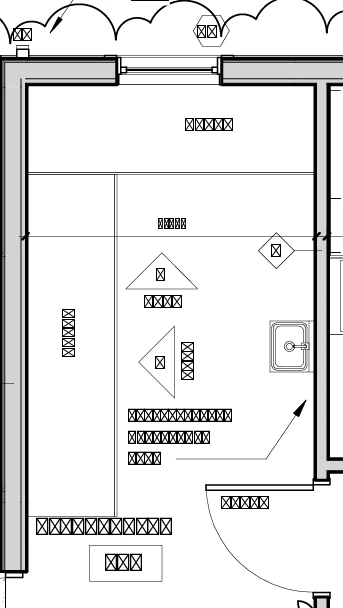
When I import certain PDFs in illustrator i get a cant't find text error and all the text displays like the picture below. i have tried adding the fonts to illustrator but that did not work


Correct answer VIJAY31886376ivs5

1. open file in adobe acrobat pdf reader

2. go to MENU>Doucment Properties>Fonts

you will see what are the fonts used in it, and install all those fonts

and then open the pdf in Illustrator

10 replies

Participant
June 17, 2025

I have done  it with the Print option. Just created a  new pdf via print. Information of font is lost, but at least the text is in illustrator as vektor visible. 

audreyb64095289
Participant
June 21, 2024

Here is an alternative solution:
Open the file in Acrobat Reader. From the menu > Export a PDF > Encapsulated PostScript > Save.
It will create a file for each page in your pdf (if you have 15 pages in your pdf, you should have 15 .eps files). Then, find the page you want to open in Illustrator, right-click on it > Open with > Adobe Illustrator. I should display the original text as seperate objects. 

Brad @ Roaring Mouse
Community Expert
Community Expert
June 21, 2024

Depends. The issue is that the program that originally created the PDF subsets the fonts (which is by design; this keeps the resulting file smaller). In doing so, it can create a custom encoding for certain subset fonts. This is why it cannot be read in Illustrator (or ANY vector program that can open PDFs)... it wasn't meant to be. PDF is not an exchange format, it's purely an output format. When you open such a file in Illustrator, even if you have the font that was originally used installed on your system, it's character codes will not match up with the subset's codes, hence gibberish or boxes, and there is NO way it can know what it's supposed to be. Even if you export this as EPS, that custom encoding will carry through. That being said, some fonts DON'T reencode in PDFs, so they would open fine, but many of the newer ones do. Illustrator converts the ones it cannot decode into Outlines. At least this maintains the look of the PDF if not the editability.

VIJAY31886376ivs5Correct answer
Participant
October 28, 2023

1. open file in adobe acrobat pdf reader

2. go to MENU>Doucment Properties>Fonts

you will see what are the fonts used in it, and install all those fonts

and then open the pdf in Illustrator

Participant
February 3, 2023

Open the PDF with Acrobat. Export to > Encapsulated Postscript. Import to Illustrator.  Unfortunately, all font will be converted to outline, but at least they are all readable and not X boxes.

Monika Gause
Community Expert
Community Expert
February 3, 2023
quote

Open the PDF with Acrobat. Export to > Encapsulated Postscript. Import to Illustrator.  Unfortunately, all font will be converted to outline, but at least they are all readable and not X boxes.


By @Brian23603149szij


If you want to outline your fonts, you do not need Acrobat.

Place (linked) the PDF in Illustrator.

Object > Flatten transparency. Check "Outline fonts"

Participating Frequently
September 28, 2022

Editing a PDF in Illustrator has limits and its not wise to do. Best is to stick with Acrobat and that also for straight forward changes. Otherwise, you just need to re-source the data which is not optimial either. Bottom line Illustrator is not a PDF editor; that's why you want to use Acrobat.

Participant
September 27, 2022

I am having the same issue! Did this ever get resolved?

Monika Gause
Community Expert
Community Expert
September 27, 2022

It probably won't, because PDF were never meant to be edited. It's just not in their structure. WHen importing a PDF, you get what you get.


https://prepression.blogspot.com/2014/09/the-ten-commandments-of-pdf.html

Community Expert
September 27, 2022

Some of those commandments for using PDFs crash against the even harder wall of reality when users such as myself have to deal with customer provided "artwork."

I have lost track of how many times I've had to go online to harvest vector logos out of company PDFs because the company's reps fail over and over again to send proper art files. 99% of the time the client will grab the first dopey JPEG or PNG image they find on their computer. Then they get annoyed when I can't use that trash. On follow-up attempts at providing "vector artwork" they often place the same JPEG or PNG image inside a PDF, AI or EPS container. Yeah, that doesn't work.

Harvesting company logos out of PDFs takes far less time than it does to manually re-create the logo in vector form over the top of a pixel-based image locked down on a lower layer. No matter how hard you try to do a good job with the conversion it will never be as accurate as having the authentic corporate artwork.

I've had to use the flatten transparency trick in Illustrator when a customer's PDF-based artwork had live fonts I didn't also possess. I've had to place and then break open the contents of PDFs to grab images or other assets that were less bad than the individual art files the client was sending.

There is such an overwhelming amount of bad practices routinely used in the trenches of the graphics world today. More often than not quick and dirty is the standard. Some of the problem is due to self-taught users who don't know any better. I've witnessed people who've taken graphics courses doing the same thing. Some of it is basic laziness or they just don't care about the details. Any way to get the job done as fast as posssible is the best route, even if the end result is garbage.

Participant
May 17, 2022

I also open architectural PDF's in Illustrator and have this problem with X-Boxes.  I had luck with opening the PDF in Adobe Acrobat, and resaving the file using "Save as other".  In that menu, there are 3 choices at the bottom:  Archivable (PDF/A), Press Ready (PDF/X), and PDF/E.  Try resaving in each format, and sometimes it works, sometimes it doesn't but I've been have some luck doing this.

Participating Frequently
December 6, 2022

If you don't need to edit the text, saving as an EPS works too. However, this method sometimes turns the text to outlines - I've not found any consistency as to when or why. (Hence the "editable text" caveat.)

XZ315
Participating Frequently
May 13, 2022

I recently had a similar issue and worked around it it by re-printing the PDF to PDF from Acrobat Pro using the Adobe Print to PDF driver.  After that, the file displayed the proper glyphs when opened in Illustrator, although they were converted to outlines.  As usual, this had the unfortunate effect of creating a thousand clipping masks/groups and making it take an enormous amount of time to edit the file.  I have not yet found a true solution.


It would be optimal if Adobe released a new program designed specifically to edit vector PDFs created in CAD programs.  It's been a few decades and it's now clear that there's zero hope for Illustrator ever being able to properly handle CAD PDFs so they should just make a new product for it at this point.

Community Expert
December 27, 2021

The PDF files may have been generated using different font builds of Myriad and Minion. Does the text in the PDF need to remain editable? If not you can use the Flatten Transparency trick to convert embedded fonts to outlines. What you do is place the PDF into a new document, but be sure to click the "link" button when doing so. Then you can use the Flatten Transparency command dialog box to convert the embedded fonts to outlines.

Participating Frequently
December 27, 2021

Well, I'm trying to edit the pdf (which was originally a .dwg file). I want to remove certain lines and edit some of the text. Though I could delete old text labels and replace them with new ones. I tried to use Flatten Transparency but nothing happened. What is perhaps a greater issue is how slow Illustrator is at handling this file. Is there something I can do to the pdf in Acrobat that will make it easier to maneuver? Here are the file properties:


Community Expert
December 27, 2021

When you placed the PDF into an Illustrator document as a linked file were the font objects visible or did they still appear as boxes with "X" through them? Is the lettering visible if the PDF is viewed in Adobe Reader? If the lettering is visible does it allow you to select it with a text editing cursor? That would indicate embedded fonts. If the fonts were converted to outlines you should be getting outlined lettering when the PDF is placed or opened in Illustrator. The problem is making me wonder if the text objects weren't rasterized or even disregarded by the application that created the PDF.

Larry G. Schneider
Community Expert
Community Expert
June 21, 2021

What font is it supposed to be? On what OS was the PDF generated? 

Participating Frequently
December 27, 2021

I'm having this same problem. The PDF was generated by a company in Germany in Windows and is based on a CAD .dwg file. The fonts are supposed to be Myriad and Minion, both of which are enabled in Illustrator. I can get the fonts to display if I 'Place' the file, but then I cannot select individual elements.

Monika Gause
Community Expert
Community Expert
December 27, 2021

What happens when you turn on the Missing glyphs protection in the Illustrator preferences before opening the PDF?