
Denise5F95
Participant
November 7, 2022
Answered

In my Swatch Panel there is an option of User Defined but it is grayed out & I can't find it

  • November 7, 2022
  • 2 replies
  • 2704 views

In my swatch Panel there is a User Defined option but mine is grayed out. How do I locate it or access it?

 

This topic has been closed for replies.
Correct answer CarlosCanto

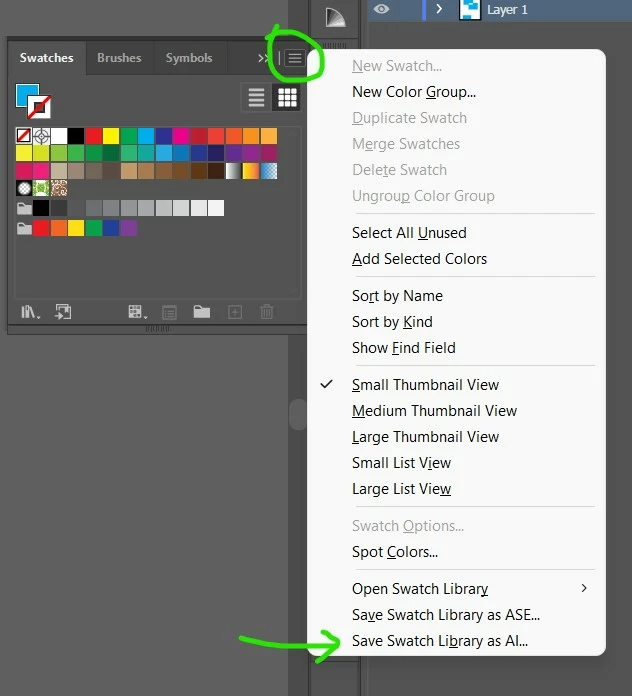
as Monika mentioned, you need to save your user defined swatches first, then the button will be available
 

2 replies

Participating Frequently
December 24, 2024

It's been years but I hope you found a solution because it is not here

Participating Frequently
December 24, 2024

My problem was that I had fill selected instead of stroke, once I switched to stroke I was allowed to save. Without saving a seperate file for the swatches to live in btw. You only need to do that if you would like to bring up a swatch library later, not for simply making them in a file.

Participating Frequently
December 24, 2024

After that I could save from either the fill or stroke, seems like a simple bug on my end.

Monika Gause
Community Expert
Community Expert
November 7, 2022

You mean the option in the menu?

It will be active once you have saved a custom swatches library into the default location in your user folder.

Denise5F95
Participant
November 7, 2022
If you go to Swatches when it opens down at the bottom left corner there is
an icon that looks like books If you open it & go to the bottom of the list
there is a user Define option. I have saved all my swatches in there but it
has disappeared/grayed out & can't be opened. How do re-activate it or
locate it?
Monika Gause
Community Expert
Community Expert
November 7, 2022

Has there been an Illustrator update?

And you didn't migrate your settings?

In that case you could search for the swatches in your folders. Here are the locations: https://www.vektorgarten.de/illustrator-settings.html