
In need of very particular randomly scattered pattern fill
Hello. I’m new to this Forum, but consider myself familiar with Illustrator.
I’m after a semi-random fill utilising variations of the same shape. I’m good with repeat patterns but this needs to be lacking in some of the consistency that would come with those. I’ve just discovered the scatter brush, which I believe is almost the solution, but not quite with my skillset.
I need a random pattern to spread far across two axes (as opposed to the Scatter brush’s following a one directional path). The objects in the pattern can only be slightly skewed, rotated, rescaled, must be within certain distances of each other without overlapping and need to vary between being in an almost (inconsistent) grid formation and also inconsistent bricks and random placements. I do not know how to accomplish this.
Here are the most favourable brush parameters I could find to partially achieve this: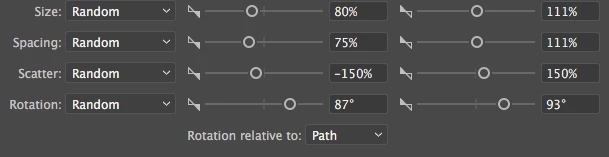
I then need to apply a custom envelope distort and duplicate the efforts with a different but similar object, with all the same placements. I need the duplicate so I can mask an underlayer that needs to give extra room for the original pattern. I do not know if it is possible to perfectly replicate the placement of something initially random.
Here is an example of the difference in base shape comparing both side by side, and one with the original layer on top. It will just be a slightly larger, simpler outline:
The much simpler pattern underlayer I’m masking I’d describe as: random blotches of organic looking vectoral noise, varying in length. I have some ideas on how to achieve this but I’d still love a suggestion.
These effects, I need to repeatedly do to the same pattern, so I can fill the random placement into several shapes. But I was hoping to find a (non manual) way so that the base shapes are not clipped apart within the external shapes and are rather completely deleted.
I’m guessing this is quite a complicated question, so thank you for reading.
 AdChoices