
Participant
June 1, 2017
Question

Inconsistent color when printing in Adobe Illustrator

  • June 1, 2017
  • 2 replies
  • 534 views

I am trying to print a CD cover with the same solid orange color throughout, and I keep having issues. Hopefully you can see in the image below that there appears to be dark and light orange lines running throughout the print vertically, and I noticed that tiny white lines also appear. I've tried many things to fix this, but I'm not super knowledgeable with the Adobe Illustrator application, so any help is appreciated. I checked the printer - which is a Canon Pixma -  to make sure the ink was working properly, and based on the tests I’ve done, it is.

If you need more information, please let me know.
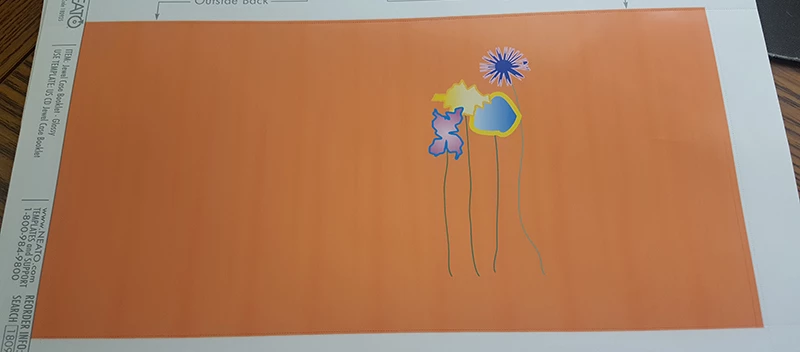
    This topic has been closed for replies.

    2 replies

    John Mensinger
    Community Expert
    Community Expert
    June 1, 2017

    Surely this is a mechanical ink application/substrate issue. Illustrator simply defines a color; there is nothing in Illustrator that happens or can be adjusted programmatically to cause or remedy that problem.

    gihonf73014638  wrote

    I checked the printer - which is a Canon Pixma -  to make sure the ink was working properly, and based on the tests I’ve done, it is.

    What kind of tests? Have you tried the same artwork with a different background fill color? Different paper?

    Participant
    June 1, 2017

    I'm also using the same type of paper I've used before, which is a Jewel Case Tray Liner - glossy from Neato products.

    Mike_Gondek10189183
    Community Expert
    Community Expert
    June 1, 2017

    I am seeing some dark vertical blob shapes.

    Are  you using the correct type of paper, those patterns do not look digital but more organic shapes from ink absorption on cheap paper. If you have small white lines, then running a nozzle check pattern and if the test has break in the liens, then do a nozzle cleaning form the control panel on your printer.

    Participant
    June 1, 2017

    I can try and do a nozzle check again. I did cleaning, deep cleaning, and nozzle check. The ink looked fine on those tests. This printer was being used on a different computer and also with Adobe Illustrator, and I haven't run into issues with this until I switched the printer to the computer I'm using now.

    Mike_Gondek10189183
    Community Expert
    Community Expert
    June 1, 2017

    Which model Pixma is this?

    Small run digital printing jobs are so inexpensive now, might cost you about as much as the inks & paper for the Pixma.