
Participating Frequently
October 12, 2022
Question

Incorrect dimensions in 'info' panel

  • October 12, 2022
  • 4 replies
  • 1072 views

Hello.


Have tried to resolve this with Adbobe support who were useless and insisteed on wanting remote access to my work laptop.


In Illustrator 2022 - if I select a rectangle that is clipping a photograph, the dimesnions in the info panel are incorrect and show the dimesnions of the placed photograph, not the bounding box.


The dimensions in the 'properties' panel are correct.
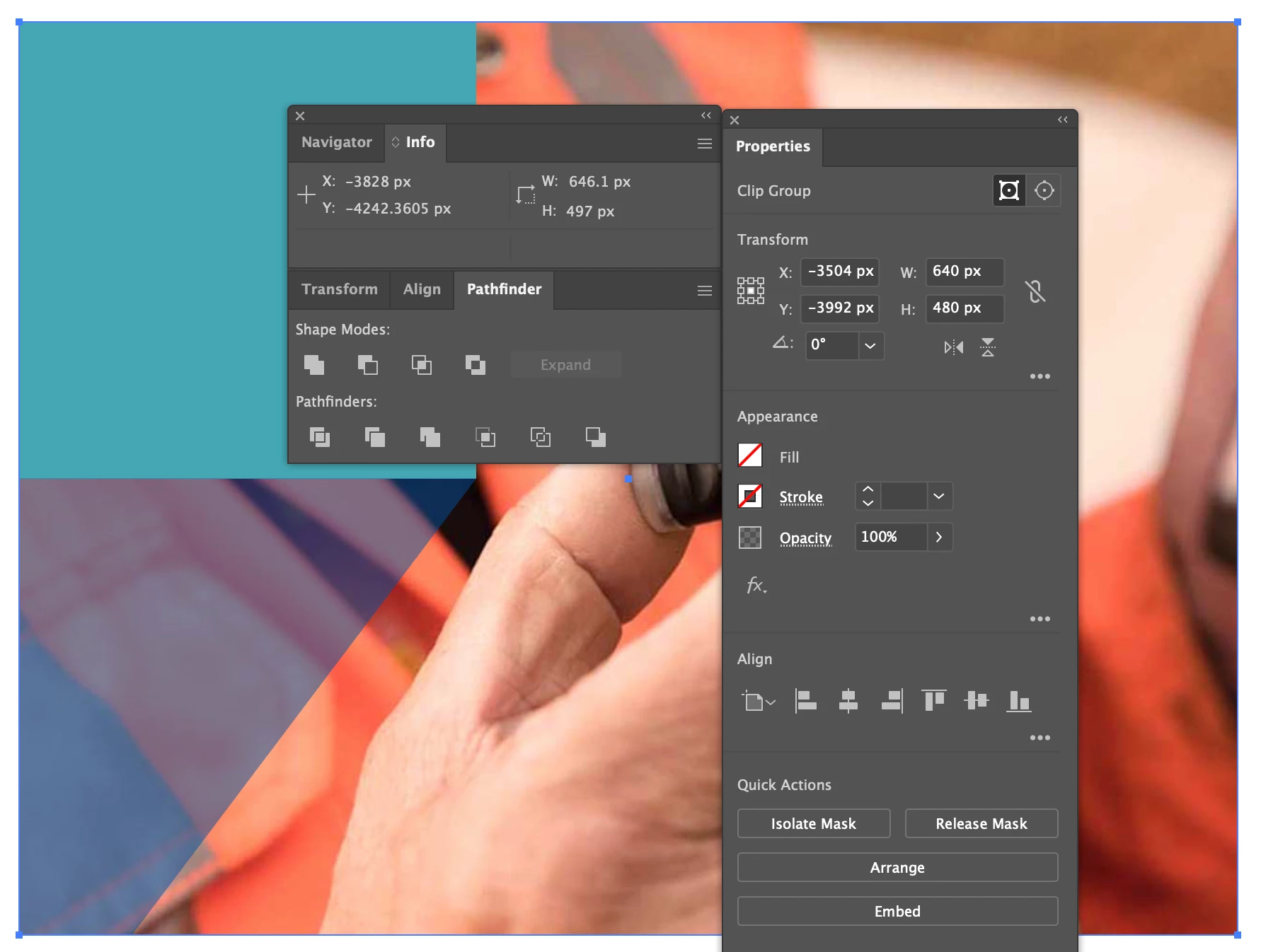


Have tried resetting the preferences and restarting my machine, as per adobe support suggestions - but the issue is still there.


How can I get these two dimensions to be consistent. 


Thanks.


This topic has been closed for replies.

4 replies

Participant
August 16, 2024

Runnin Illustrator 2024 and this is still a problem.  Why is the Info panel not resizable?  Also, it's not rendering correctly in the UI... 


Anubhav M
Community Manager
Community Manager
August 16, 2024

Hello @petemanpeteman,

We understand that encountering technical issues can be frustrating. Would you mind sharing some more details, like the exact version of the OS/Illustrator and the exact details of your workflow, including a screen recording of the problem (https://adobe.ly/3SNB00f), so we can investigate this further?

Looking forward to hearing from you.


Thanks,

Anubhav

pixxxelschubser
Community Expert
Community Expert
October 12, 2022

Hi @iana47686319 

do not try to click on the "layer" in Layers Panel - click on the small rectangle to the right of the clipping path rectangle in the Layers Panel instead.


Or try the following workaround:

  1. click on your clipping group (directly on the canvas) with the selection tool.
  2. open the Layers Panel
  3. use the magnifying glass icon at the bottom of the Layers Panel to find the group in the layer hierarchy
  4. click on the small rectangle to the right of the clipping path rectangle name (you could call it a layer - but it is not)


Info and Properties Panel shows the same values.

Participating Frequently
October 12, 2022

Thanks those worked.

pixxxelschubser
Community Expert
Community Expert
October 12, 2022

Please try to open the Layers Panel and select the clipping rectangle there. What happens?

Participating Frequently
October 12, 2022

I have to find it in isolotation mode as there are many layers, but selecting between the cliping path layer or linked file layer in the layers panel doesn't select the layer on the artwork / change the info panel. Is that normal, seems that clicking a layer should select it on the canvas?

Ton Frederiks
Community Expert
Community Expert
October 12, 2022

Using the Direct selection tool on the clipping mask will give the correct info of the clipped object.

You may want to do a feature request here:

https://illustrator.uservoice.com/

Participating Frequently
October 12, 2022

Hi Ton.


The direct selection tool seems to give me the dimension of the clipped image, not the bounding box, as below:

Ton Frederiks
Community Expert
Community Expert
October 12, 2022

Thanks Ton, smart guides makes it workable.


Is this a regression / change in illustrator - don't ever remember the info panel being incorrect before.


I cannot check older versions than 2021, they behave the same. But I hardly ever use the Info panel, mostly use the Transform panel because it gives the info and let me change it.