



CarlosCanto
Community Expert
Community Expert
November 14, 2011
Question

Introducing: Insert Page Numbers

  • November 14, 2011
  • 10 replies
  • 75035 views

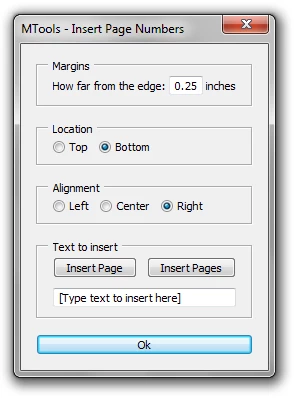
Hi all, about three weeks ago a user asked about something like this, I thought it was a good idea to have it scripted.

Have a use for it? Let me know if there are questions, bugs...
#target illustrator

// script.name = UI_insertPageNumbers.jsx; // works with CS4 & CS5

// script description = Inserts page numbers (or any other text) to all artboards in the active document;

// script.required = at least one open document

// script.parent = CarlosCanto // 11/14/11;

// script.elegant = false;

// Notes: The script creates a new layer (Page Numbers) then adds a text frame per Artboard that act as footer or header text.

//                     Its primary function is to insert Page Numbers, but it could be used to insert any other kind of information.

if (app.documents.length > 0) // continue if there's at leat one document open

    {

                    // start building User Interface

                    var win = new Window("dialog","MTools - Insert Page Numbers");

                    var panelMargins = win.add("panel", undefined, "Margins");

                    var lblMargins = panelMargins.add("statictext",undefined,"How far from the edge:");

                    var txtMargins = panelMargins.add("edittext",undefined, 0.25);

                    var lblUnits = panelMargins.add("statictext",undefined,"inches");

                    var panelLocation = win.add("panel", undefined, "Location");

                    var radTop = panelLocation.add("radiobutton",undefined,"Top");

                    var radBottom = panelLocation.add("radiobutton",undefined, "Bottom");

                    var panelAlignment = win.add("panel", undefined, "Alignment");

                    var radLeft = panelAlignment.add("radiobutton",undefined,"Left");

                    var radCenter = panelAlignment.add("radiobutton",undefined, "Center");

                    var radRight = panelAlignment.add("radiobutton",undefined, "Right");

                    var panelFooter = win.add("panel", undefined, "Text to insert");

                    var grpPages = panelFooter.add("group");

                    var btnPage = grpPages.add("button",undefined,"Insert Page");

                    var btnPages = grpPages.add("button",undefined,"Insert Pages");

                    var txtFooter = panelFooter.add("edittext",undefined, "[Type text to insert here]");

                    var btnOk = win.add("button", undefined, "Ok");

                    radRight.value = radBottom.value = true;

                    win.alignChildren = panelFooter.alignChildren = "fill";

                    panelMargins.spacing = 3;

                    panelMargins.orientation = panelLocation.orientation = panelAlignment.orientation = "row";


                    win.helpTip = "Coded by CarlosCanto";

                    btnPage.helpTip = "Adds *page* keyword, it represents a single page";

                    btnPages.helpTip = "Adds *pages* keyword, it represents total number of pages";

                    txtFooter.helpTip = "Type \r\t'Page *page* of *pages*' \rto get \r\t'Page 1 of 3' \rfor example";


                    //-----------------------------------------------------------------------------------------

                                                            btnOk.onClick = function(){

                                                                      doSomething(); // call main function

                                                                      win.close(); // close when done

                                                             }

                    //-----------------------------------------------------------------------------------------

                    //-----------------------------------------------------------------------------------------

                                                            btnPage.onClick = function(){

                                                                      footer("*page*");

                                                             }

                    //-----------------------------------------------------------------------------------------

                    //-----------------------------------------------------------------------------------------

                                                            btnPages.onClick = function(){

                                                                      footer("*pages*");

                                                             }

                    //-----------------------------------------------------------------------------------------

                                                            win.center();

                                                            win.show();


                    //-----------------------------------------------------------------------------------------

                    function footer (page) //

                              {

                                        txtFooter.text = txtFooter.text + page;

                              }

                    function doSomething()

                              {

                                        //alert("I'm doing something");

                                        var idoc = app.activeDocument;

                                        var ilayer = idoc.layers.add();

                                        ilayer.name = "Page Numbers";

                                        var pages = idoc.artboards.length; // number of artboards

                                        var footerPages = (txtFooter.text).replace("*pages*",pages); // replace the "*pages*" keyword with the actual number fo pages (artboards)


                                        var margins = Number(txtMargins.text)*72; // get margins in points

                                        //$.writeln(margins);


                                        for (i = 0; i<idoc.artboards.length; i++) // loop thru all artboards, and add input text from UI

                                                  {

                                                            footerPage = footerPages.replace("*page*",i+1); // replace "*page*" keyword with the actual page Number

                                                            var itext = ilayer.textFrames.add();

                                                            itext.contents = footerPage; //"page 1 of 1";

                                                            var fontSize = itext.textRange.characterAttributes.size;


                                                            var activeAB = idoc.artboards;

                                                            var iartBounds = activeAB.artboardRect;


                                                            var ableft = iartBounds[0]+margins;

                                                            var abtop = iartBounds[1]-margins;

                                                            var abright = iartBounds[2]-margins;

                                                            var abbottom = iartBounds[3]+margins+fontSize;


                                                            var abcenter = ableft+(abright-ableft)/2;


                                                            if (radRight.value == true)

                                                                      {

                                                                                //var msg = "right";

                                                                                itext.left = abright;

                                                                                itext.textRange.paragraphAttributes.justification = Justification.RIGHT;

                                                                      }

                                                            else if (radCenter.value == true)

                                                                      {

                                                                                //var msg = "center";

                                                                                itext.left = abcenter;

                                                                                itext.textRange.paragraphAttributes.justification = Justification.CENTER;

                                                                      }

                                                            else

                                                                      {

                                                                                //var msg = "Left";

                                                                                itext.left = ableft;

                                                                                itext.textRange.paragraphAttributes.justification = Justification.LEFT;

                                                                      }

                                                            if (radTop.value == true)

                                                                      {

                                                                                var msg = "top";

                                                                                itext.top = abtop;

                                                                      }

                                                            else

                                                                      {

                                                                                var msg = "bottom";

                                                                                itext.top = abbottom;

                                                                      }

                                                  } // end for loop thru all artboards

                              } // end function doSomething();

     }

else

    {

        alert ("there's no open documents");

    }

This topic has been closed for replies.

10 replies

Participant
July 31, 2017

This also works for CC. Just remove the first 3 lines. Good work Carlos!

runninghead_design
Inspiring
June 11, 2019

Tried it- it's great! Still works in CC2019 with the #target... and next two blank lines commented out like so:

// #target illustrator...

//

//

LeoMari-eL6mBl
Inspiring
February 11, 2016

I need to do the same with Indesign. It's possible?

Doug A Roberts
Community Expert
Community Expert
February 11, 2016

it's built-in in Indesign and very flexible.see here:

Add page numbering to your pages in Adobe InDesign

LeoMari-eL6mBl
Inspiring
February 11, 2016

Yes, I do like that. I work with textbook and want to page numbers and letters automatically, with script.

o2_Studios
Known Participant
August 3, 2015

Awesome! So appreciated. Why this isn't a built-in function to any program that has multiple pages / artboards is beyond me. Thank you!

Participant
May 4, 2015

YES! Thank you!

Participant
February 18, 2015

HI Carlos,

Thanks for this script. Awesome and has saved me large chunks of time today and, no doubt, in the future.

CarlosCanto
Community Expert
Community Expert
February 18, 2015

you're welcome, you should try a newer version in post # 18

lurkerX
Participant
September 2, 2014

Thank you so very much Carlos! This is pure gold. Already saving me hours : )

CarlosCanto
Community Expert
Community Expert
September 3, 2014

you're welcome, there's a newer version of this script (link in post #18).

what are you using the script for?

Participant
October 6, 2014

Hello there, this seems awefully useful! 

Unfortunately i can't seem to make it work in applescript; and textedit doesn't want to accept a .jsx or .scpt suffix...

the formatting of the script seems to not be accepted by applescript...  a repeated "syntax error" message springing up at each save.

It seems to be relative to the returns being represented by // and the use of periods and certain nominative things (it recognized CS5 but not CS4, bizarrely)...  Am I missing a glaringly obvious step?

Thank you for any response!

Davel-SD
Participant
May 7, 2014

Thanks for this Carlos. The script works, however, I am unable to close the window as it has no close window button and so have to force quit Illustrator, thereby making it impossible to save what this wonderful script does. I'm on a Mac, using CS6. Any ideas how to close the script window after running it?

CarlosCanto
Community Expert
Community Expert
May 7, 2014

you're welcome, press "Esc" key to close, sorry about not being clear enough.

Davel-SD
Participant
May 7, 2014

Doh! Sorry, didn't think of that. Works great! Thanks!

Participant
February 25, 2014

Thank you so much, saved me lots of time!

Participating Frequently
November 14, 2011

Hey Carlos

How do I use the script?

I did not notice a download link to where the script is located.

Paal Joachim

Participant
November 14, 2011

Paal,

All you do is open Applescript or Javascript, copy Carlos' text and paste it into your new script file. Save that in CS5's Scripts folder or wherever you want. When using the script you go to the file menu - Scripts - Other Scripts and navigate to your new script and viola!

Hope this helps

Jeff

Participating Frequently
November 14, 2011

Thanks Jeff!

I also received a reply from Carlos:

"Hi Paal, the script is the text in colors below the image, copy starting from "#target illustrator" all the way down to the last closing bracket "}", then open the ESTK or any text editor, paste it there and save it with a sugested name "UI_insertPageNumbers.jsx" or any other name. Make sure you save it with a "JSX" extension. Save it in you default "scripts" folder and it will show in the Illustrator "File->Scripts" menu, next time you restart illustrator."

I tested this out and here are some of my findings:

I pasted the code into the default TextEdit mac text editor. Format -> Make Plain Text. Saved it as a .jsx file.

Placed the file into Adobe Illustrator CS5 -> Scripting.

Reopened Illustrator. Opened a file (you need to open a file first). Looked in the File -> Scripts (it was not visible) -> Other Scripts and found the file.

A dialog box opens and you can test out how it works.

To get page numbers remove the text in the box and click Insert Page.

A follow up to this wonderful script.

What about changing the font and size of the page numbers?

Thank you for the script Carlos! Hopefully Adobe can purchase it from you and add to to the next version.

Monika Gause
Community Expert
Community Expert
November 14, 2011

I can't believe it. Works just great.

I don't susally do page layouts in Illustrator, but to number a set of logo proposals to send to the client this will come handy as well. Thanks so much.

CarlosCanto
Community Expert
Community Expert
November 14, 2011

thanks Monika

Inspiring
November 14, 2011

Do you mind if I send the link for this thread to someone at Adobe?