
Participating Frequently
June 1, 2017
Answered

Inverted/reverse perspective in Illustrator

  • June 1, 2017
  • 1 reply
  • 8420 views

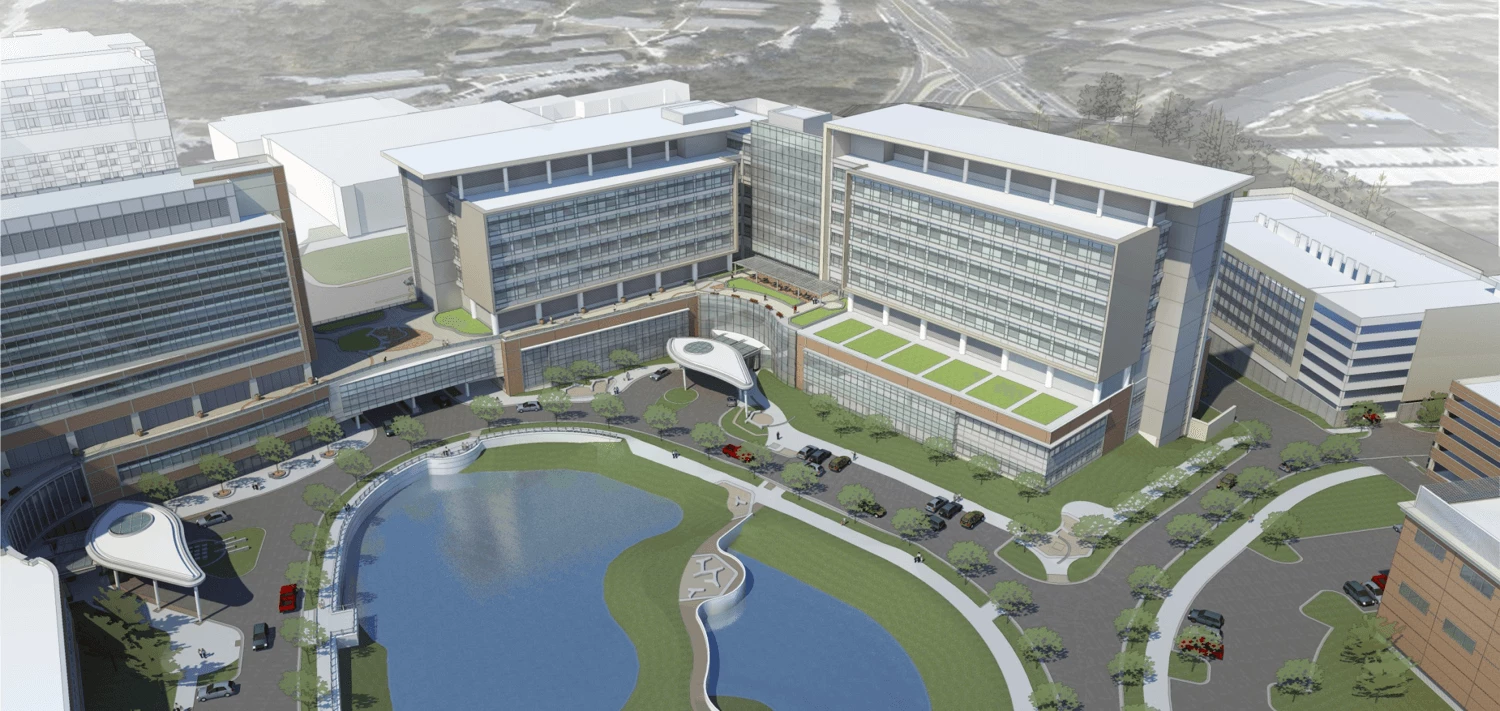
I'm trying to figure out if I can set up the perspective tool to like in the attached image. Basically, inverting the initial perspective. I've tried messing around with the horizon line, planes, etc. but can't seem to get a setup that looks like this. I know I can do it by creating 2 perspective grids and doing each side of the building on its own, but that becomes difficult to line up etc. and I'm wondering if there is an easier way? Any advice is greatly appreciated, thanks!
This topic has been closed for replies.
Correct answer Monika Gause

Thanks Myra,

I took a course on Lynda.com that taught me the ropes on the tool, I just couldn't wrap my head around how to set the various points to achieve the perspective for this particular shape. I'm still not sure that I get it completely, but Monika's image helps a lot.


There are tutorials available here:

Illustration tutorials for technical and automotive illustrators and art students

That's about perepctive drawing theory, not particularly about Illustrator's perspective grid, which is a kind of different thing working with.

And then there's this book:

https://www.gregmaxson.com/store/the-complete-technical-illustrator-pdf

1 reply

rcraighead
Legend
June 1, 2017

Build it in SketchUp and import as vector. Or just do the whole project in Sketchup.

I realize I don't know your goal, I just wonder why do something in AI that is better suited for another tool.

Participating Frequently
June 2, 2017

Thanks rcraighead,

That's a good point, but there are a number of reasons I want to do this in AI, not the least of which being that I don't have a license for SketchUp, which looks like a great program btw.

1) I am not looking to re-create this exactly, all I really need to do is create a very simplistic skeleton so I can use it for a sort of 3D map, but it only needs to be a simple perspective drawing.

2) I am a graphic designer and rarely have a need to do any 3D perspective drawings like this, so it doesn't really make sense for my company to buy a license for something like SketchUp for a one-off project.

3) I am most comfortable working in Adobe products, and I'm sure AI will be plenty sufficient for what I'm trying to do with this, I just need to know how to set up the perspective tool in the right manner, or to know if it is is indeed possible (at default the perspective comes at the viewer, sort of like if you were on the other side of the building in the photo, I'm trying to flip that inward if that makes sense?)

Thanks again for your comment, maybe someone else will have an idea of how to setup the perspective this way?

Monika Gause
Community Expert
Monika GauseCommunity ExpertCorrect answer
Community Expert
June 2, 2017

Thanks Myra,

I took a course on Lynda.com that taught me the ropes on the tool, I just couldn't wrap my head around how to set the various points to achieve the perspective for this particular shape. I'm still not sure that I get it completely, but Monika's image helps a lot.


There are tutorials available here:

Illustration tutorials for technical and automotive illustrators and art students

That's about perepctive drawing theory, not particularly about Illustrator's perspective grid, which is a kind of different thing working with.

And then there's this book:

https://www.gregmaxson.com/store/the-complete-technical-illustrator-pdf