


- Home
- Illustrator
- Discussions
- Is it possible to use AI "selection sets" in scrip...
- Is it possible to use AI "selection sets" in scrip...

Copy link to clipboard
Copied
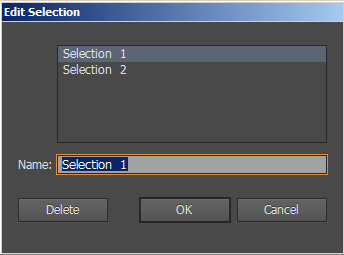
Wondering is there way to use those selection sets that found from Select menu in script?

Using this list in ScriptUI where I can select them. This would help me to use selection while I'm in "dialog" type list. Anyone have solution?


 1 Correct answer
Yay! BridgeTalk isn't most easiest and best documented case, but there is good samples. Thanks guys for keeping me on the right track 
After couple tries I got some message through BT And still with palette type window! Now this opens totally new possibilities 
...#target illustrator
#targetengine main
var script_name = "BridgeTalk Test"
var doc = app.activeDocument;
var doc_selection = doc.selection;
function btMsg() {
var bt = new BridgeTalk;
bt.target = "illustrator";
var message


Explore related tutorials & articles
 8
Replies
8
8
Replies
8



Copy link to clipboard
Copied
not directly, but you could record actions that use each selection, then you could run either action with your script, if you have CS6 or newer.
another more direct option would be to give unique names to your objects, so your script can find them and select them (or not, you don't need to select an object to work on it, just need to get a reference to it)
Copy link to clipboard
Copied
Thanks for the answer Carlos.
The reason why I would like to use those sets was to help me choose easily set of items. I have used "dialog" type window and then I cannot interact with AI UI. But I made some research and found some interesting topics. I guess there is workarounds for this type windows to get those work to use BridgeTalk if I'm right.
Like in this script example -> http://kasyan.ho.com.ua/save_psd_png_delete.html There is interaction but still can use PS UI.
Couple good articles was:
http://www.davidebarranca.com/2012/11/scriptui-bridgetalk-persistent-window-examples/
http://www.davidebarranca.com/2012/10/scriptui-window-in-photoshop-palette-vs-dialog/
I just want to use basic interaction with my document elements and still keep my script window opened. Like select all layers with text with just clicking the ScriptUI window button without get it to closed  Maybe I'll continue to research more about BridgeTalk topic. Just say if I'm on wrong way in this case
Copy link to clipboard
Copied
You're on the right track, Bridge Talk is the way to go, David e's page is an excellent resource. You can also search this forum, we have posted lots samples on the topic

Copy link to clipboard
Copied
What I experienced with BridgeTalk is summed up as learning how to write everything needed to be done inside of a function which can then be sent through bridgetalk as a string to be ran as a totally independent script, and having twice the fun because it didn't really throw any error and failed silently when working with palette.
Copy link to clipboard
Copied
Debugging is part of the fun!! Bridge Talk is tricky at first, but it's easy now that there are working samples out there
Copy link to clipboard
Copied
Yay! BridgeTalk isn't most easiest and best documented case, but there is good samples. Thanks guys for keeping me on the right track
After couple tries I got some message through BT And still with palette type window! Now this opens totally new possibilities 
#target illustrator
#targetengine main

var script_name = "BridgeTalk Test"
var doc = app.activeDocument;
var doc_selection = doc.selection;

function btMsg() {

    var bt = new BridgeTalk;
    bt.target = "illustrator";
var message = objInfo + '\r objInfo(doc_selection);';
bt.body = message;
bt.send();
}
function objInfo() {
var doc = app.activeDocument;
var doc_selection = doc.selection;
for ( i = 0; i < doc_selection.length; i++ ) {
$.writeln ( + " Hello BridgeTalk!");
}
}
startGUI();
function startGUI() {
// Create Main Window
var win = new Window( "palette", script_name);
// Style Option for main Window
win.orientation = "column";
win.alignChildren = ["fill", "fill"];
// PANEL: Objects Group
var objGrp = win.add("panel", undefined, "Objects");
objGrp.orientation = "row";
objGrp.alignChildren = ["fill", "fill"];
// BTN: Object Info
var btnObjInfo = objGrp.add('button', undefined, "Selected Objects");
btnObjInfo.onClick = function () {
btMsg();
};
// Close button
win.quitBtn = win.add("button", undefined, "Close");
// Event listener for the quit button
win.quitBtn.onClick = function() {
win.close();
}
// Centering & Show Window
win.center();
win.show();
}
Copy link to clipboard
Copied
you're welcome, thanks for posting your script, it should help future generations.

Copy link to clipboard
Copied
wow this is some bizarre syntax - but is the key for BT messaging to work, apparently:
var message = objInfo + '\r objInfo(doc_selection);';


Get ready! An upgraded Adobe Community experience is coming in January.
Learn more
 AdChoices