
Participant
October 28, 2024
Answered

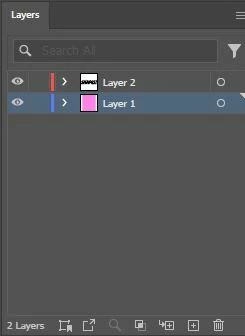
Is there a way I can see/know if a specific layer is already locked?
  • October 28, 2024
  • 2 replies
  • 881 views

Here the screenshot of a sample I'm referring to. The last layer is already locked and the first one isn't. Is there a way for me to know if a layer is locked or not. Not sure if this is a new update in Adobe Illustrator since this is my first time and I'm used to other programs that has signs/icons whenever a layer is locked.

This topic has been closed for replies.
Correct answer barbara_a7746676

If you click the small arrow to the lefrt of the layer, that will expand the layer and if there are any locked items on that layer you will see a padlock next to that item.

If the whole layer is locked you will see a padlock icon to the right of the eye icon on that layer.


There are many advantages to using layers in Illustrator. As you said, to keep things organized is one reason. It is also easier to select items and to rearrange them.

2 replies

barbara_a7746676
Community Expert
barbara_a7746676Community ExpertCorrect answer
Community Expert
October 28, 2024

If you click the small arrow to the lefrt of the layer, that will expand the layer and if there are any locked items on that layer you will see a padlock next to that item.

If the whole layer is locked you will see a padlock icon to the right of the eye icon on that layer.


There are many advantages to using layers in Illustrator. As you said, to keep things organized is one reason. It is also easier to select items and to rearrange them.

Participant
October 28, 2024

Thank you very much! I'm just confused now because why is it named "layer" if there are multiple layers within it and not have it as a group lol

barbara_a7746676
Community Expert
Community Expert
October 28, 2024

You can have multiple main layers. Each object on a main layer is considered a sub-layer.

Participant
October 28, 2024

Edit: Apparently, the 2nd layer isn't locked because I still managed to draw another shape in it. Just dismiss what I said in my earlier post. I've read other designers don't use layering that much when using illustrator but I got used to layering because I want it organized.