Chris  P.  Bacon
Inspiring
December 12, 2022
Answered

Is there any way to transfer a path or selection from Illustrator to InDesign?

  • December 12, 2022
  • 2 replies
  • 1146 views

I tried all clipboard handling settings in both apps and also by placing stuff as AI, but I only get a rectangular frame in InDesign, not any original freehand path as it was in Illustrator.

This topic has been closed for replies.
Correct answer Chris P. Bacon

 I would, but I can't get InDesign to produce that kind of object. When I paste, it's a path.

Please show us the layers panel.


I found the solution:

Freehand paths and shapes pasted into InDesign, some of them filled with text in InDesign:
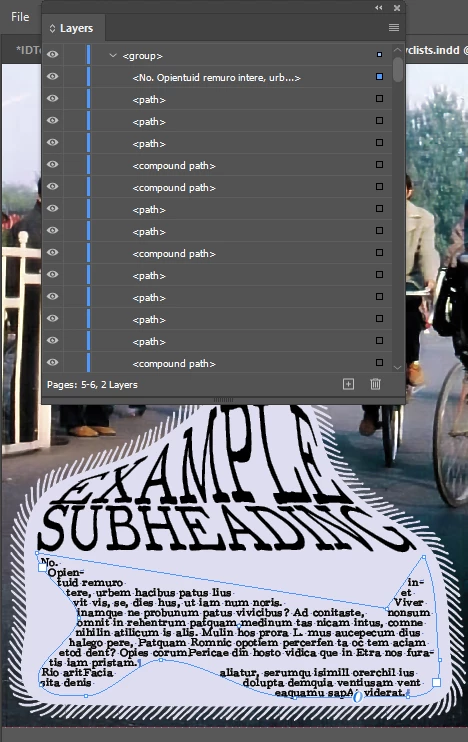
It seems that the key was my clipboard handling settings and that I needed to ignore text wrap for the text frame when it was selected with the directs election tool in InDesign, and the text shape was brought over as a shape with fill not as a text shape, I made it a text shape in InDesign by clicking it with the text tool, I don't remember how I removed the fill of it. But I could remove it.


 

2 replies

Met1
Legend
December 12, 2022

How are your Clipboard Handling prefs set up?

Chris  P.  Bacon
Inspiring
December 12, 2022

With these settings I have active freehand paths transferred over from Illustrator to InDesign only with copy / paste (it does not work if placing an AI).

The freehand paths work with fill in InDesign, but also can be filled with text if selected with the direct selection tool and if maked a text box and "ignore text wrap" turned on in the text frame settings.

I transferred all paths with fill, none with text, I made them text later in InDesign.

Chris  P.  Bacon
Inspiring
December 16, 2022

Forgot to say I need to ungroup the pasted content first.

Doug A Roberts
Community Expert
Community Expert
December 12, 2022

Does copy & paste not work for you?

Chris  P.  Bacon
Inspiring
December 12, 2022

No, whatever I copy over, I only get it in a single rectangular frame in InDesign.

Chris  P.  Bacon
Inspiring
December 12, 2022

If you can get freehand paths over to InDesign, please show me your clipboard handling settings in both apps.