
Participant
December 23, 2022
Answered

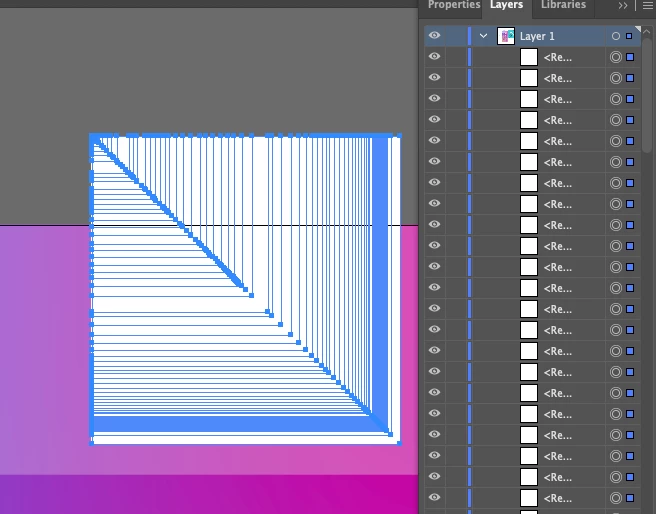
Is this a bug in the Illustrator rectangle tool?

  • December 23, 2022
  • 3 replies
  • 1246 views

Hi there,


Does anyone know why this happens when I draw a rectangle with the rectangle tool? Dozens of rectangle layers are created as I hold shift and drag the mouse. It won't let me draw just one big rectangle. 


Adobe Illustrator 26.3.1

M1 Mac Mini 

macOS Monterey V12.5


Thanks in advance!


Miles


    This topic has been closed for replies.
    Correct answer Ton Frederiks

    Is perhaps the tilde ~ key stuck?

    3 replies

    kglad
    Community Expert
    Community Expert
    December 23, 2022

    @Miles5FA9 


    (in the future, to find the best place to post your message, use the list here, https://community.adobe.com/ <moved from using the community> )

    Miles5FA9Author
    Participant
    December 23, 2022

    Oops, am I in the wrong place? That link seems to take me right back here. 

    Miles 

    kglad
    Community Expert
    Community Expert
    December 23, 2022

    @Miles5FA9 


    you're in the correct place now.  the original forum where you posted "using the community" is for questions about how to use the adobe forums.  your post was then moved to a better forum "illustrator" for finding ai experts.


    sorry, about all that.  using the adobe website (including forums) is not easy so, do your best and we'll move your post if we think that improves the chances of getting help for you.

    Monika Gause
    Community Expert
    Community Expert
    December 23, 2022

    If the keyboard is OK; check other apps. They might interfere. The browser Chrome is known for that, but there are more. Reboot the computer and open only Illustrator. Does it work then?

    Miles5FA9Author
    Participant
    December 23, 2022

    In this case, it was the tilde key. Thanks so much for offering more solutions just in case. I was ready to go through all of them lol. Enjoy the holidays!

    Miles

    Ton Frederiks
    Community Expert
    Ton FrederiksCommunity ExpertCorrect answer
    Community Expert
    December 23, 2022

    Is perhaps the tilde ~ key stuck?

    Miles5FA9Author
    Participant
    December 23, 2022

    This was it, Todd. Thank you for the prompt reply! You solved a problem I needed to resolve by EOD today. Thanks a ton and enjoy the holidays!

    Miles 

    Ton Frederiks
    Community Expert
    Community Expert
    December 23, 2022

    Good to hear that helped (and now you know how to create special effects when drawing with the tilde key down).