


- Home
- Illustrator
- Discussions
- Re: Isometric mode not really isometric
- Re: Isometric mode not really isometric

Copy link to clipboard
Copied
Hi all,
Does anyone know why the isometric mode in Illustrator isn't at 30 degrees like isometric should be?
It's slightly off, which makes it a nightmare to work with if you want pixelperfect results.
See attachment, there's a line at 30 degrees, and a square where isometric perspective is applied.
The sides of the square should be at 30 degrees, but there are not.
Why Adobe?!



 1 Correct answer


Try changing the Y axis to 35,264389
See this discussion from 2016 :https://forums.adobe.com/thread/2243469


Explore related tutorials & articles
 23
Replies
23
23
Replies
23


Copy link to clipboard
Copied
Mario,
What happens if you hold Ctrl/Cmd and press E?
This will toggle between GPU and CPU, the former is faster, but sometimes it moves in mysterious ways.
Copy link to clipboard
Copied
Hi Jacob,
nothing really changes if I do that, it's still off.
It's really easy to replicate though, just draw a line, rotate it 30 degrees, then take a square and apply isometric top, try to allign them and you'll see the square (which should be at 30 degrees) is off. Why is that? This has been bothering me for years
Copy link to clipboard
Copied
This also happens when you take other isometric planes btw!
Lets say you want isometric left or right. Again take a square and apply isometric left or right. Your vertical lines should stay vertical, but they don't for some odd reason I don't understand?
Copy link to clipboard
Copied
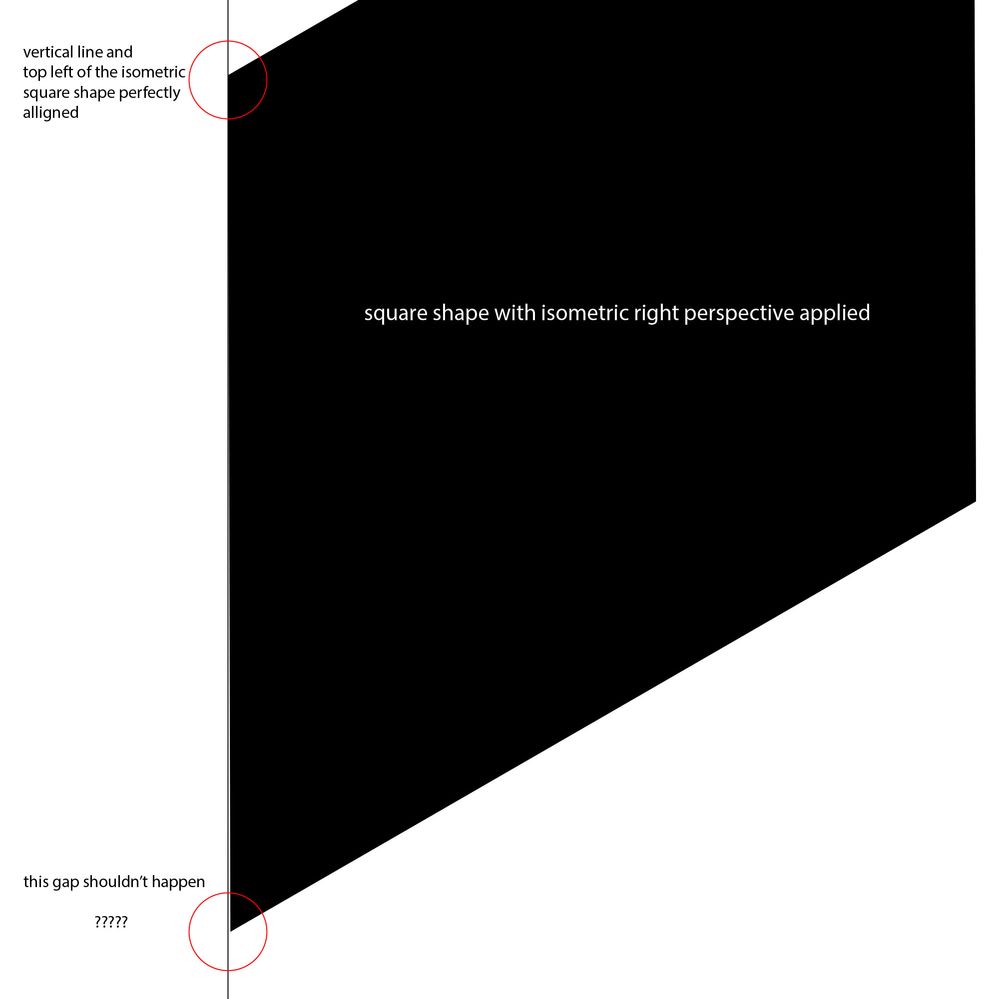
Here is another example, this time with an isometric right perspective applied to a square shape.
Both vertical lines (the vertical line and the left side of the square) should stay perfectly vertical, but again the isometric shape is off.
Any idea's why?

Copy link to clipboard
Copied
Assuming that you're talking about the 3D (Classic) effect here, the new 3D effect has more accurate isometric presets.
Copy link to clipboard
Copied
Hi Doug,
Yes, I'm talking about the 3D Classic effect. The new 3D effect indeed has more accurate isometric presets (Y=35,264° vs. Y=35° for classic 3D), but they don't work.
The new 3D is just as bad as the classic and you will get identical results like the images I posted above (which are made with the classic 3D effect). On top of that with the new 3D function you will get a lot of unnecessary extra shapes if you expand it to wireframes. I use the "Plane" function, so there's no extrusion, but if you expand that to wireframes a simple square gives you 6 shapes (2 squares and 4 lines), why Adobe?
This whole 3D function is pretty messy and inaccurate to be honest 😞
Copy link to clipboard
Copied
The new preset seems much more accurate to me, testing the two side-by-side. I can see a deviation from a 30 degree line with the old effect, but not the new.
Yes, expanding the new effect is not very useful, unfortunately.
Copy link to clipboard
Copied
It doesn't seem very accurate to me.
See below, a square with isometric right preset applied, and a vertical line.
Notice how the vertical line and the left side of the square aren't parrallel?
This shoudn't happen

Copy link to clipboard
Copied
My test looks correct. Are you sure the old effect isn't applied to that object? Check the appearance panel.
Copy link to clipboard
Copied
I'm 100% sure Doug, I would love to see your file.
FYI: you have to test this on a rather big shapes to see it, the square in the image above is 5000x5000 pixels, it harder to notice with small objects, I assume you tested this with a small object?
Copy link to clipboard
Copied
Do you see a difference in angle using 'Render as Vector' in the 3D options?
Copy link to clipboard
Copied
Thanks for the tip Doug.
Hallelujah, 'Render as Vector' does seem to make a difference!
I'm still not sure why I get 6 individual shapes when trying to render a square, but at least it seems accurate!
Copy link to clipboard
Copied
Take a look at the shapes it creates. It's not made a square, but a very tiny extrusion resulting in a 6-sided shape.
Copy link to clipboard
Copied
Almost the same with the Classic effect, 5 points.
Copy link to clipboard
Copied
I don't think I've ever looked at the result of expanding a 3D rotated square. A clip group with an open path in it, odd.
The new 3D effect > Rotate/Plane however is still generating a 3D > Extrude object, just a very thin one.
Copy link to clipboard
Copied
It's indeed odd.
In classic 3D when you expand you will get a group, within that group you will find a clip group, within the clip group you will find another group. and in that group you will find an open path for a square?! (seriously Adobe, why you make this so complex?)
In the new 3D mode when you expand you will also get a group. and in that group you will find 6 paths.
This would make sense if the 3D actually had a depth, but we are talking about the plane mode which is flat?!
This all seems unnecessary, complex and time consuming.
Copy link to clipboard
Copied
The Classic 3D is easily fixed with Pathfinder Unite, it will create a single closed 4 points shape. An action that creates a Classic isometric top object (with the correct precision), expands the Appearance and applies a Pathfinder Unite can quickly give you a clean isometric object.
Copy link to clipboard
Copied
Try changing the Y axis to 35,264389
See this discussion from 2016 :https://forums.adobe.com/thread/2243469
Copy link to clipboard
Copied
The 35,264389 angle seems to work better with the Classic 3D effect
Copy link to clipboard
Copied
Thanks Ton for linking to the discussion from 2016 and the 35.264389° tip.
Changing the Y manually in the classic 3D to 35.264389° does seem to work. Funny enough Illustrator seems to change it to "35.26°" and when you press "OK" and go back to the 3D window there's just "35°" there? Very confusing...
I'm a bit surprised and dissapointed that doing isometric work is still such a time consuming mess in Illustrator.
I do a lot of intricate isometric work and I approach it in a modular Lego-like way, so when something isn't 100% accurate it becomes just plain frustrating to work with, similar like 1 Lego block wouldn't fit on another one.
I actually switched over to Affinity Designer for all my isometric needs, the isometric mode in Affinity Designer is brilliant, it's fast, 100% accurate and actually a joy to work with and I can just copy/paste it into illustrator.
Copy link to clipboard
Copied
I'm a big fan of this plugin for isometric drawing:
Copy link to clipboard
Copied
Thanks for the plugin tip Doug, looks interesting.
Still, kind of sad to see that we need to pay for a 3rd party plugin because Adobe can't make a decent isometric mode themselves.
Copy link to clipboard
Copied
Yes, this is rounding, but when you make a graphic style, it looks like the precision is kept and the Classic version gives less objects after expanding; a path and a clipping mask (and keeps the fill color instead of an non native object).


Get ready! An upgraded Adobe Community experience is coming in January.
Learn more
 AdChoices