Inspiring
April 22, 2021
Answered

Isometric Spiral staircase

  • April 22, 2021
  • 4 replies
  • 3360 views

Hi does anyone know how to make a spiral staircase in Illustrator, in isometric view/perspective - many thanks

This topic has been closed for replies.
Correct answer Doug A Roberts

Hi thanks for your efforts everyone (especially Doug). I am familiar shapebuilder but it does not work for me the way described. I'll try again with fresh eyes at the weekend. thank you all


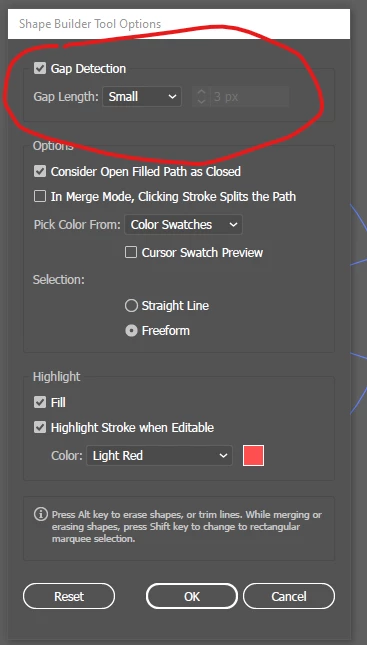
Apologies, I see the issue with polar grid. Shape builder can be finnicky with circles. Try turning on Gap detection (double-click the tool for options):
4 replies

Jacob Bugge
Community Expert
Community Expert
April 22, 2021

Kaye, everyone,


Curiously, all the staircases shown so far, except for the latest one by Doug, are Kerr (or Ker) style.


Kurt Gold
Community Expert
Community Expert
April 22, 2021

Doug, hopefully the guys who are supposed to walk down your (first) corkscrew stairs won't have one over the eight.


Doug A Roberts
Community Expert
Community Expert
April 22, 2021

This would be my first thought:

Create a circle and use 3D > Extrude & Bevel, Isometric Top, and whatever extrude depth you need.

Create two lines (actually shapes with vertical ends, so they coincide when it repeats). Make them into a symbol.

Map the symbol to the 3D effect. Stretch to fit.

Create a circle with spokes at the base of your 3D effect.

Alt-drag each spoke up in turn so that it coincides with the spiral.

Carry on drawing from there.

 
kpabbleAuthor
Inspiring
April 22, 2021

Hi many thanks for your reply...got a little lost from step 4...

1 Create a circle and use 3D > Extrude & Bevel, Isometric Top, and whatever extrude depth you need (done this)

2 Create two lines (actually shapes with vertical ends, so they coincide when it repeats)  (think I did this right)

3 Make them into a symbol (did this)

4 Map the symbol to the 3D effect. Stretch to fit. (got lost from here)

5 Create a circle with spokes at the base of your 3D effect.

6 Alt-drag each spoke up in turn so that it coincides with the spiral.

7 Carry on drawing from there.

Doug A Roberts
Community Expert
Doug A RobertsCommunity ExpertCorrect answer
Community Expert
April 23, 2021

Hi thanks for your efforts everyone (especially Doug). I am familiar shapebuilder but it does not work for me the way described. I'll try again with fresh eyes at the weekend. thank you all


Apologies, I see the issue with polar grid. Shape builder can be finnicky with circles. Try turning on Gap detection (double-click the tool for options):

Monika Gause
Community Expert
Community Expert
April 22, 2021

Like this:

kpabbleAuthor
Inspiring
April 22, 2021

Hi - many thanks for your reply. Does the result end up as an isometric view?

Monika Gause
Community Expert
Community Expert
April 22, 2021

With the perspective grid you can't produce isometric views.