Inspiring
May 14, 2018
Answered

Issue with Redding shades on color picker

  • May 14, 2018
  • 3 replies
  • 1050 views

When it comes to the color Red on the color picker, I have found that, arbitrarily, the Paths that I make heavily red, having used a red shade of the red-orange vs. the red-purple side of the color spectrum and vice-versa come-up as being shown somewhere in the opposite, when the same path is selected to be revised.

Have you ever found this as an issue before? It's like the application is not actually remembering the color CMYK/RGB codes but guessing them - very annoying.

Any help would be appreciated.

Sand Patch

    This topic has been closed for replies.
    Correct answer Monika Gause

    Thank you, Ms. Gause,

    I think you are on to something here. I experimented with it some, using not just red but other colors, like blue, yellow, etc., finding that I had some interesting results.
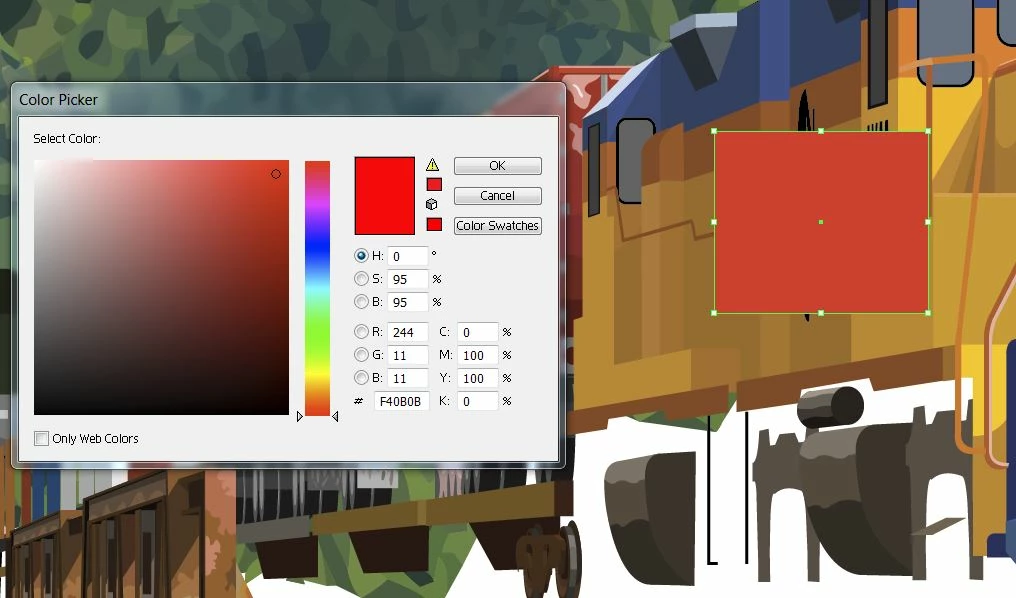
    This is the first time I had chosen a color for the path. I then clicked "OK."
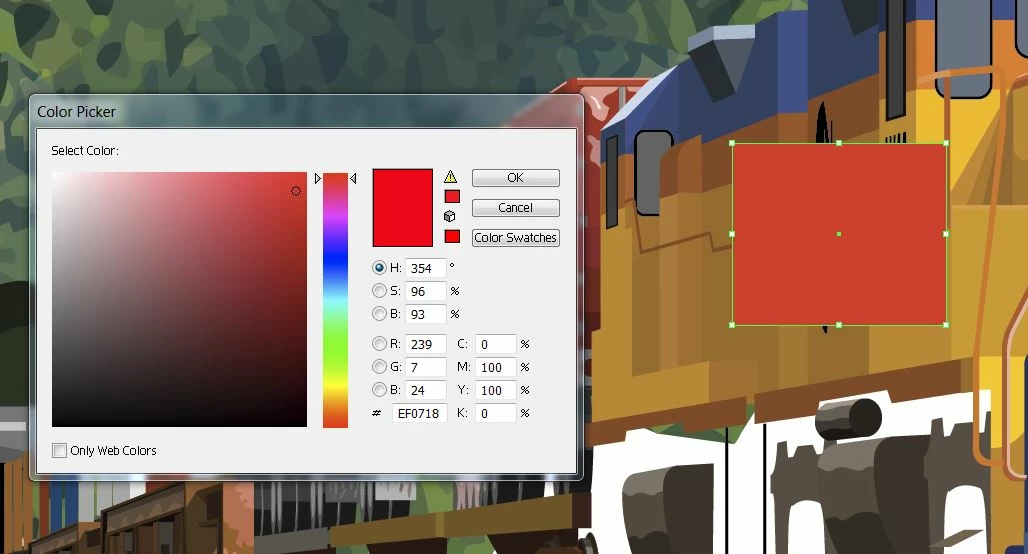
    I clicked on the Color Picker fill box the second time. Notice that the slider is now at the top, red-purple end of the spectrum.
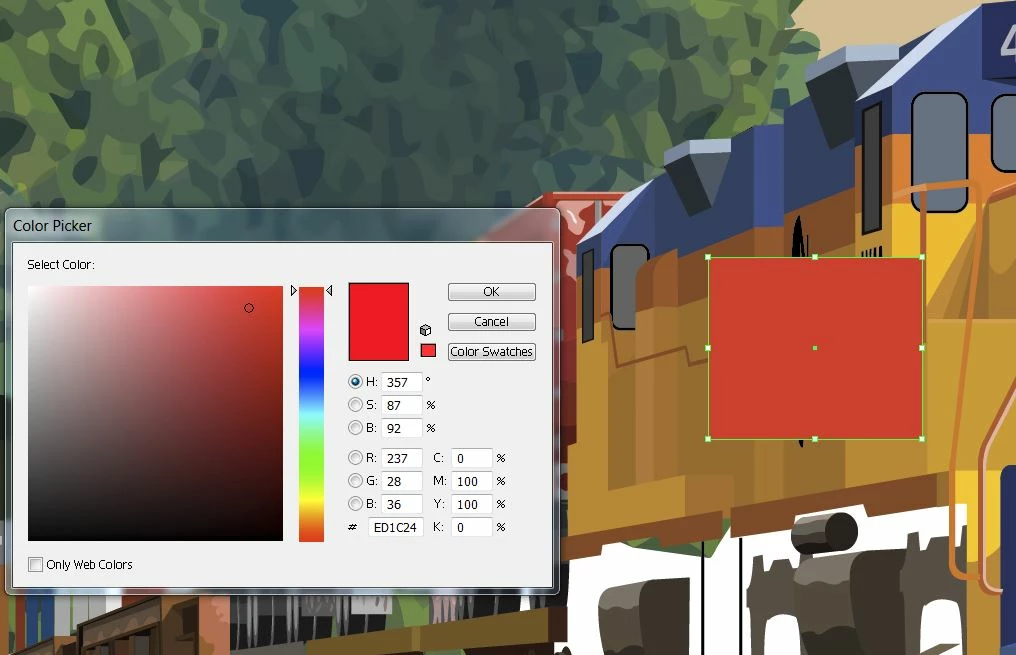
    Going to the Color Picker for the third and last time, I then noticed that the circle had moved automatically to a state, that was not causing any exclamation point to be indicated.

    This seemed to be the same trend when working with other colors. As far as I can tell while using a NEC Color Critical monitor, the path did not change color at any point of time. Does that mean that it had been at the same place one the color spectrum slider all along, but just not indicating it?

    Sand Patch


    When working in CMYK, your color automatically gets converted to something that can be reproduced with the color profile you're using.

    When working in CMYK color mode, it doesn't make a lot of sense to use the color picker at all. Use either the color panel or the swatches panel.

    3 replies

    Inspiring
    May 16, 2018

    Of course.

    Take this image for instance.

    Notice that it that the area has varies shades of red. Also notice that the Color Picker sider representing the color wheel begins with a shade of red (at the top) and ends with another shade of red (at the bottom).

    Originally, many of the paths in the area had colors selected somewhere in the reddish at bottom (in the red-orange vs. the red-purple area). They somehow the changed without my consent.

    I am using CS4, and this has been a long-lasting question for me, in many of my projects.

    Sand Patch

    Monika Gause
    Community Expert
    Community Expert
    May 16, 2018

    Please show before and after.

    When you initially select the color, is there a warning triangle? It signals an out of gamut color. So your color gets converted to something CMYK can reproduce and that's why it's different next time.

    Inspiring
    May 27, 2018

    Thank you, Ms. Gause,

    I think you are on to something here. I experimented with it some, using not just red but other colors, like blue, yellow, etc., finding that I had some interesting results.

    This is the first time I had chosen a color for the path. I then clicked "OK."

    I clicked on the Color Picker fill box the second time. Notice that the slider is now at the top, red-purple end of the spectrum.

    Going to the Color Picker for the third and last time, I then noticed that the circle had moved automatically to a state, that was not causing any exclamation point to be indicated.

    This seemed to be the same trend when working with other colors. As far as I can tell while using a NEC Color Critical monitor, the path did not change color at any point of time. Does that mean that it had been at the same place one the color spectrum slider all along, but just not indicating it?

    Sand Patch

    ceyhun_akgun
    Legend
    May 15, 2018

    I did not understand the problem very well. I share the screen photo. You're talking about the Recolor Artwork panel.

    Graphic Designer Educator / PrePress Consultant
    Monika Gause
    Community Expert
    Community Expert
    May 15, 2018

    You might want to show some screenshots.